BOTS: Okta Partner Experience
Okta Partner Experience is a scenario from BOTS(Boss Of The Soc) by splunk.
Coffeecase
You’re on the job within the SOC at Coffeecase. Pretty normal day: employees onboarding, employees offboarding, accessing servers, single-sign-oning into various apps, and using various kinds of MFA. But not all is well either - there’s some adversaries trying to brute-force and cookie steal, and hopefully being thwarted by Okta! Follow along, explore some Okta data, and score points.
Having completed the SOC analyst path on HackTheBox, the motivation to go deeper into blue team operations came from competitive experience — in high-level CTF competitions, the differentiator between top teams often comes down to defensive scenarios. This writeup covers the Okta Partner Experience scenario from BOTS.
It’s a small company … :
Question: How many distinct users are found in the data? Answer guidance: Use only the username, not the domain

using the index main and the source type logs, we filter by the targetUserAlternateId, the dc function from the starts command here is used to calculate only the distinct ones and we end up with the answer 10 users.
Doh ! I locked myself again. :
Question: Which user locks themselves out the most? Answer guidance: Provide the first and last name
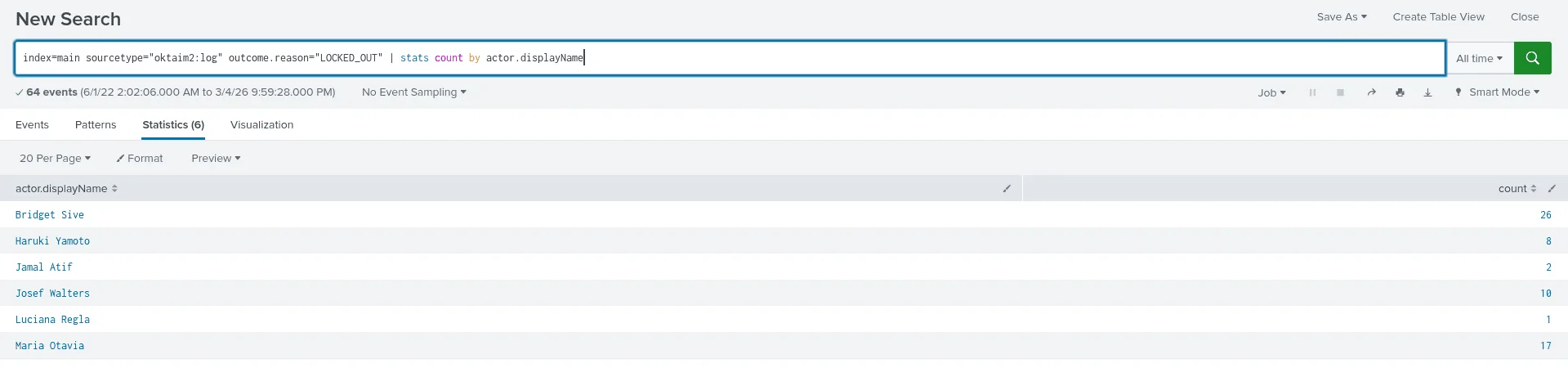
my thought process here is to look in the logs for the term ‘locked’ since I didn’t know what fields I should be targetting and filtering by, reading the results I became interested in the field outcome.reason as it tells the state we’ll be filtering by, and the actor.displayName which is the full name of the users, we see from the image that the user Bridget Sive was locked out the most (26 times !).
India Attacks! :
Question: What is the latitude and longitude of the potential adversary located in India? Answer guidance: Use this format but substitute the actual numbers: 18°32’45”N,71°39’40”E. You may have to Google how to make a degree symbol on your keyboard!
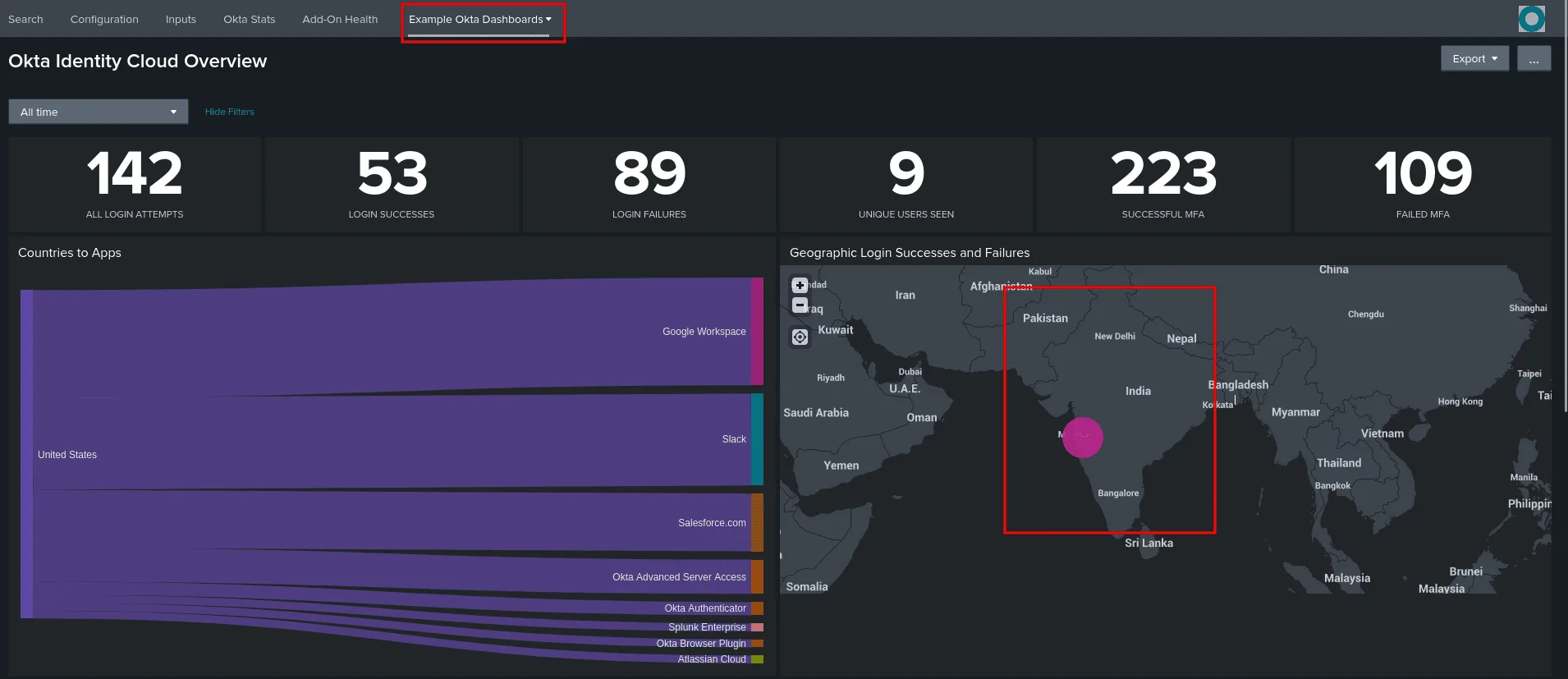
for this one I used the ‘Example Okta Dashboards’ as it showed stats of the users overall, and one of them was the Geographic Login Successes and Failures, we see only one event from India and clicking on it shows the exact coorinates and we can also click on it to view the associated event with it (there are many ways to solve this after all) .
we get the following coordinates : {“lat”: 18.6161, “lon”: 73.7286} , and using an online converter we get the answer : 18°36’57”N,73°43’42”E
You get SSO and you get SSO and … :
Question: How many different applications do Coffeecase employees use Okta SSO to access (with the exclusion of any “Okta” apps)? Answer guidance: Exclude any app names that begin with “Okta”
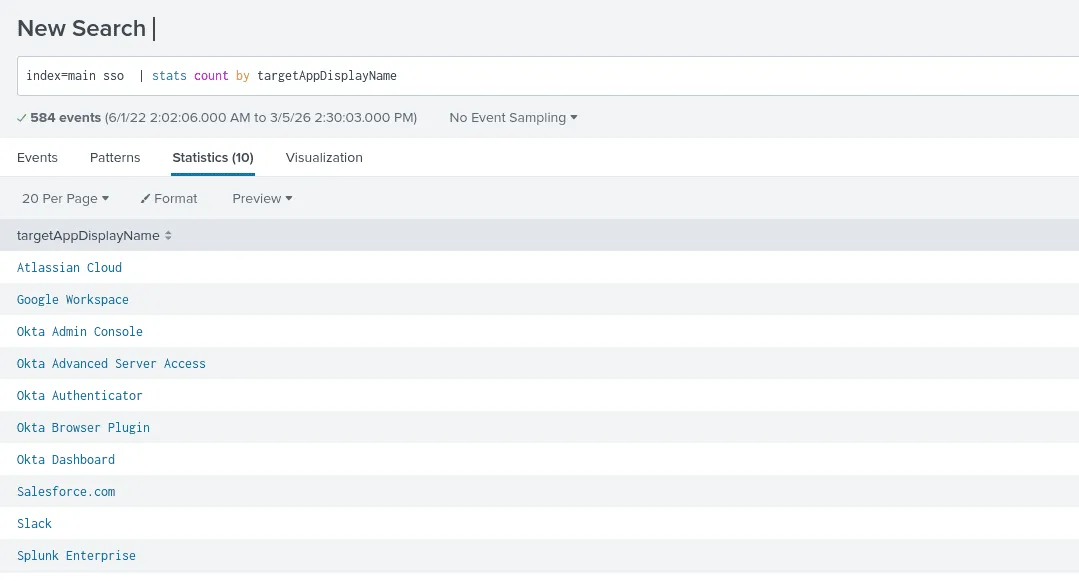
my methodology is whenever I’m starting from an uncharted area in which I have no clear information to start my search with such as the exact field names, I just start by searching the relevent buzz words in attempt to identify what fields matter the most to me and select them, we can also use fieldssummary in splunk to get the info. As seen in the image only 5 apps don’t seem to be connected with okta and use sso, though that’s not the correct answer, I tried looking for other apps but there is only Bookmark App which doesn’t require sso, so not our case, the answer was 6, I still wonder if I am really missing another app or if one of the okta ones we saw like dashboard etc isn’t considered of okta tho it has the name of it.
Working hard or hardly working? :
Question: What is the last app that Luciana makes use of SSO to get access into? Answer guidance: Provide the full name of the app as found in the data.
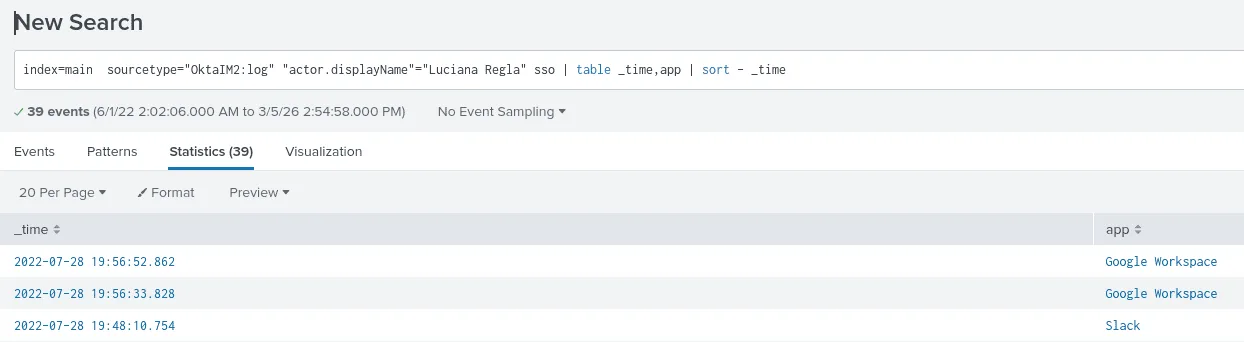
here the source type for logging the login events is the Okta logs, we’re filtering by the user Luciana and the sso applications, and we sort by time, we get that the last app is Google Workspace .
You’re still the most common :
Question: What is the most popular form of MFA authentication used either as primary or secondary factor? Answer guidance: Use the full string found in the data.
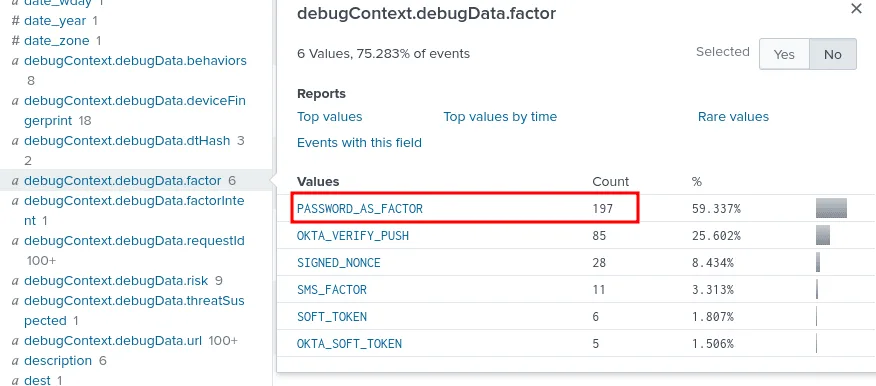
for this one it started by looking up the term ‘mfa’ this led me to many events related to it, another key word was factor, searching for both led me to this field named debugContext.debugData.factor which had the answer we needed about the most used MFA by users.
At least it’s better than SMS! :
Question: Which Coffeecase employee uses Google Authenticator? Answer guidance: Provide first and last name.
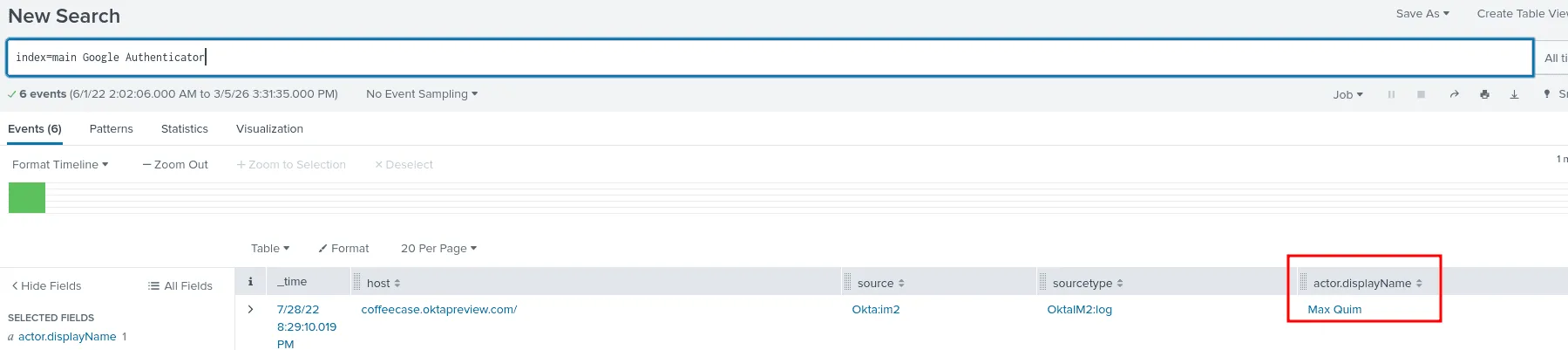
the easiest way is the one shown in the image, otherwise we can use the ‘Example Okta Dashboards’ as it shows geographically which authenticator apps were used in which regions, tweaking the queries we get the user Max Quim.
So many authenticators. So little … :
Question: What is the average amount of authenticators used by each user? Answer guidance: Round to zero places.
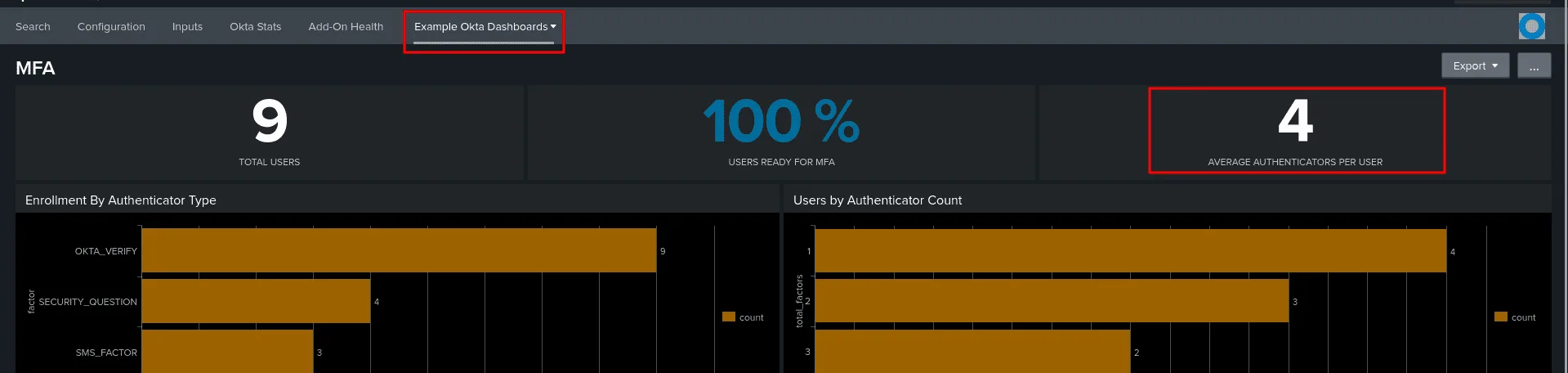
checking the ‘Example Okta Dashboards’ add-on, we see from the statics that 4 is the average authenicators used per users.
I used to live there but it got t…:
Question: Max Quim works mostly out of Salt Lake City, Utah but his mobile phone number is attributed to what US state? Answer guidance: Provide the full name of the state.
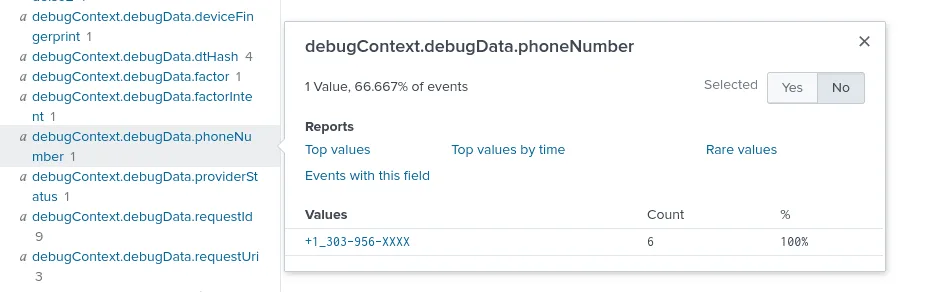
I hit my head against the wall for a bit on this one, as I managed to find his other places he connected from but no explicit phone number, then it hit me that I should be looking for places where the phone number may be logged in the data such a case may for sending sms messages, which was a plausable idea since there has been MFA and one way for that is sms messages .., so I looked up the user + sms and got my answer at the debugContext.debugData.phoneNumber = +1_303-956-XXXX . looking up this format online the +1 is for United States and the 303 for Colorado state. and that was the answer.
New job, new apps :
What time does Josef Walters get provisioned into Google Workspace? Please provide answer in UTC time. Answer guidance: Provide the time in UTC format in HH:MM:SS. Example: 19:34:23.
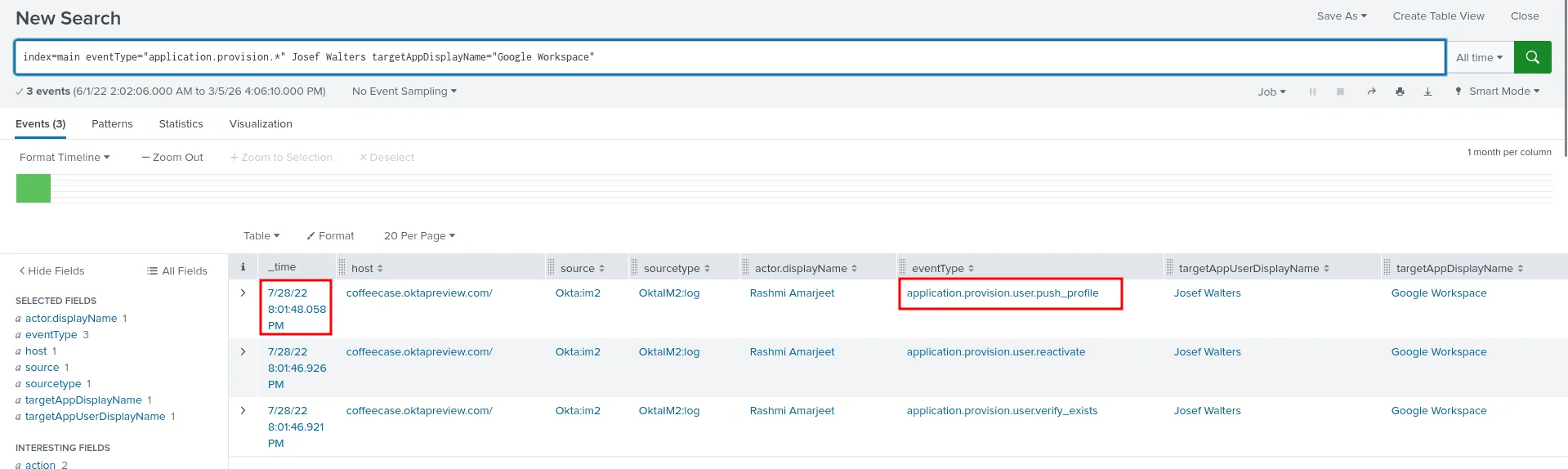
my thought process here is to start by looking up provision, from there I discovered there is an eventType that had provision, I made my search for the event types that had provision broad and also lookup the user Josef Walters with it, as seen in the image the exact eventType responsible here is application.provision.user.push_profile and the exact time was 20:01:48 .
You can’t take it with you :
Question: A Coffeecase employee is fired for distributing company secrets. Okta automatically de-provisioned all applications from this user. Which user was it? Answer guidance: Provide first and last name.
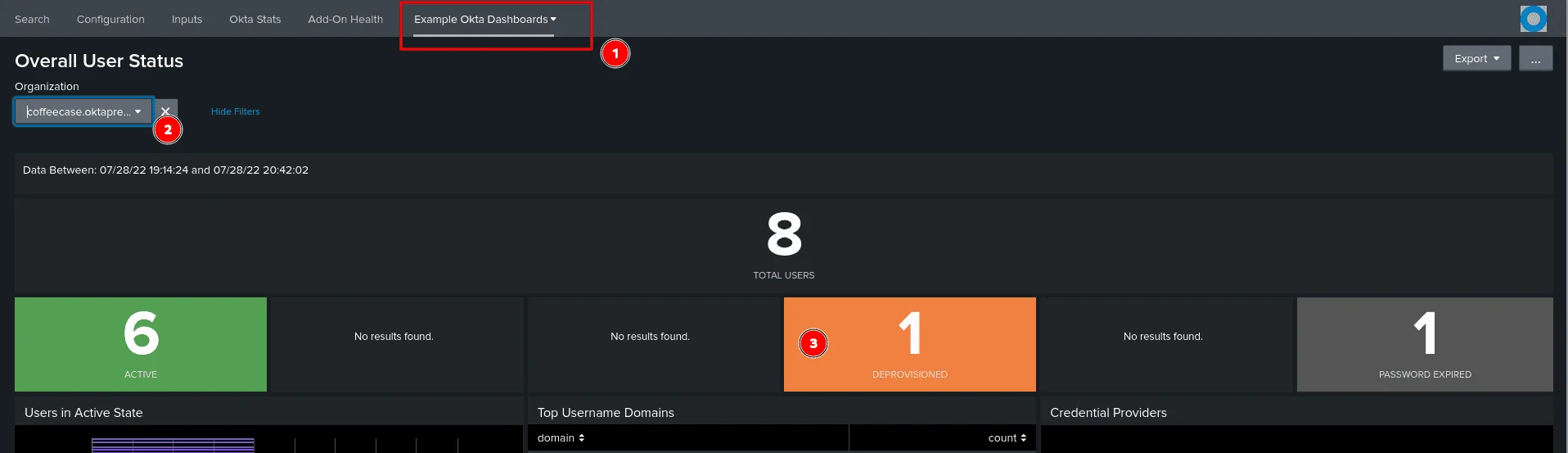
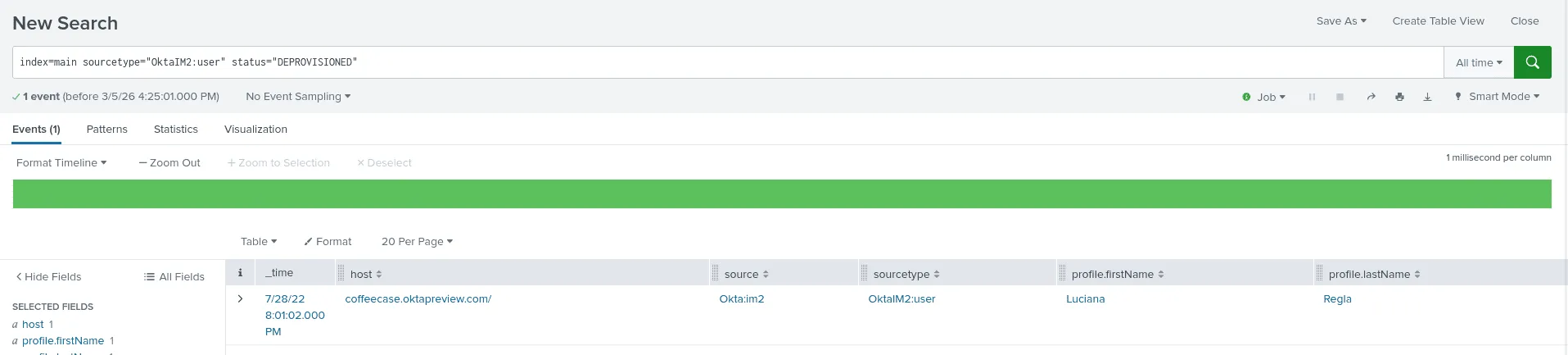
in the ‘Example Okta Dashboards’, if we check the overall overview about the users, it stands out that 1 user is deprovisioned, clicking on it to view the events we find that the user is Luciana Regla, another way to do this is by checking the status of users directly as shown below :
We don’t have any employees there:
Question: A potential adversary tries to log in as kelechi@coffeecase.biz and is denied access to Coffeecase’s Okta tenant due to a country block policy. What operating system was this adversary using when they were blocked? Answer guidance: Provide operating system info as found in the data.
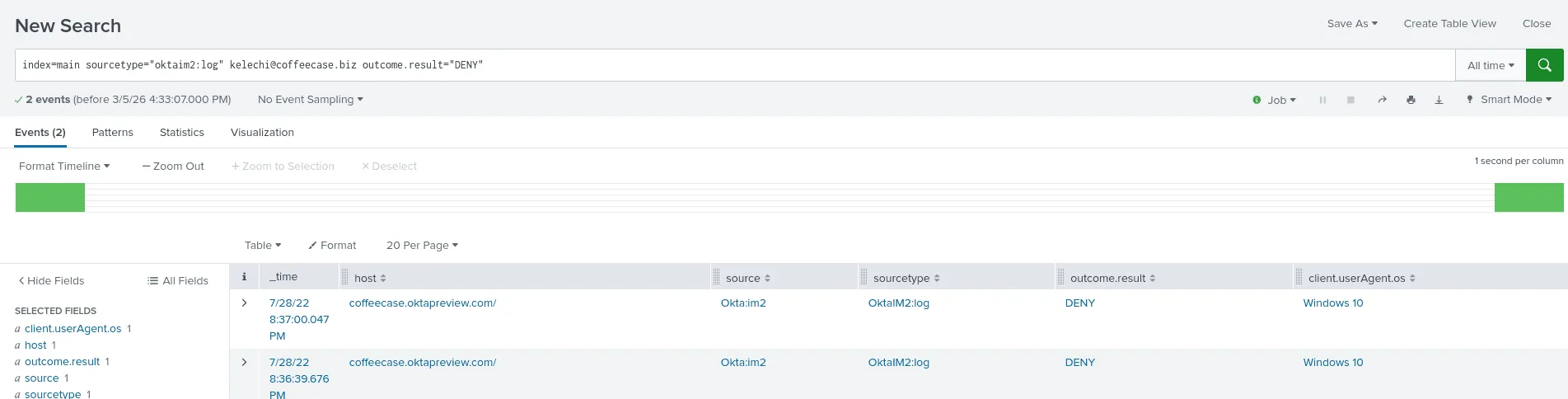
as seen in the image above, checking the status for denied ones for the user kelechi, and we get the os used as windows 10.
It wasn’t me bro :
Question: A user reports suspicious activity via Okta’s Suspicious Activity reporting capability. What is the suspicious IP found in the data?
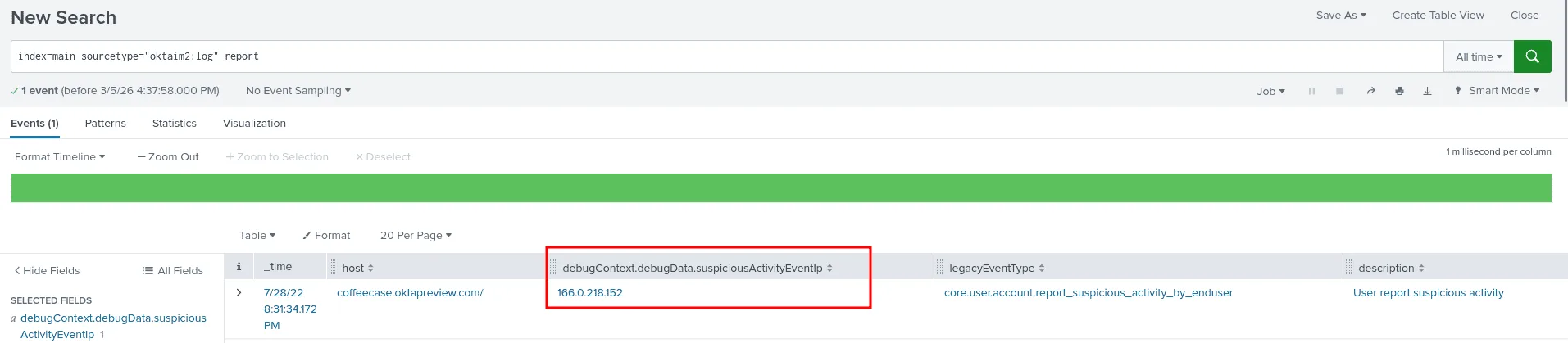
this seemed like something that would be specific to Okat, so looking up report, surprisignly it was an easy find and the ip address is 166.0.218.152.
Cookie Crunsh:
Question: Two Coffeecase employees are potential victims of session cookie hijacking. Who are they? Answer guidance: Name the two users (username only) in alphabetical order, separated by commas (example: alice, bob).
To find the potential victims of session cookie hijacking, I started looking for anomalies, one thing that would stand out in a senario of session hijacking is a user connecting from 2 different parts of the world, while not the most regorous indicator, it’s still worth investigating :
my query was :
1
index=main user.session.* "client.geographicalContext.country"="*"  | stats count by client.geographicalContext.country

In a situation where most connections are from United States, it’s very tempting to investigate the other countries, and we’ve encountered Brazil before in the senario for suspecious activity, so let’s hypothethize that the actor is connecting from Brazil :
1
index=main user.session.* "client.geographicalContext.country"="Brazil" |stats count by action
the results of this say 7 failure connections and 2 success ones ! and checking the success ones yields the users we’re looking for : Kelechi Adwoa and Max Quim.
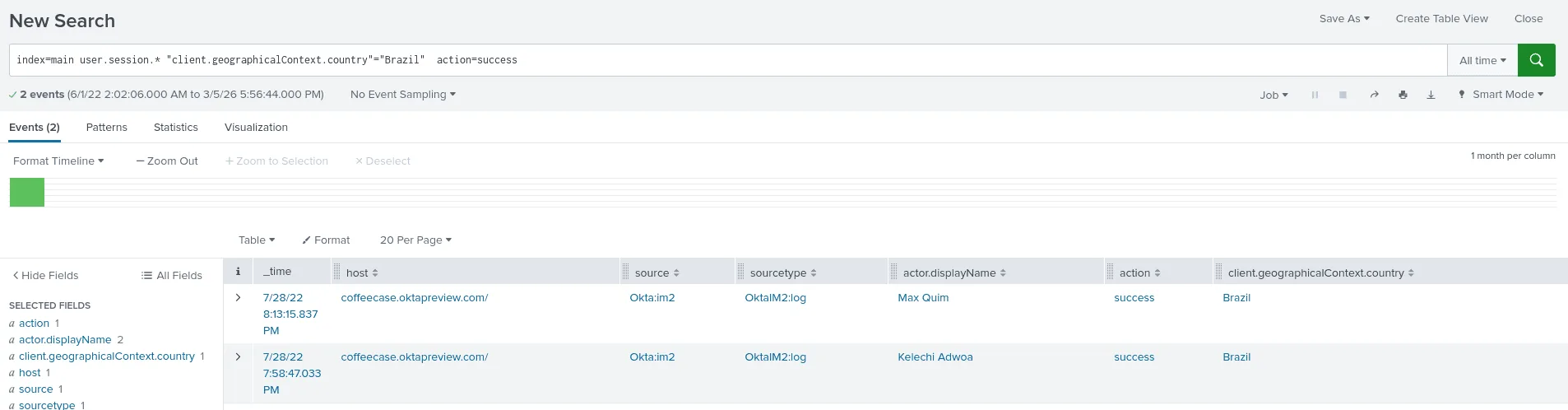
what we said up to now is just a hypothesis, and to verify :
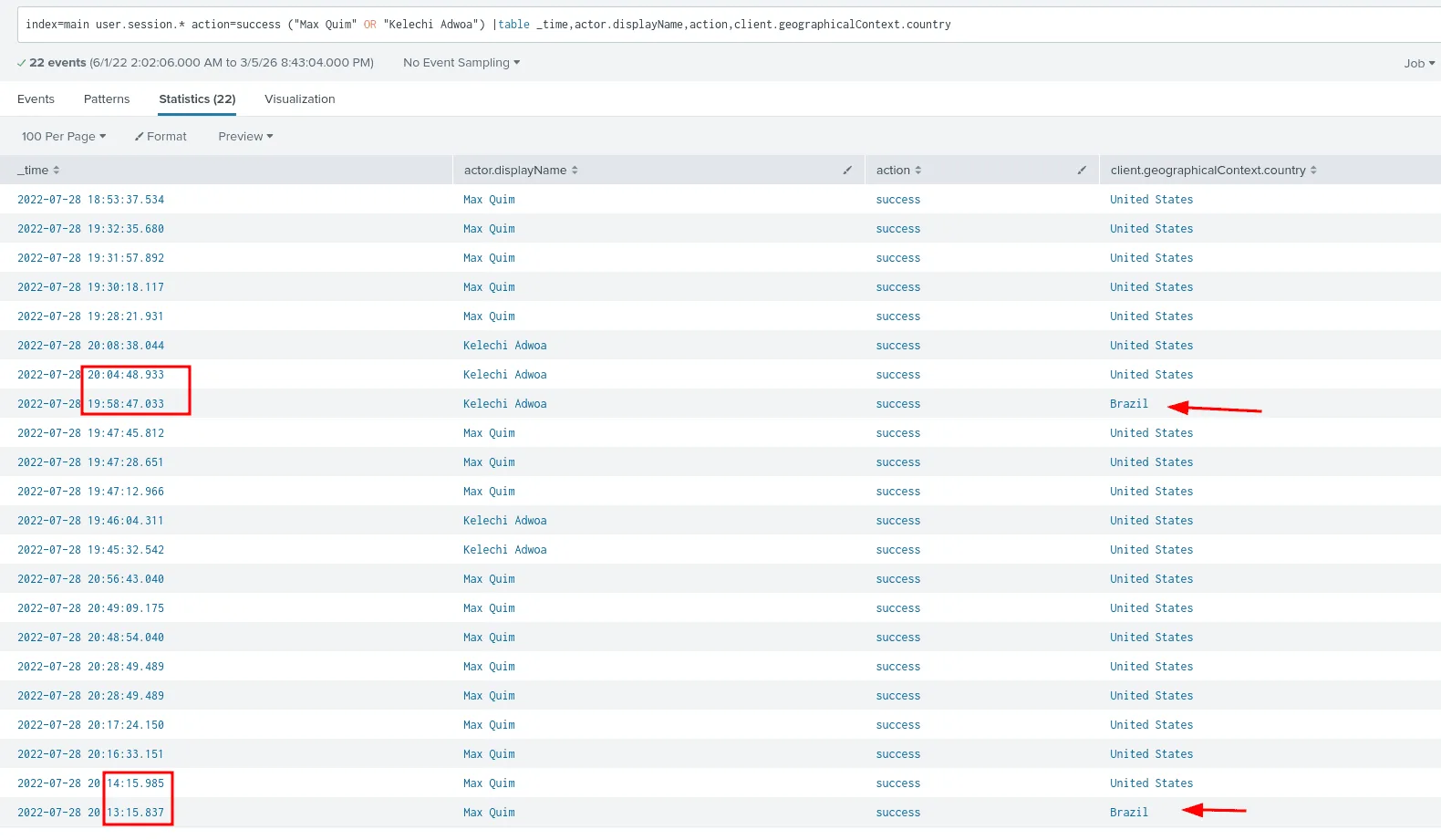
as seen in the image below these 2 users are usually connecting from the United States and after few minutes from Brazil, which means a successful session hijacking attack happened !
That’s brutal!:
Question: From what likely city and country is a brute-force attack attempted on one of Coffeecase’s employees, from a known anonymizing proxy IP address? Answer guidance: Provide the city and country, comma separated. Ignore any special characters.
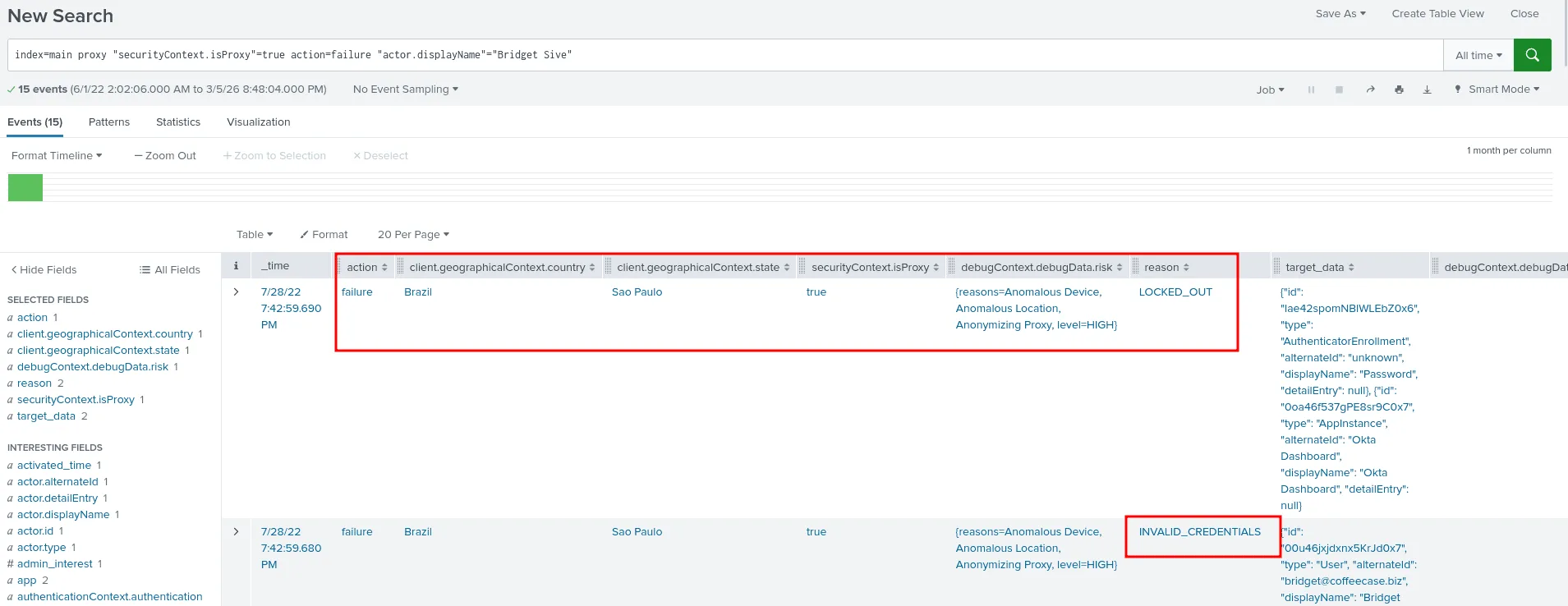
to answer this we first search for event where the field securityContext.isProxy is set to true to signfie a proxu service is use, from there we can filter by the failure actions of authentication as a bruteforce attack will have more failed attempts than successful ones, this helped us map the user account being attacked as Bridget Sive, the attacker attempted invalid credentials 9 times and the account got locked out in the 10th failure. in the image above we can see the country and the city : Sao Paulo, Brazil .
Oh. I thought I had that turned on:
Question: One of the app users is unable to login due to an Okta Verify device assurance policy. What was the given reason why their device failed the check? Answer guidance: Provide the full policy name that denies the login.
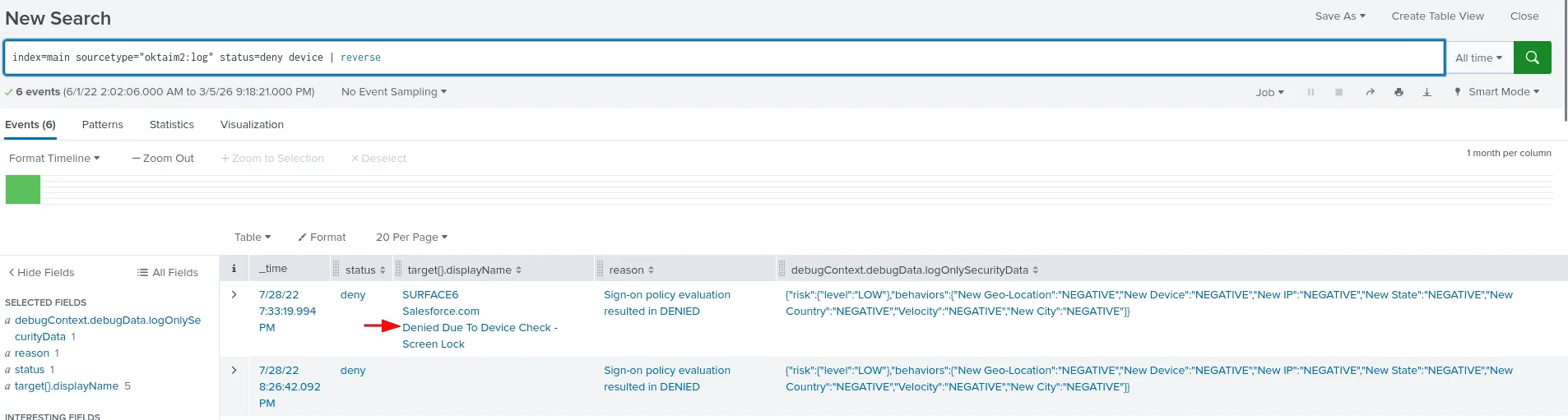
for this one I first checked for anything with the status deny, the narrowed down to events that have something to do with devices, that narrowed the events to 6th, which is easy to scan and go through, the last one for the user Max was denied and the reason was : Denied Due To Device Check - Screen Lock .
This is the year of linux on the ..:
Question: Coffeecase uses Okta Advanced Server Access to provide privileged access management in front of Linux and a single Windows server. When was the first time the Linux machine was accessed via Okta ASA? Provide in UTC time. Answer guidance: Provide the time in UTC format in HH:MM:SS. Example: 19:34:23.
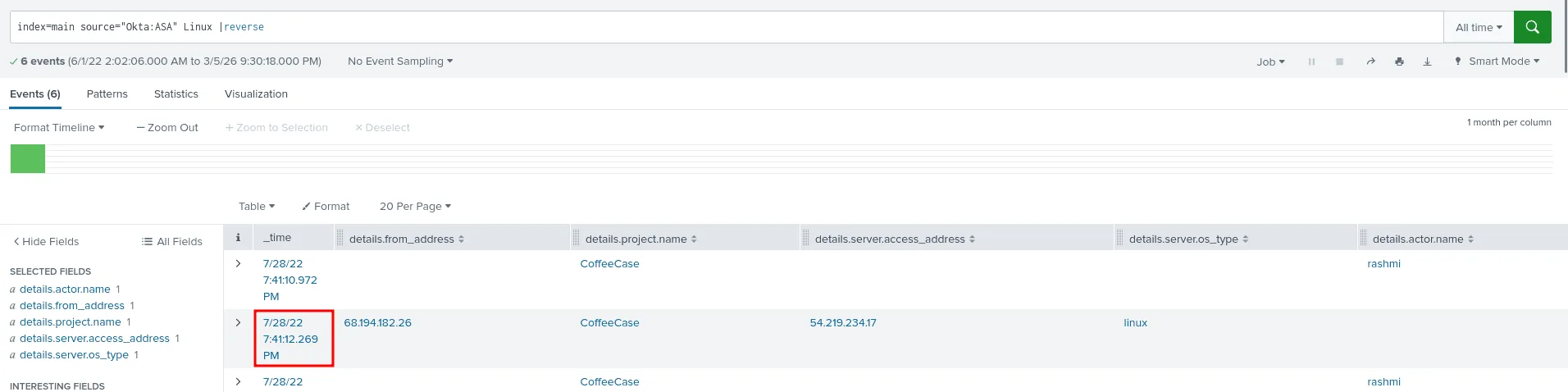
as seen in the image below, my approach as always is to first undersatnd what kind of event are present then I look for ways to narrow down the number of events to the ones most relevent to my task and search, filtering by linux ( the OS type ) actually proved to be a good indicator, and left us with only 6 events, checking each of them we understand more about the context and the first time a connection accored was at 19:41:12.
Opening a window:
Question: Coffeecase uses Okta Advanced Server Access to provide privileged access management in front of Linux and a single Windows server. What is the access IP address of the Windows server that can be accessed through ASA?
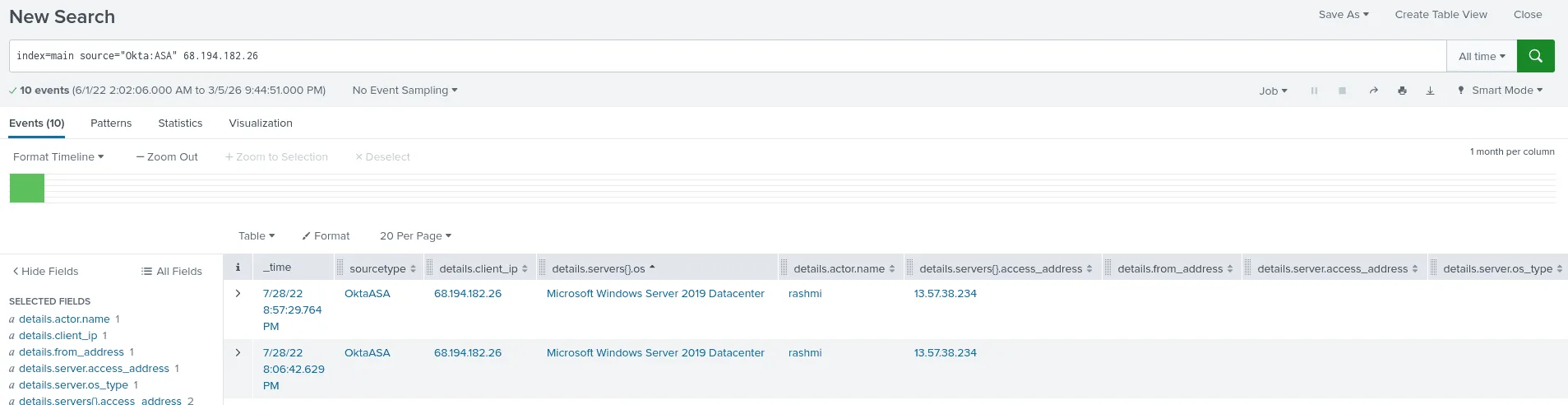
there are many ways to find the answer, one of them is that from the last question we found out that a privileged user with the ip address 68.194.182.26 did ssh to a the Coffecase’s linux server, this question asks us about the ip address of the windows server, what are the odds that the previous user we found that sshed to the linux server did also rdp to the windows server ? to test this theory we look up his ip address as the client and sure as seen in the image above we find the ip address of the windows server 13.57.38.234 .
You must be this tall to access the …:
Question: Coffeecase has set up application-level policies to define access to various apps, based on sensitivity and type of device accessing the app. What is the name of the policy that defines authorization for Atlassian Cloud? Answer guidance: Provide the full name of the policy as found in the data.
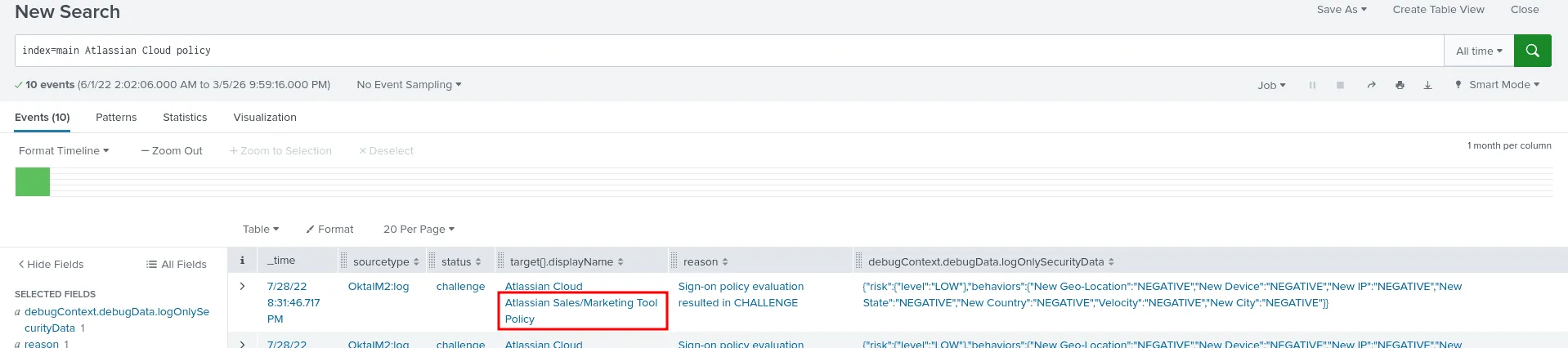
as I may be known by this now, first we search for the app Atlassian Cloud + policy, I’ve seen this longs before and read through them, and I understand them at this point, and the policy in question here is Atlassian Sales/Marketing Tool Policy. we can expand the events to understand more of it.
This marks the last question for this senario, if you have any questions, observations, feedback, feel free to reach out :)