Corelight Partner Experience
A writeup for the Corelight Partner Experience scenario.

Corelight trickbot ctf :
Q1:
Use index=corelight for this challenge Question: How many total Suricata alerts were generated in this index?
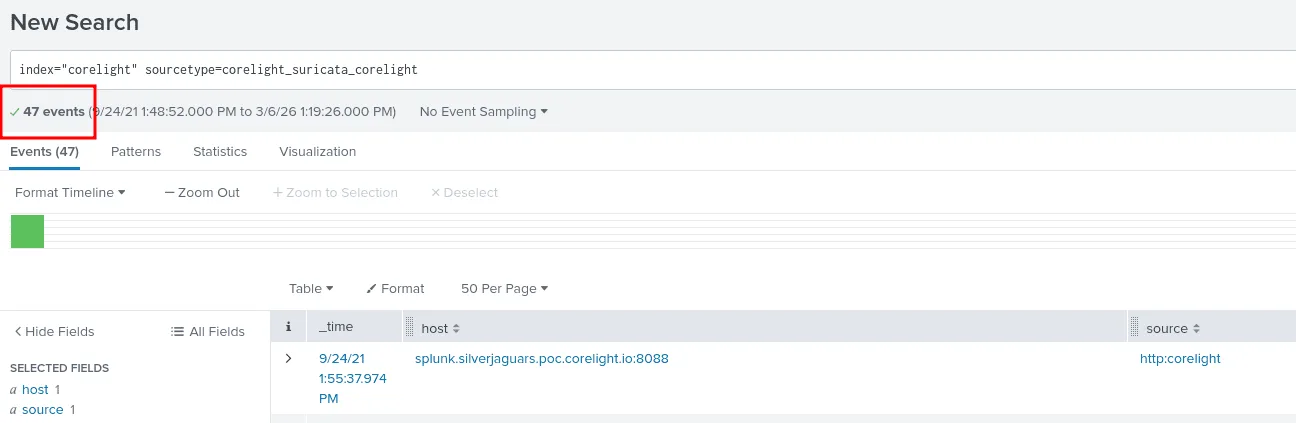
As seen in the image above we use the index corelight and the sourcetype as corelight_suricata_corelight for the suricata alerts, there are 47 events ( alerts ) which is the answer.
Q2:
Question: Most of the alerts are being generated by a single source host. What is its IP address? Answer guidance: Provide the IPv4 address. Example: 192.168.1.1

to find this ip address, we count how many times each ip address generated was the source of an alert using src_ip, as seen in the image, the ip 10.0.0.31 generated 46 alerts alone, which is the answer.
Q3:
Question: What’s the name of the malware family identified by these alerts?
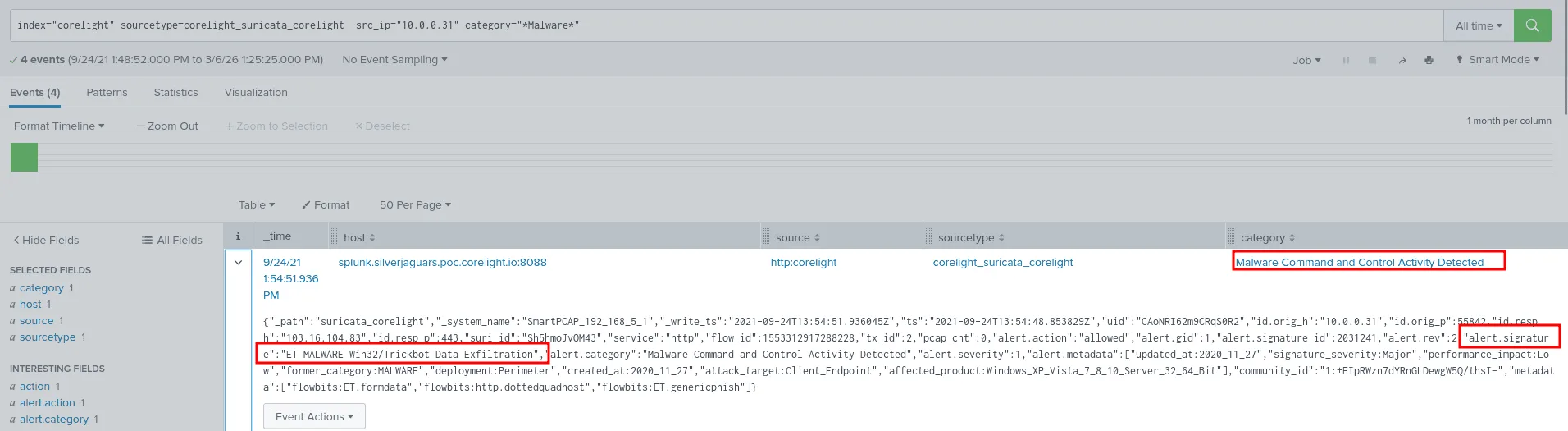
since we have a valid reason to suspect the ip address 10.0.0.31 we found from the previous question, we’ll filter by it and search for any suricata alerts indicating malware activity, and we do find 4 events about a malware C2 detected, checking the alert.signature part we see it is ET MALWARE Win32/Trickbot Data Exfiltration , the correct answer then is Trickbot.
Q4:
Question: Let’s take a closer look at the “ET MALWARE Win32/Trickbot Data Exfiltration” alerts. You’ll notice that three of the alerts share a single UID, meaning they all occured on a single TCP stream. What is that UID?

we already found the 4 events from the previous question, all that’s left to find those with the same uid indicating they all accoured on a single TCP stream, the answer from the image thus is CAoNRI62m9CRqS0R2 .
Q5:
Question: What is the IP address of the malicious server involved in the alerts for this stream? Answer guidance: Provide the IPv4 address. Example: 192.168.1.1
from the image in Q3, we see in the field :
1
"uid":"CAoNRI62m9CRqS0R2","id.orig_h":"10.0.0.31","id.orig_p":55842,"id.resp_h":"103.16.104.83","id.resp_p":443
the is.resp_h => 103.16.104.83 is the adversary’s malicious server involved here.
Q6:
Question: What layer 7 protocol is the traffic in the previous question flowing over that generates the alerts?
still using the same image from Q3 we see this :
1
"id.orig_h":"10.0.0.31","id.orig_p":55842,"id.resp_h":"103.16.104.83","id.resp_p":443,"suri_id":"Sh5hmoJvOM43","service":"http"
the service indicated here is http, and that’s the layer 7 protocol we’re looking for.
Q7:
Question: Taking the UID mentioned in the previous question and searching for it across the index, we see that a corelight_notice log was also generated. What is the number of the MITRE ATT&CK TTP referenced in the notice?
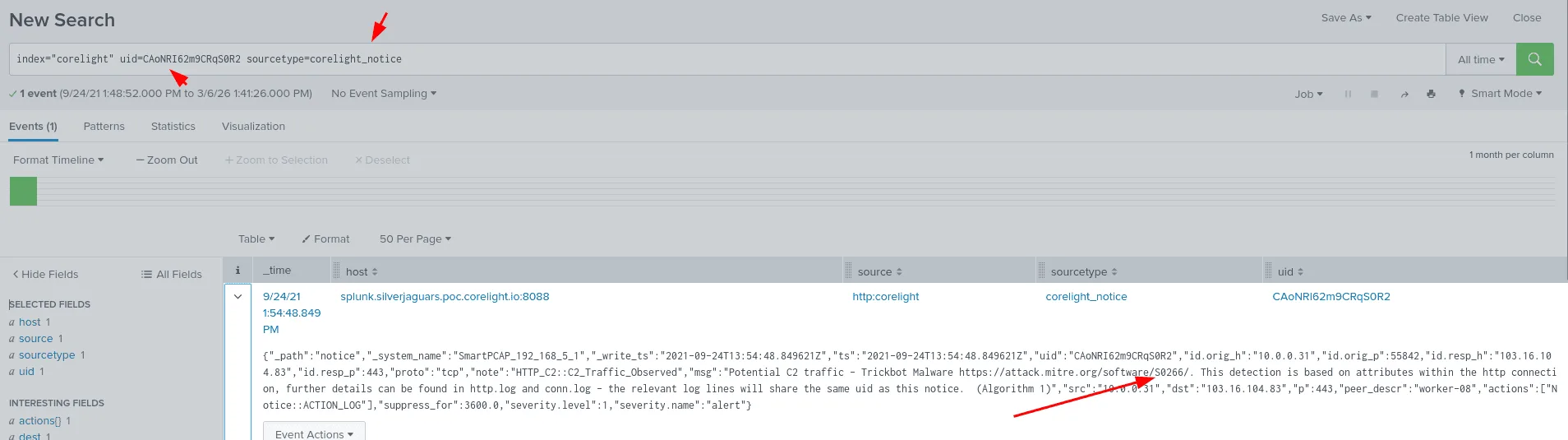
as we see here when we filter by the uid we found previously and setting the sourcetype to corelight_notice, we find a notice with the msg : Potential C2 traffic - Trickbot Malware https://attack.mitre.org/software/S0266/. This detection is based on attributes within the http connection, further details can be found in http.log and conn.log - the relevant log lines will share the same uid as this notice. (Algorithm 1)”.
the MITRE ATT$CK TTP referenced here is S0266.
Q8:
Question: What User-Agent string was sent as part of the Trickbot HTTP requests?

we already have the uid which is the most precise thing we have as of now to map the whole attack and draw a broad picture & understanding of the whole attack surface, all that’s needed to be done is to filter using the sourcetype corelight_http, further filtering for the http_user_agent, we land on the answer being Ghost.
Q9:
Question: What is a process name that is repeated within the POST body of these HTTP requests?
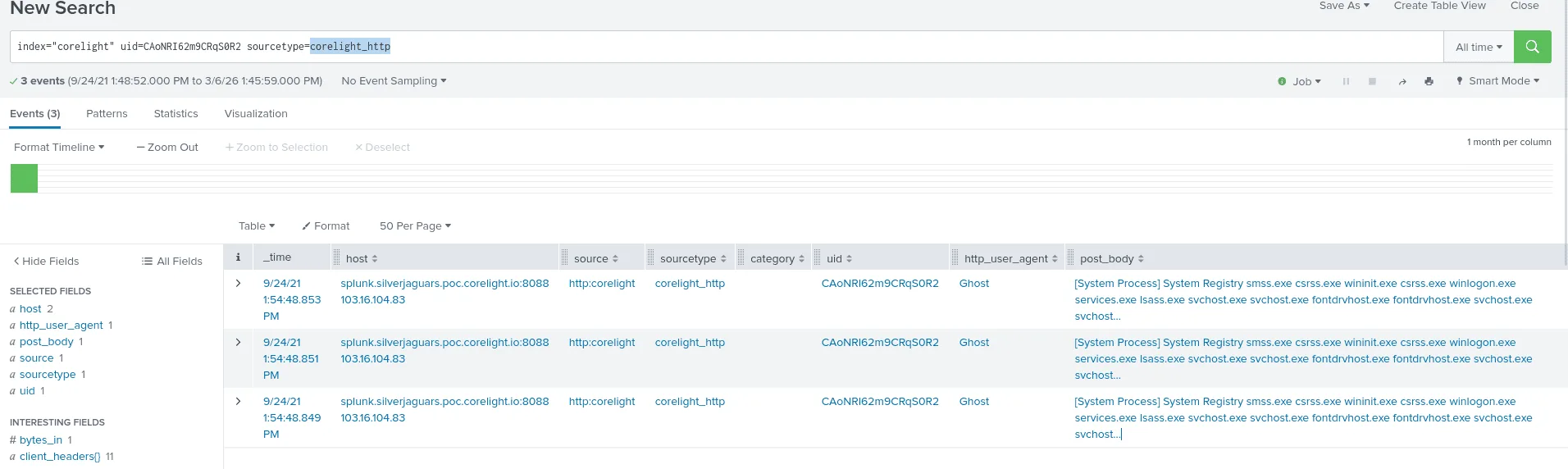
All the requests we’ve seen before are actually POST ones, so nothing to filter there, looking at the post_body, we see many system process names, though the most repeated one is svchost.exe.
Q10:
Question: Let’s look at what happened after the malware was dropped. Looking at Suricata alerts following the Trickbot alert, a popular scanning tool appears to have been used for reconnaissance. What is the name of that tool?
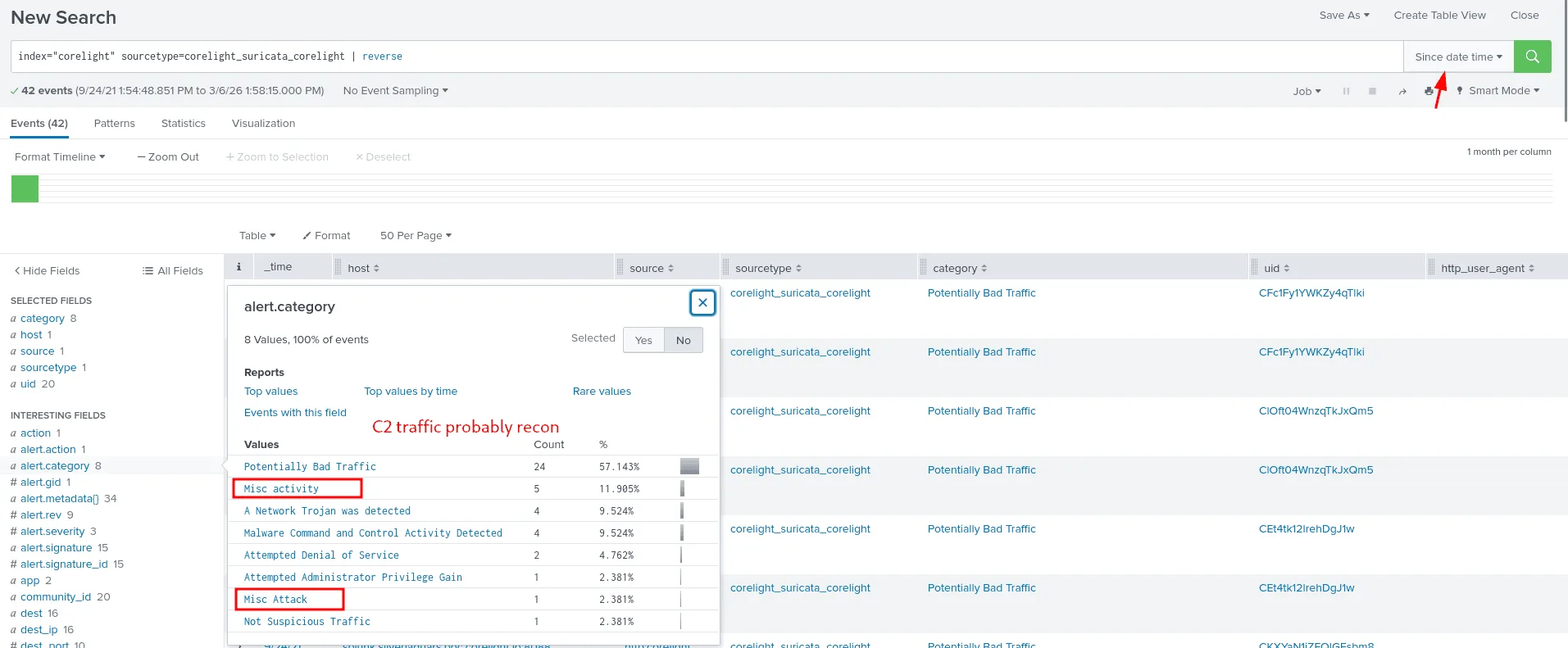
from the previous question we have a rough understanding of the situation and the svchost.exe events we saw before are highly suspecious, as svchost.exe is common used by attackers in initial access or for exfiltration, I filtered by time, +-1 min after the svchost.exe events we found, and as seen in the image a few alert.category stand out, one of them is the ‘Misc attack’ investigating it further :
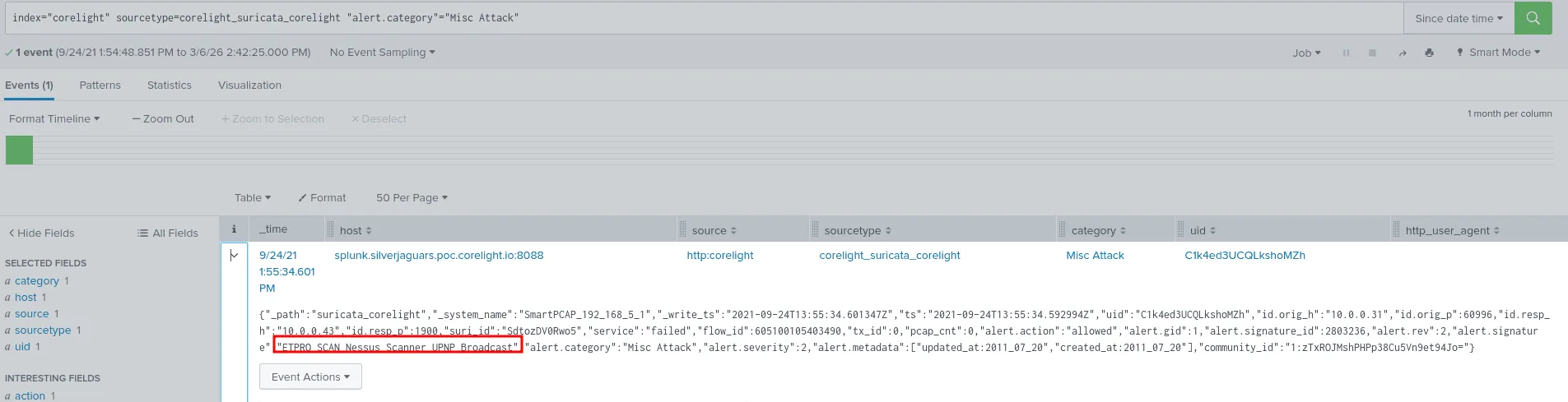
thus the scanner that was used is Nessus, only 1 min since the last svchost.exe events.
Q11:
Question: One of the alerts generated by our infected host could result in command execution on a wireless access point. Looking at the response from the remote system, however, it’s pretty clear that the attack failed. How many bytes did the target send back to the attacker on this connection?
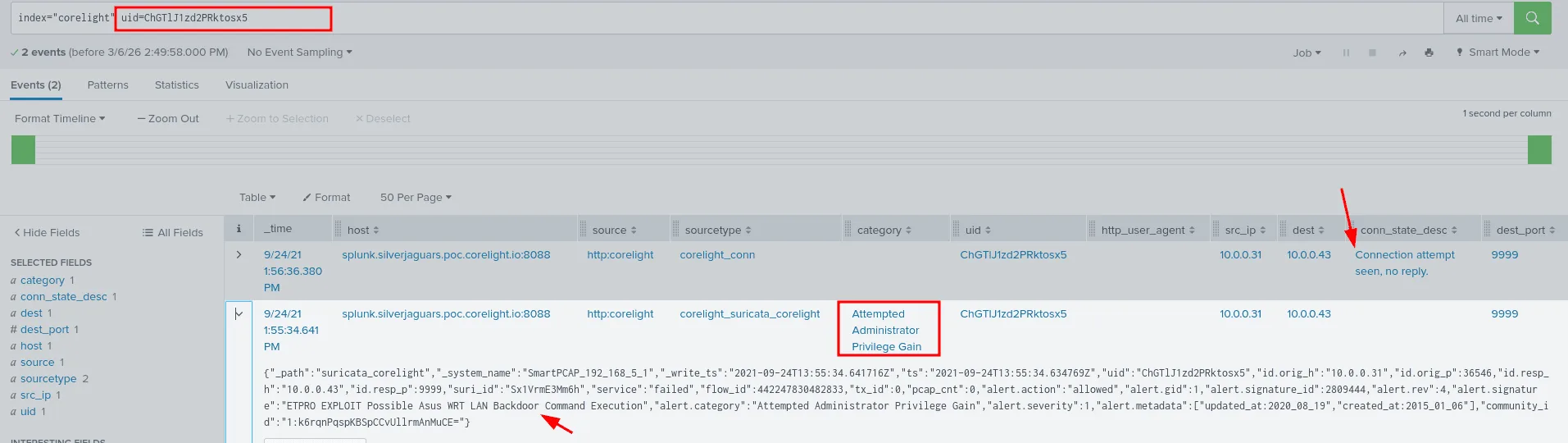
from the previous questions we have identified our host as 10.0.0.31, already infected and compromised, the attacker now is using it in attempt to infect and attack other hosts on the network, I looked up this ip as the source and found an interesting attack category ‘Attempted Administrator Privilege Gain’ the destination was 10.0.0.43 which would turn out to be the access point being mentioned here, I extracted the UID to filter for this connection flow between our infected host and this wireless acccess point, the attacker was trying to EXPLOIT Possible Asus WRT LAN Backdoor Command Execution on port 9999, but as seen after roughly 2 seconds of the attempt no reply was seen from the 10.0.0.43 which indicates a failed attempt.
Q12:
Question: Looking at the layer 7 services used by the infected host after the Trickbot alerts above, we see an SSH connection made to an internal host. What is the IP address of that host? Answer guidance: Provide the IPv4 address. Example: 192.168.1.1
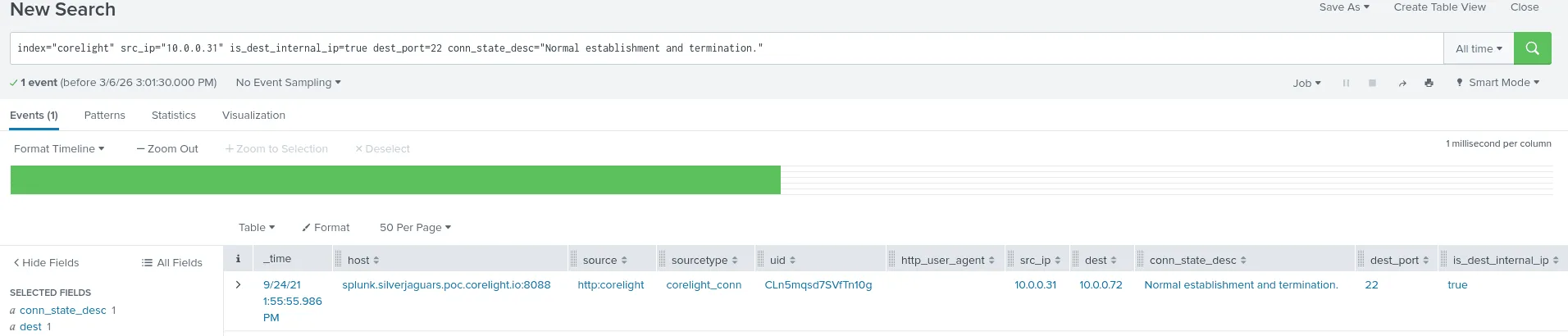
we always start with what we know, ssh default is port 22 ( though not always ), and we know the ip address of our affected host, we notice that there are many conn_state_desc descriptions, many failed/dropped, connection attempt not seen, the advirsary was likely trying to pivot in the internal network and attempt lateral movement by brutefocing ssh creds ( though we’re not sure at this point just a theory to test ). but only ‘Normal establishment and termination’ , the destination for that was 10.0.0.72, moving forward we assumed this host has also been breached at this point.
Q13:
Question: What is the PCR (producer/consumer ratio) of that SSH session? Answer guidance: Round your answer to 5 decimal places. Example: 2.34567
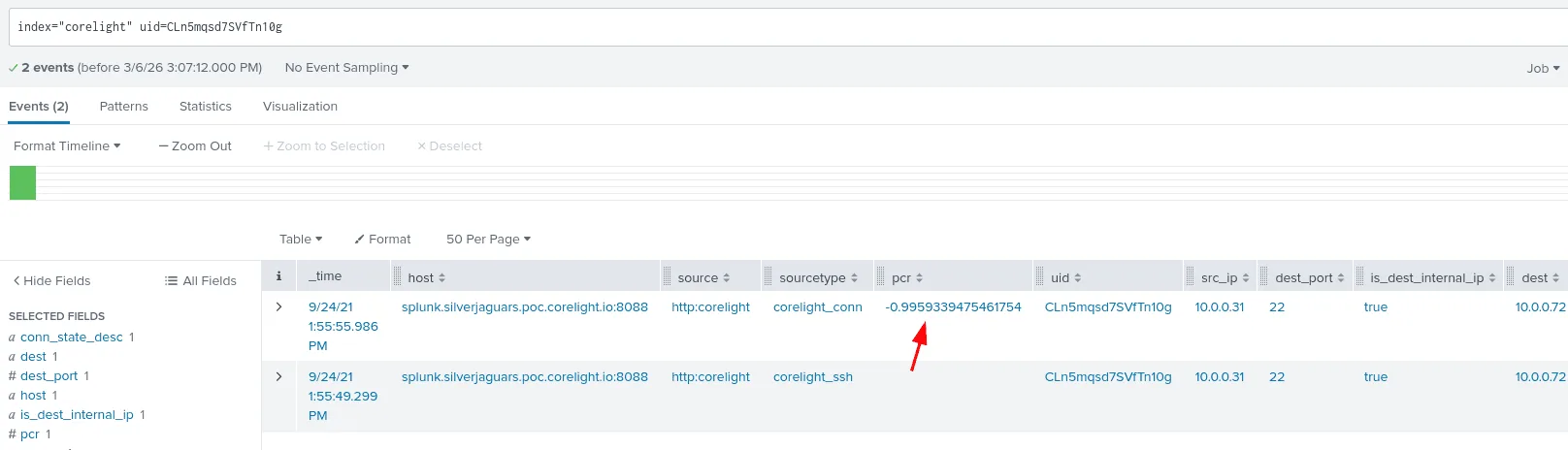
as always I’ll be using the uid to follow the connection from before, and we find the pcr ( the ratio of data sent/received, helpful for detecting exfiltration attempts or any other abnormal network traffic ), the pcr => 0.99593.
Q14:
Question: Examining the inferences section of the SSH log associated with that session, one code indicates a behavior that explains the PCR we just observed. Which code is it?
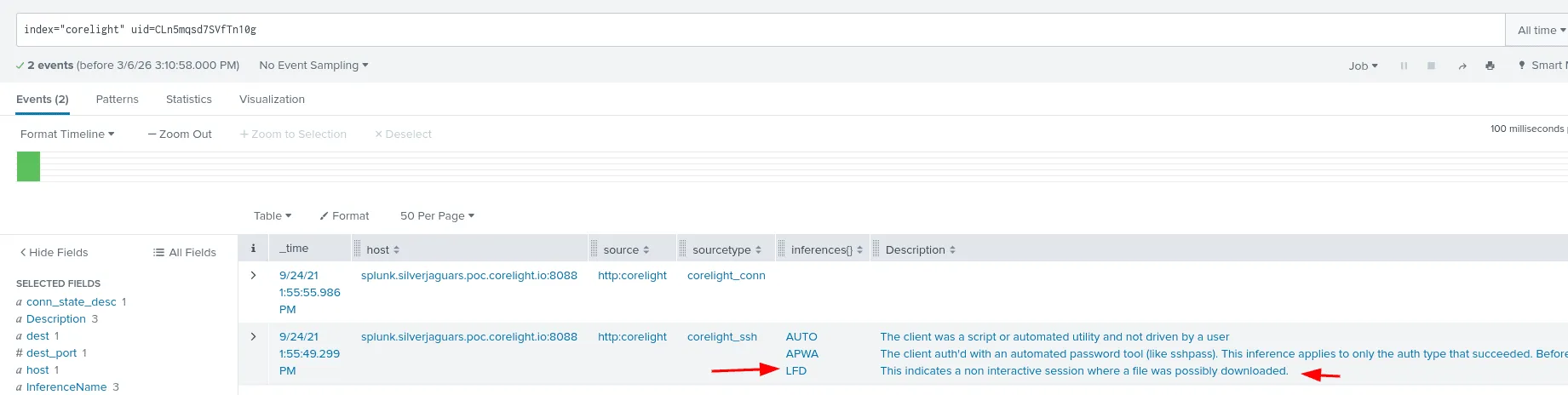
checking the inferences we find the LFD ( Large File Download ) which explains the pcr we found before, the destination and inferenceName explain the field better.
Q15:
Question: The owner of the infected workstation had no credentials to log into 10.0.0.72 over SSH. However, there was another connection between those hosts over HTTP. What attack type was sent over that connection?
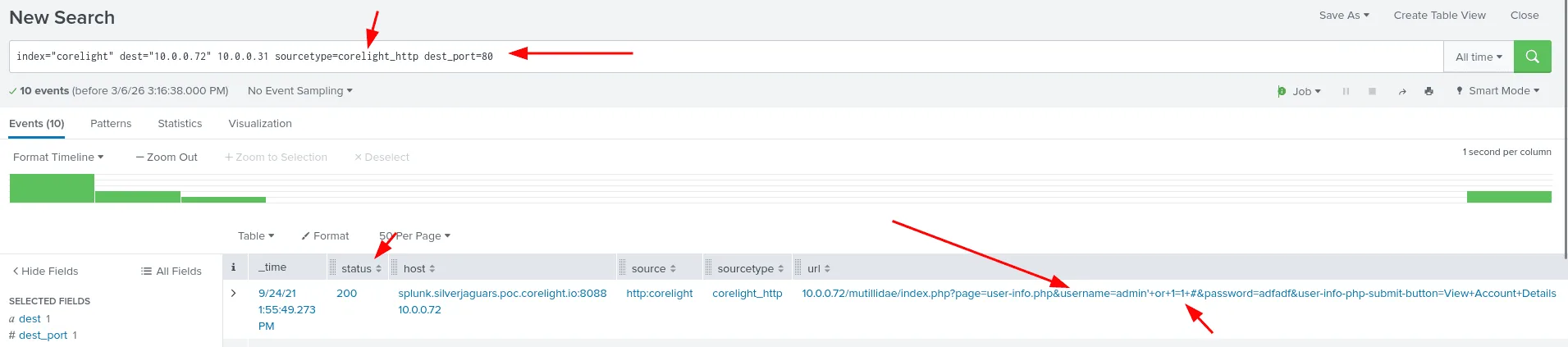
since the connection happened over http we’ll be using the sourcetype: sourcetype=corelight_http and port 80, we notice in the referer or the url, attempts of a classic sql injection attacks being inserted in the username field. following the evidence, this attack worked and the answer is: sql injection.
Q16:
Question: What parameter of the index.php script did the infected system attempt to use for SQL injection?
as seen in the previous image, the parameter that was used was the username.
Q17:
Question: What was the HTTP status code from the targeted server?
as seen in the image from Q15, the status code returned by the server was 200 Ok.
Q18:
Question: Did this SQL injection attack generate any Suricata alerts? (Yes/No)
the answer is No, this can be verified by checking the suricata logs for any alers for sql injection or 10.0.0.72. but none can be found.
Q19:
Question: Returning to SSH connections made by our infected host, we see a second one being made to a country the organization has no business relationship with. What country is that connection going to?
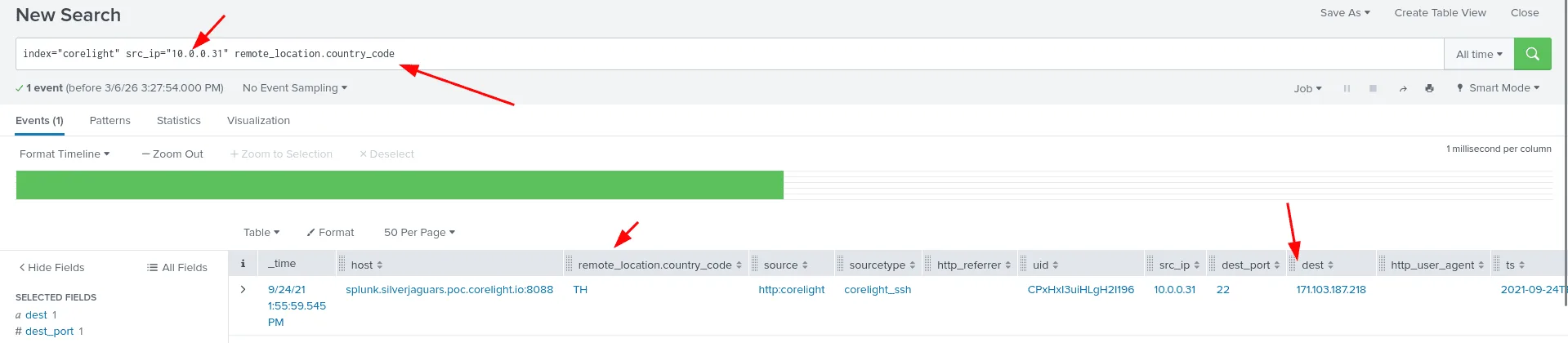
checking for connection made to the destination port 22 ( though not always would be ssh ) , and searching for ‘country’ keywrod along with that to return events that have these two, a connection indeed was made to an ip 171.103.187.218, the country code was TH which stands for Thailand.
Q20:
Question: Judging by the PCR (producer/consumer ratio) of this connection, data was definitely exfiltrated to this external system. What is the SSH host key of that system?
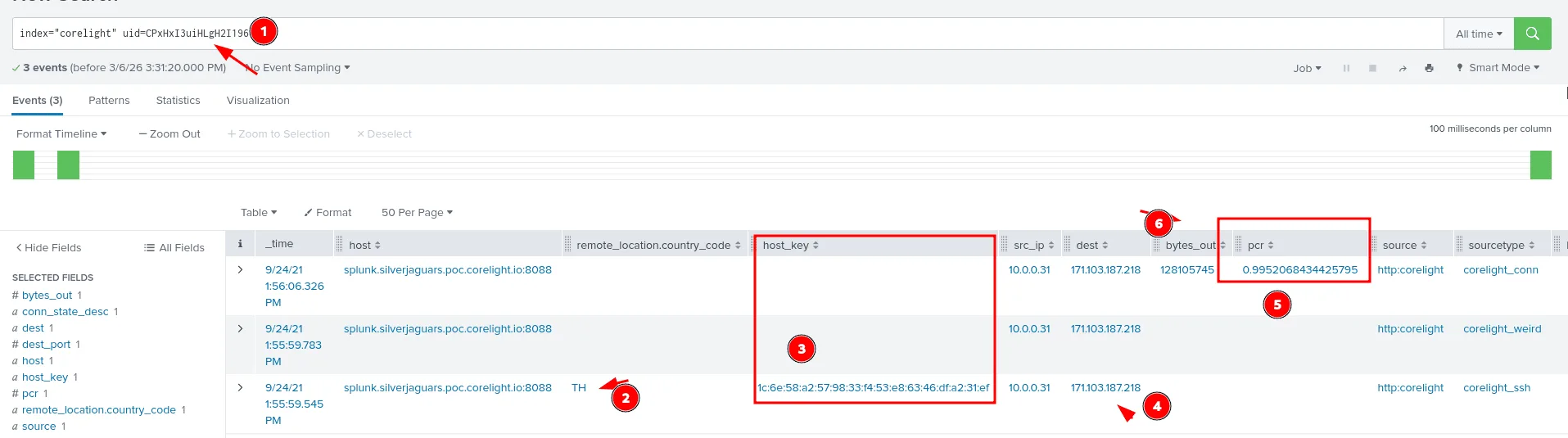
as seen in the image above we filter by the uid, checking for events that used the same TCP stream, the rest of the ssh connection likely, and the pcr is endeed off, data was exfiltrated, and the host key for the external system it was exfiltrated to is 1c:6e:58:a2:57:98:33:f4:53:e8:63:46:df:a2:31:ef.
Q21:
Question: How many payload bytes were sent over that connection?
the same image from Q20, we see how many bytes were transfered in the bytes_out field which is 128105745.
Q22:
Question: The challenge author’s favorite SSL certificate organization name - a default out of many certificate generation tools - is present in this index, highlighted by a Suricata alert. What is that organization name?
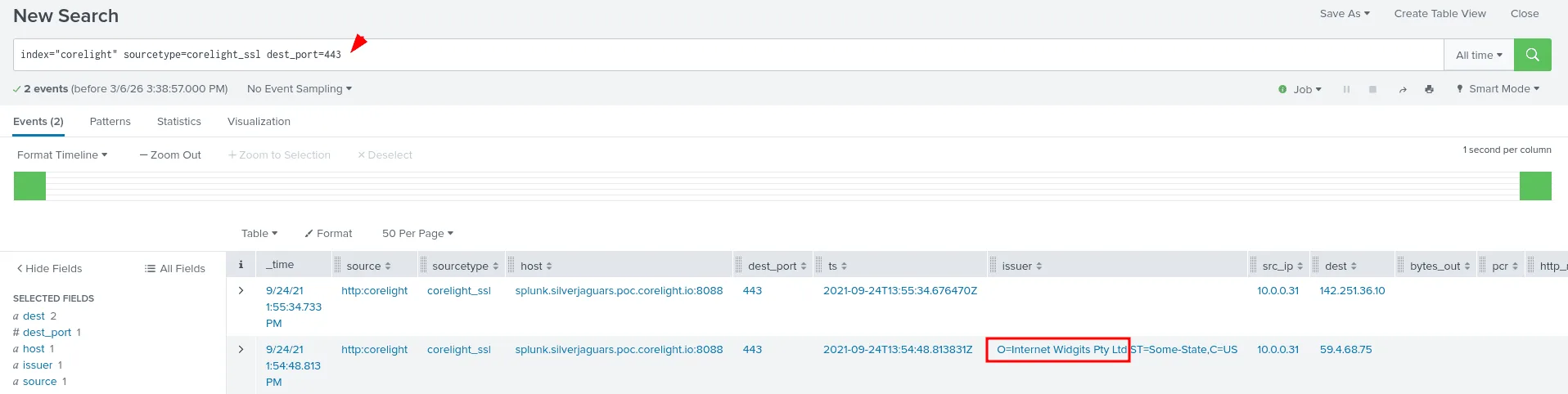
since I’ve already took a look at the sourcetypes available for this index using the metadata command at the start of this challenge, I knew of the existence of te corelight_ssl sourcetype and it seems just the kind of place we’ll be looking for ssl certificates, the other insight is that there is both port 449 and 443, idk if there are others, but I’m filtering by the 443 port for https, and only 2 events remain, we can go through them now, the 2nd one had the issuer information we were looking for, the organisation name : Internet Widgits Pty Ltd.
Corelight zeek and suricata ctf :
Q01:
Use index=ctf for this challenge Question: An HTTP request is made to a specific PHP page. What is the filename of that page (excluding any path or slashes)? Answer guidance: Include the file extension. Example: budget.xls
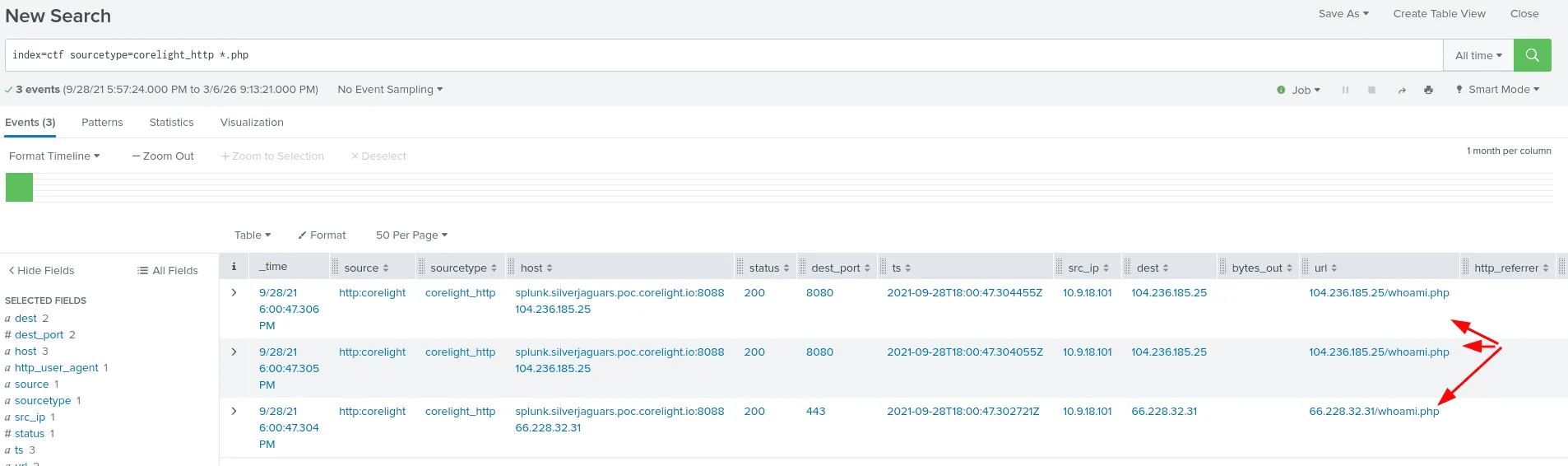
this time we’ll be using the index ctf, we’re looking for a custom php page, so we search for php extention files using the star * wildcard, and the sourcetype corelight_http. the page is whoami.php.
Q02:
Question: What is the IP address that only appears once as the server for the three connections in the previous question? Answer guidance: Provide the IPv4 address. Example: 192.168.1.1
from the previous image in Q01 we see whoami.php appear in 3 events, the unique ip address we’re looking for is 66.228.32.31.
Q03:
Question: What is the IP address that mail.ventascintas.com resolved to? Answer guidance: Provide the IPv4 address. Example: 192.168.1.1
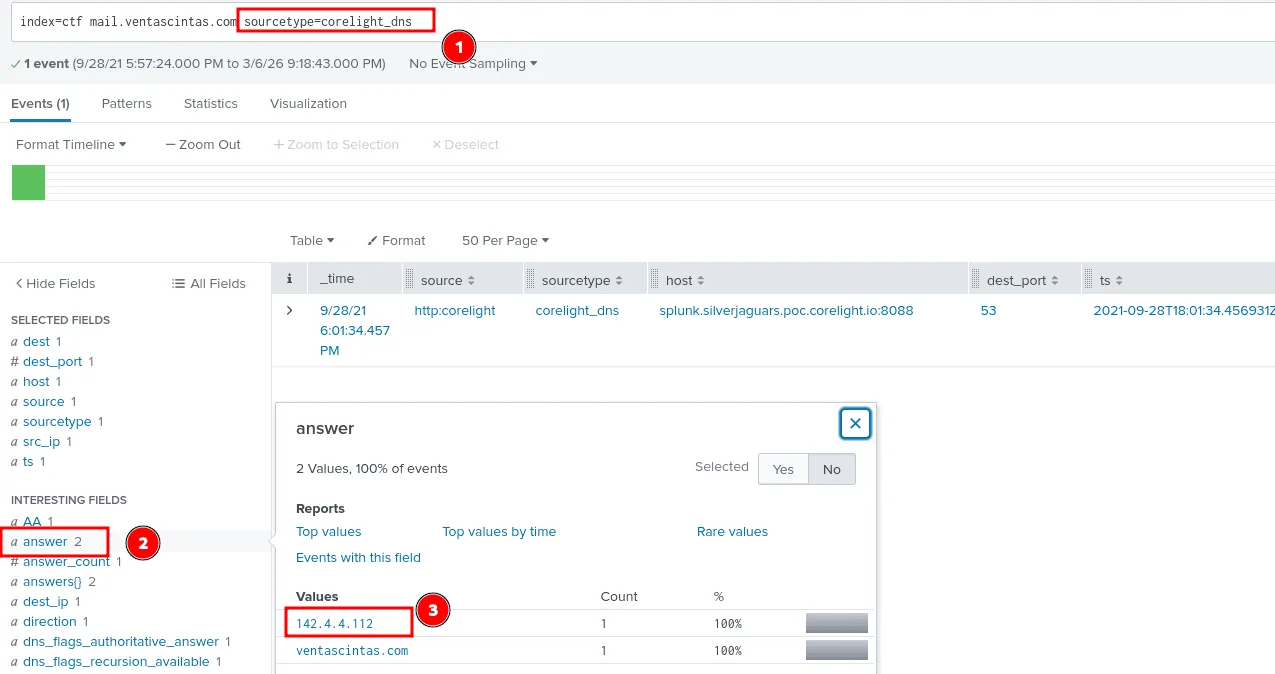
to find the ip address the domain resolved to we’ll be searching through the sourcetype=corelight_dns for the answer, as seen in the image above it resolved to 142.4.4.112.
Q04:
Question: What is the domain associated with an X.509 certificate subject that purports to be from London? Answer guidance: Provide the domain name of the system. Example: splunk.com
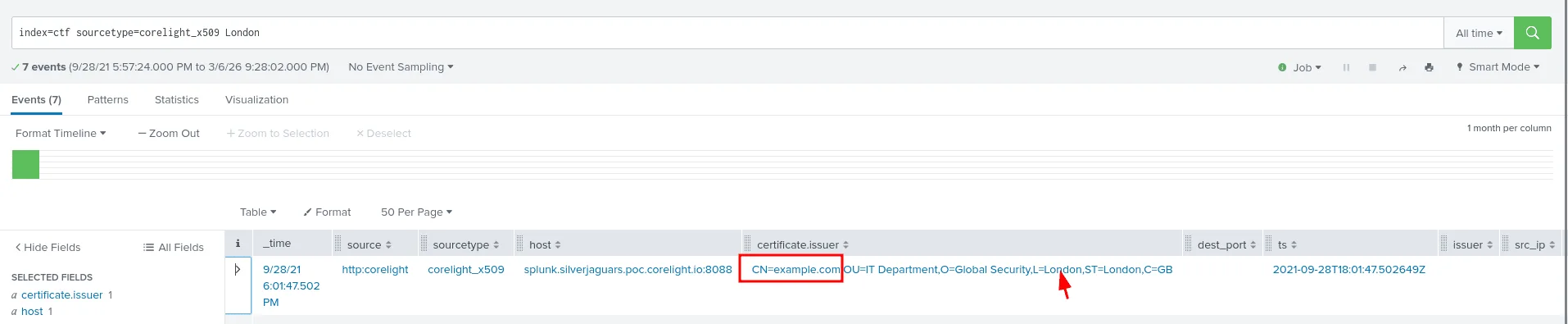
I noticed using the metadata command the sourcetype corelight_x509 which seems to be the place I’ll be looking for this kind of information at. it’s also appealing to look for https traffic if it hold any certificates ( which is another way to solve this ), London seems like a key word here, thus my query got me the exact answer in the certificate.issuer field : CN=example.com,OU=IT Department,O=Global Security,L=London,ST=London,C=GB , and the domain associated with this certificate is example.com.
Q05:
Question: What cipher suite was used with the certificate from the prior question?
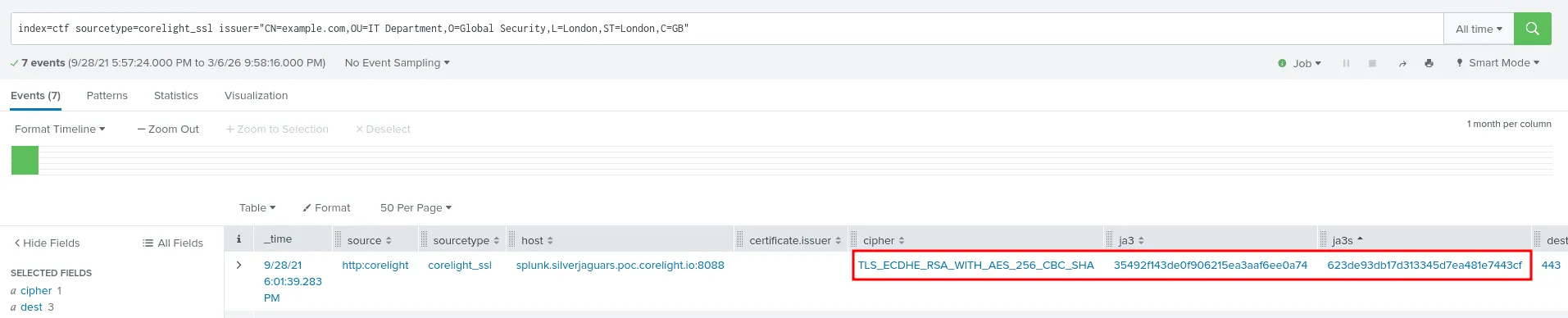
we didn’t find anything in the corelight_x509 sourcetype about the cipher that was used with the certificate, so we move the other sourcetype corelight_ssl and filter by the issuer since we already know it at this stage, the cipher is : TLS_ECDHE_RSA_WITH_AES_256_CBC_SHA.
Q06:
Question: There is a unique JA3 hash associated with certificate from the previous question. What is that hash?
from the same image in the previous question we see the JA3 hash being : 35492f143de0f906215ea3aaf6ee0a74
Q07:
Question: What was the matching JA3S hash associated with the JA3 hash identified in the previous question?
still from the same image in question 20, we can also see the JA3S hash being: 623de93db17d313345d7ea481e7443cf.
Q08:
Question: What department does that certificate from question 204 allegedly correspond to?
the answer to this question already shows in the previous images and the issuer field we found before : CN=example.com,OU=IT Department,O=Global Security,L=London,ST=London,C=GB
the department is the : IT Department
Q09:
Question: What is the SHA1 of the most recent X.509 certificate from question 204?
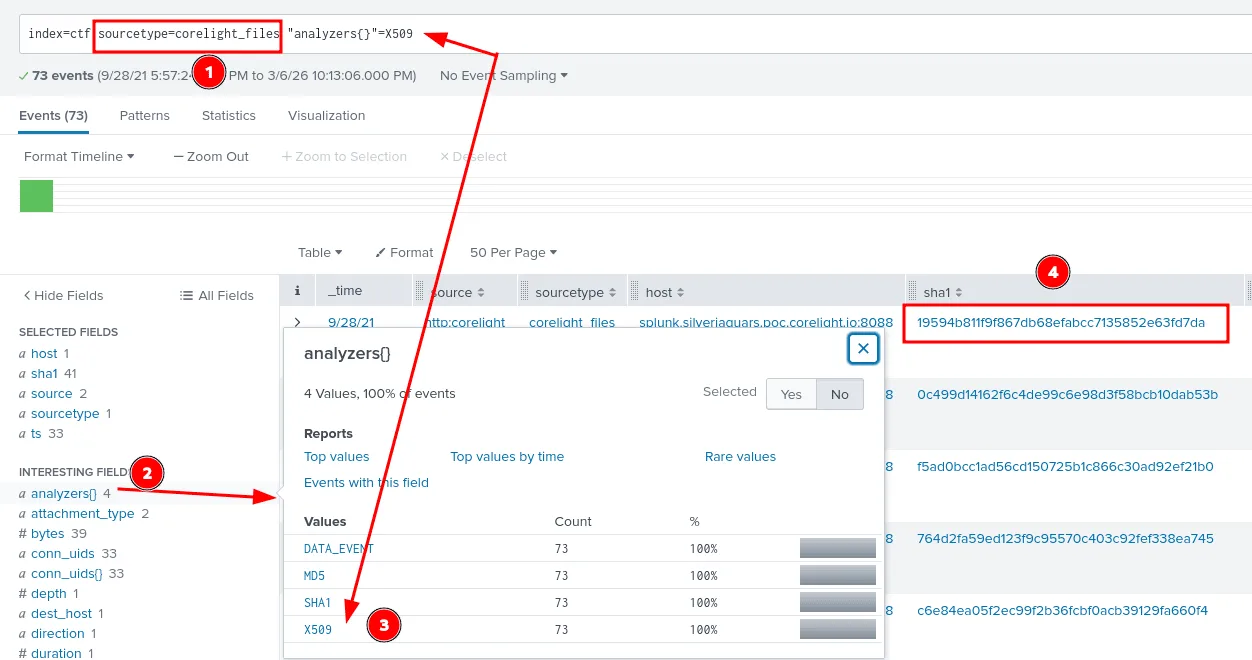
from my humble expereience, hashes are best found in files sources, or sysmon if it’s windows logs, taking a look at the sourcetypes we have availabe for us, one of them is corelight_files , so we can start there, next we filter by the analyzers set to X.509 certificates are what we’re looking fore, and I didn’t sort by time cuz by default I think splunk shows the most recent events first and the answer was : 19594b811f9f867db68efabcc7135852e63fd7da .
Q10:
Question: An executable was downloaded from 124.158.6.218. What was the name of that executable? Answer guidance: Include the file extension. Example: budget.xls
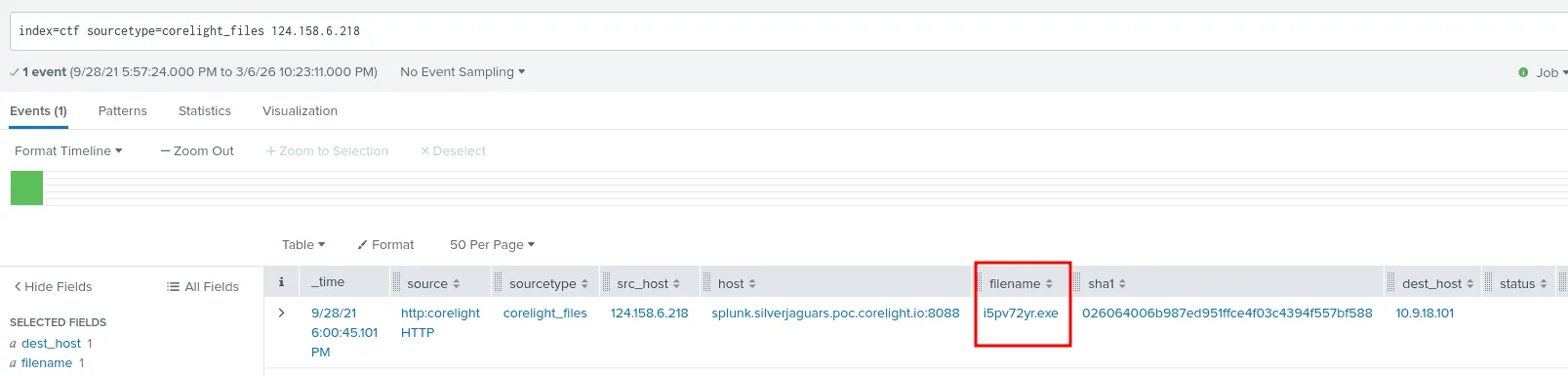
since we’re still in files and we may need hashes again, let’s look for the executable here first, and it actually worked and we got the name of the executable that was downloaded from 124.158.6.218 to 10.9.18.101 , we note this internal ip address as a potential affected host to watch for in the futrue and we can dump the sha1 we got to virustotal if it’s associated with any APTs or malicious activity.
Q11:
Question: As part of this traffic, there were two executables downloaded from 104.168.98.206. What is the SHA1 of the most recently downloaded executable?
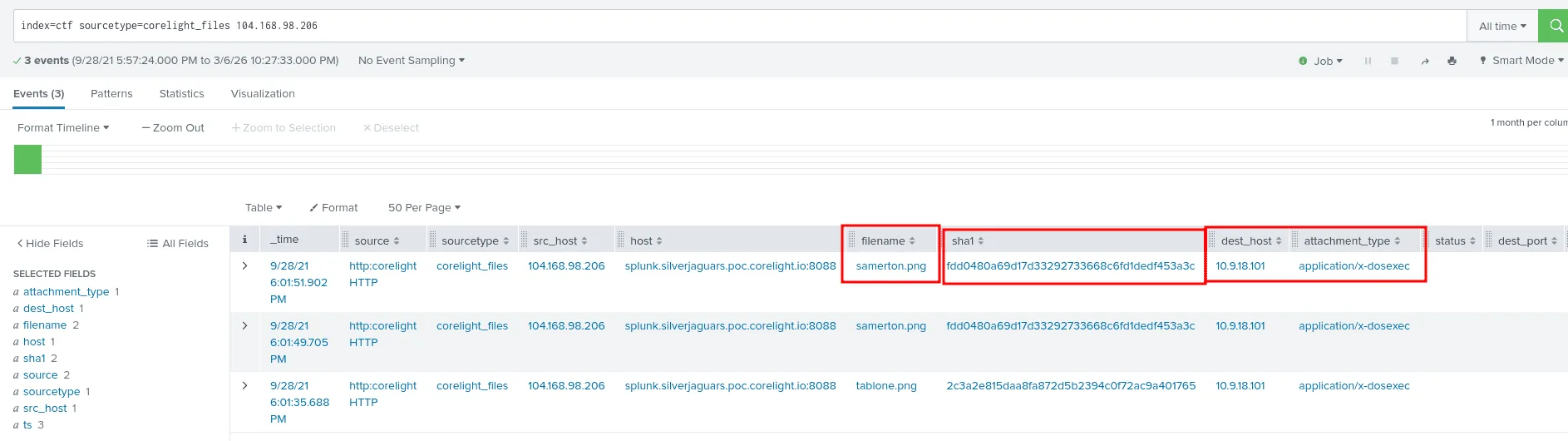
from the previous question we knew the host 10.9.18.101 is likely compromised, good we have something to work with plus this question also point us to the ip address 104.168.98.206 as the source of the executables, we have everything we need to search.
we get 3 results as seen in the image above, though the filename samerton.png ( the most recent one ), has the extention of an image, the attachement type says application/x-dosexec which is a MIME type that idnetifies Windows executable files. the hash sha1 of this file is fdd0480a69d17d33292733668c6fd1dedf453a3c .
Q12:
Question: There was a Word document downloaded that has some Spanish flair to it. What was that document’s name? Answer guidance: Include the file extension. Example: budget.xls
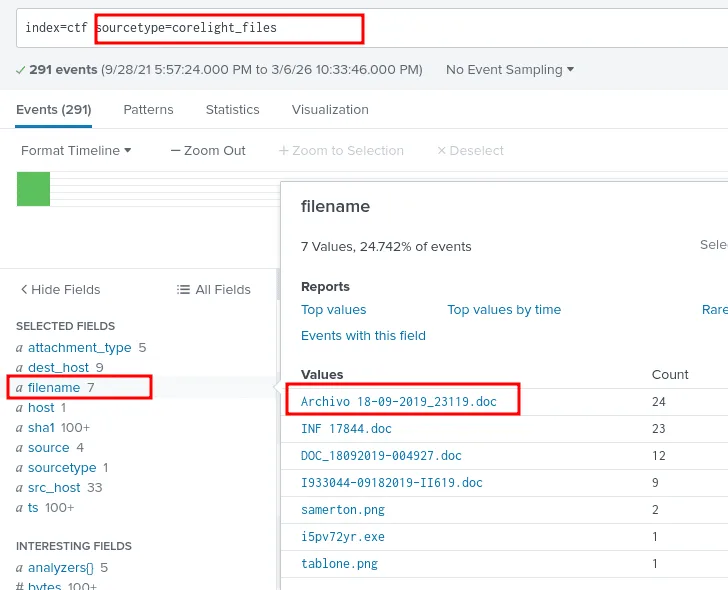
we’re still in the files sourcetype, and checking the filename field there are 7 files, and one of them is a doc file that reads Archivo 18-09-2019_23119.doc, and that’s the spanish one we’re looking for.
Q13:
Question: There’s an email address sending suspicious emails from a domain that no longer resolves to an IP address. How many emails were sent with that email address? Answer guidance: Provide the integer value. Example: 42

what’s the best place to find emails? through the one who dilevers them SMPT! we’re using the sourcetype corelight_smtp here and filtering by mail from, out of the 1st 2 suspects the domain gchteam.com no longer resolves to an ip address, and the count of emails is 35 ! ( we also checked the subjects of these emails to confirm it was indeed suspecious ).
Q14:
Question: What was the average time between a DNS request and a DNS response for the DNS server with the IP of 10.9.18.1? Answer guidance: Round your answer to 5 decimal places. Example: 2.34567
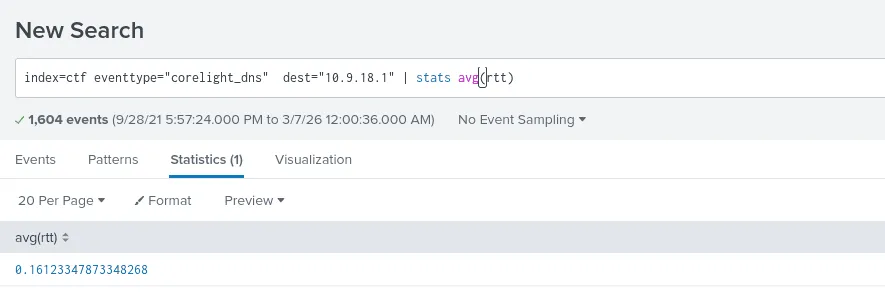
here we’ll be laveraging DNS Round-Trip Time (RTT) field which measures the latency for a DNS query to travel from a client to a resolver and back, the dns server here is 10.9.18.1 ( the destination ip ), and we’ll be using the avg function to calculate the average and round it as seen in the image above. the answer thus is 0.16123.
Q15:
Question: This traffic sample has been reduced to a four minute window, during which we observed unusually high delays on DNS responses. During what minute were DNS responses slowest? Answer guidance: Provide the integer value. Example: 42

we’ll be sorting by the rtt here, and we notice the highest is around 6s which is pretty slow, and the minute it happened was 01 (2021-09-28 18:01:47.904), took me so long since I was submiting 01 and not 1 !
Q16:
Question: An analyst was reading an introduction to threat hunting and came across a User-Agent string that looked familiar: “WinHTTP sender”. What is the hostname of the infected host?
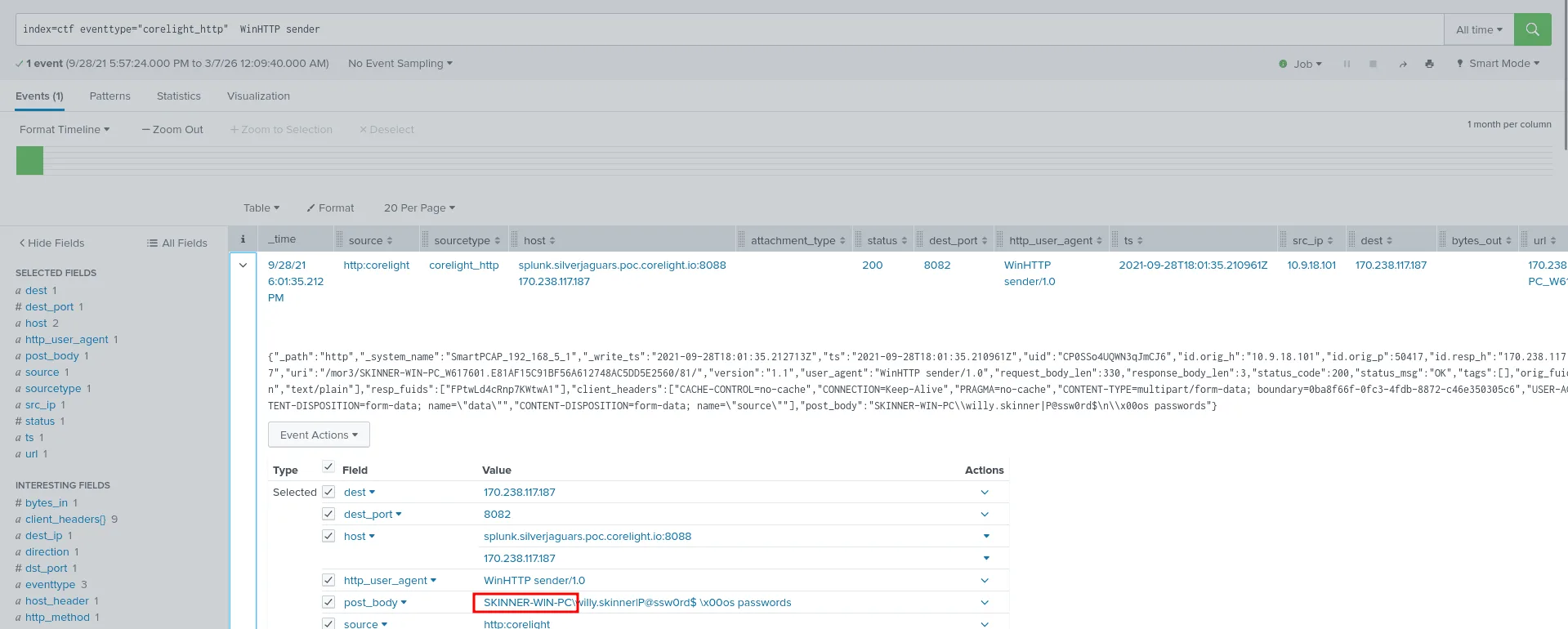
the best place to find user-agents is http traffic, we set that as the sourcetype and we look it up, we see the affected hostname as in the image above SKINNER-WIN-PC . ( we also get a user/username for further investigation of it’s ever required )
Q17:
Question: In their copious free time, an analyst reads a blog post about a technique that attackers use to download files from their C2 server. A potential indicator is that the user agent will contain “WinHTTP loader”. What is the file size of the payload downloaded using this technique?
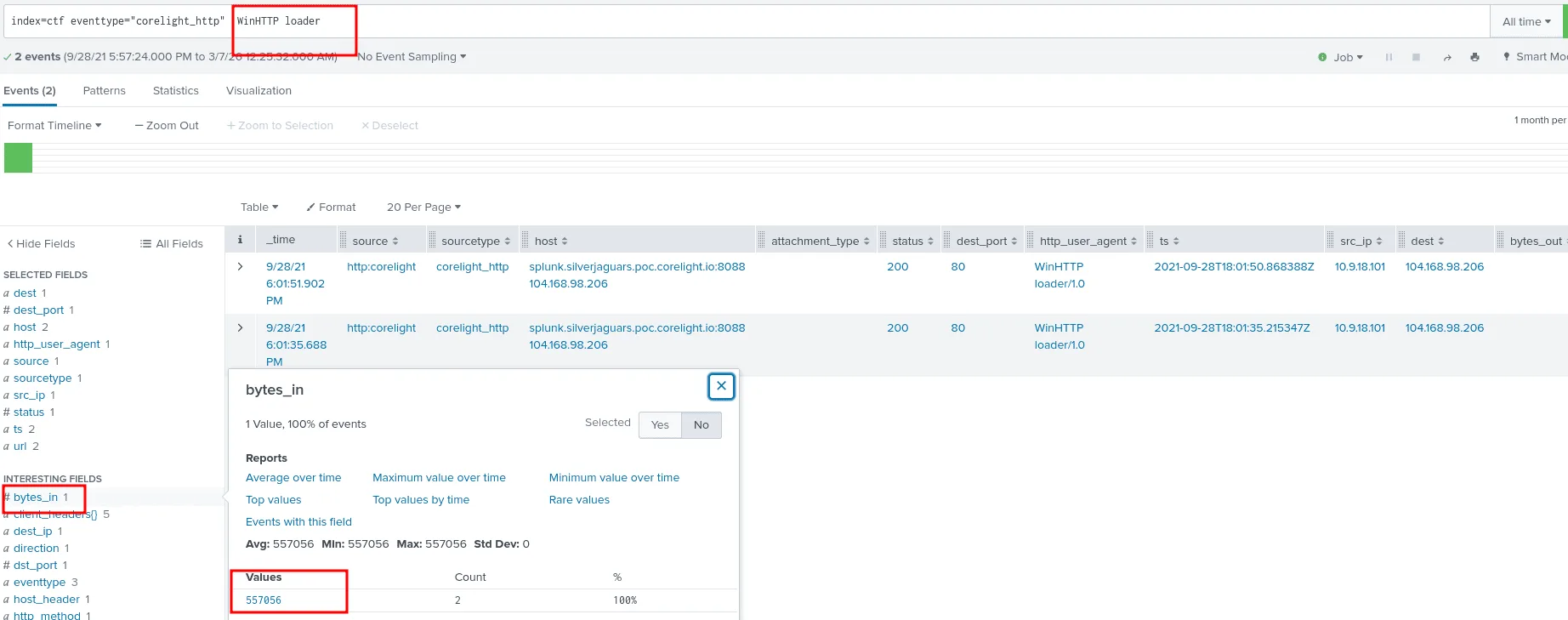
still looking at the http sourcetype, we’ll be looking for the user agent WinHTTP loader as we see in the image, The query index=ctf eventtype=”corelight_http” WinHTTP loader would return the HTTP traffic where the user agent contains “WinHTTP loader/1.0”, showing the file downloads from the C2 server (104.168.98.206) with filenames like samerton.png and tablone.png that are actually Windows executables (application/x-dosexec mime type) and the “response_body_len”:557056 .
Q18:
Question: Oh, here’s a hypothesis to test during our next threat hunt. Find traffic that Corelight identifies as SSL, but is actually on TCP port 80. Using this hypothesis, identify any suspicious traffic and extract the JA3S hash for further analysis.
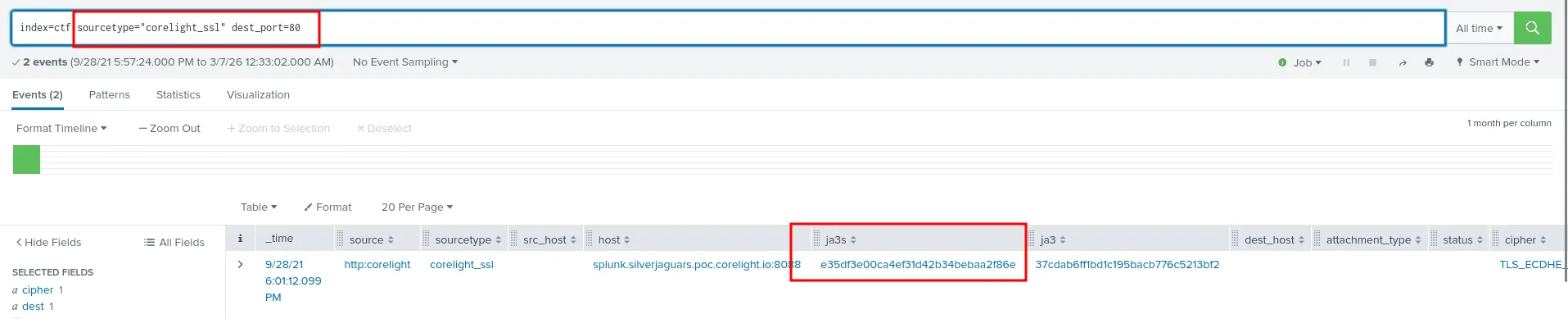
as we see in the image above using the sourcetype corelight_ssl and filtering by port 80, we notice the certificate has expired, the traffic is detected as ssl but it’s on port 80, and we have the JA3S for futher analysis : e35df3e00ca4ef31d42b34bebaa2f86e
Q19:
Question: We’ve received a report that our network is sending malicious emails, but they provided the external IP address which isn’t very useful since our network implements NAT. They said the malicious email was sent to accounting@ashlinetransportation.com. Locate the email, find the attachment, and get the filename so we can statically (and dynamically) analyze its contents. Answer guidance: Include the file extension. Example: budget.xls
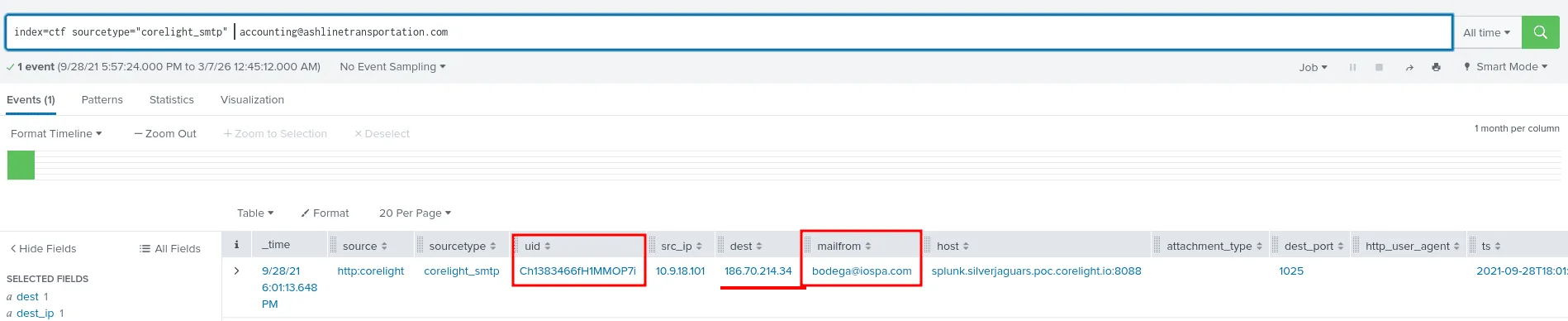
The best place to be looking for emails is still smtp sourcetype, and indeed there is only one event where the recipient was accounting@ashlinetransportation.com, but we learn that the email was sent by bodega@iospa.com from the internal ip address 10.9.18.101 to 186.70.214.34, but we still didn’t get the exact filename, for that we use the uid to track the same tcp connection, the attachment will be sent in one of them most likley so we filter just by the uid.
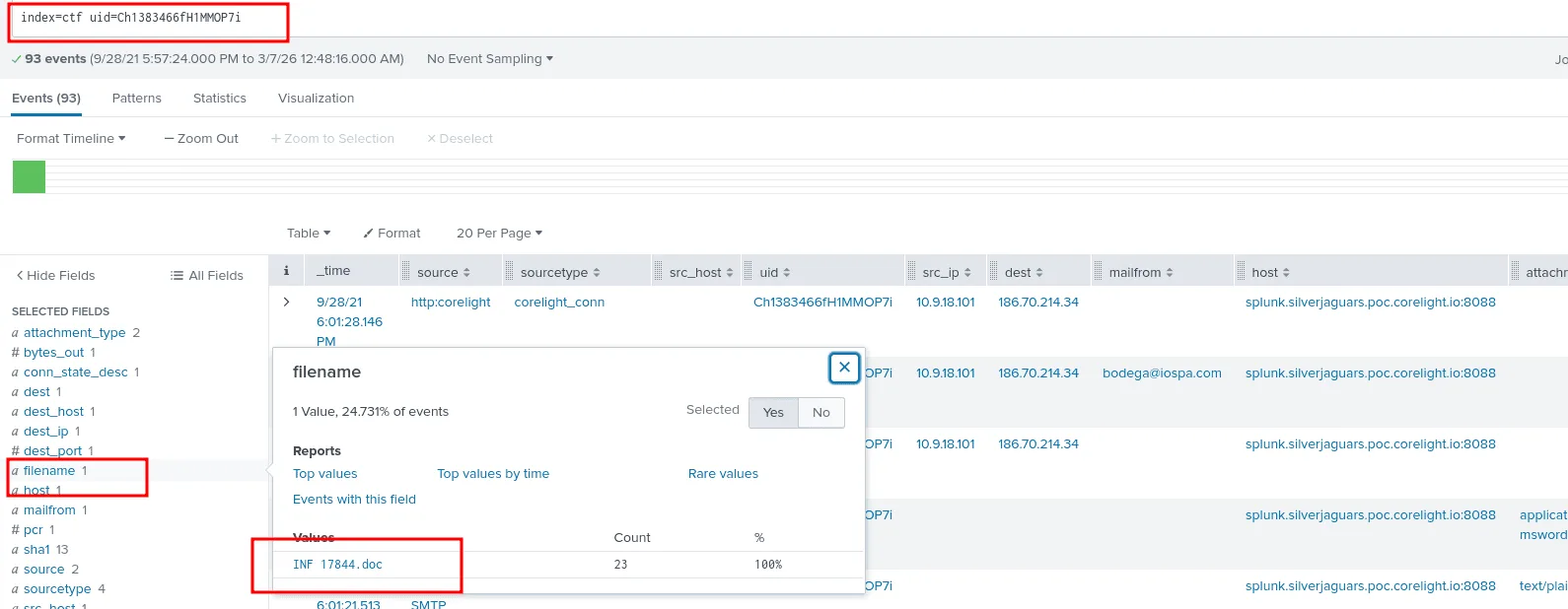
and indeed there was only one file that was sent INF 17844.doc!
Q20:
Question: One of our analysts is considering having a reverse engineering team take a look at an odd executable with a SHA1 hash of 026064006b987ed951ffce4f03c4394f557bf588. Use Corelight’s built-in file analyzers to identify the timestamp when the executable was complied. Answer guidance: Provide the date/time in the format YYYY-MM-DDTHH:MM:SS. Example: 2021-09-29T11:37:52

as seen in the image above we used the provided hash to us to find information about the filename and other related information, but the most important one is the fuid, as we’ll use it to find the exact timestamp when was the executable compiled.
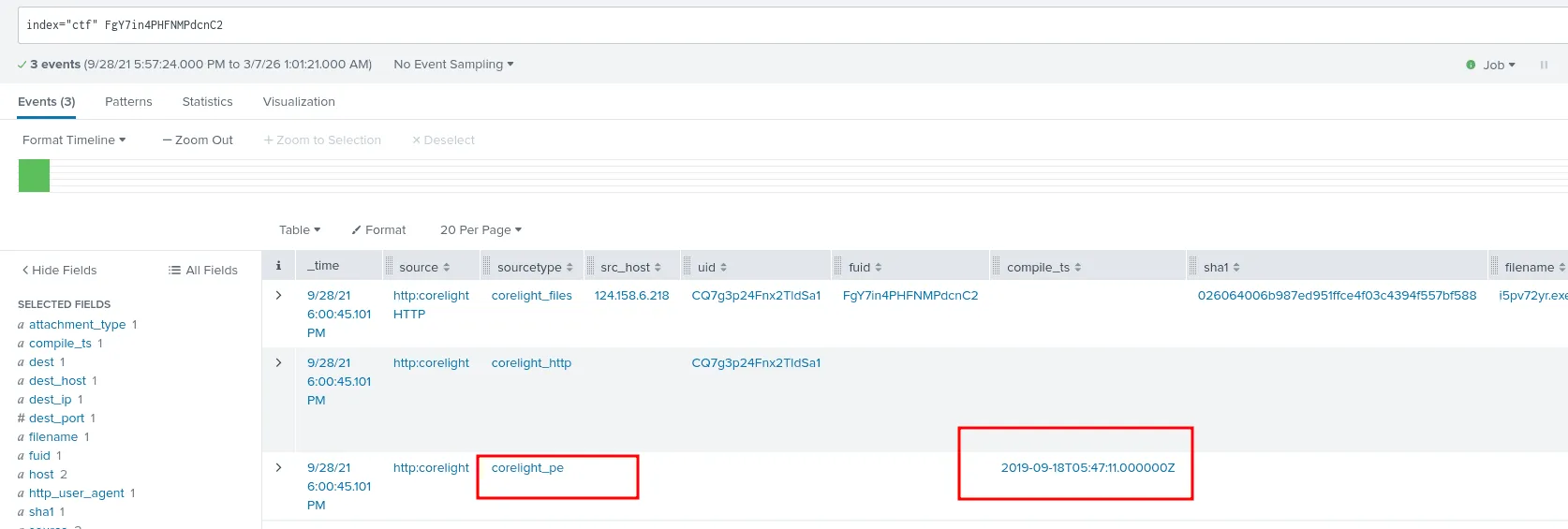
looking up just the fuid, we get the results, among them is the compile_ts fields for the compiled timestamp 2019-09-18T05:47:11.000000Z from the corelight_pe sourcetype.
Q21:
Question: Before sending the file for dynamic analysis, your interest is piqued. What is the malware family for the file with hash 026064006b987ed951ffce4f03c4394f557bf588?

looking up the hash in virustotal the answer seems to be emotet
this marks the end of this senario, it indeed has been a long journey.